
Stakeholders want to know three things about any project: Is it on track? What has been done? What needs attention? A status report answers those questions in a few minutes of reading. Sent weekly or every two weeks, it keeps sponsors, managers, clients and team members informed, builds trust and surfaces problems early, before they become expensive. The key is a consistent, easy-to-read format that people actually look at.
Our free project status report template for Microsoft Word fits on a single page. It includes project details, colour-coded red-amber-green (RAG) ratings for overall health, schedule, budget and scope, a summary, accomplishments, a milestones table, risks and issues with owners, a budget line and next period plans with decisions needed. Preview it below, download the editable DOCX file and use our guide to write status reports that stakeholders appreciate.
Download the free project status report template
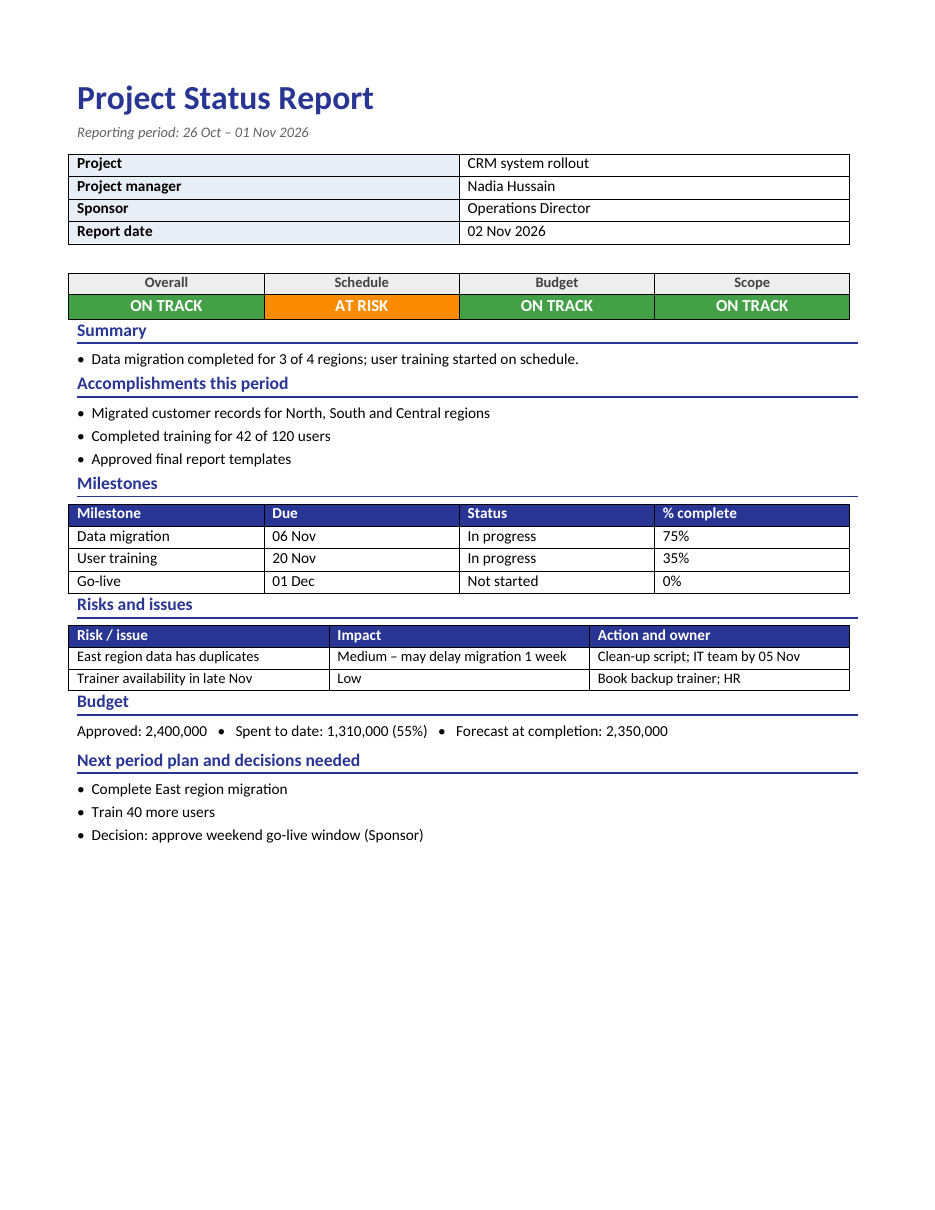
The template opens in Microsoft Word, Google Docs, LibreOffice Writer and Pages. Update the fields each reporting period, change the status colours as needed and send it as a PDF or paste it into an email.
What is a project status report?
A project status report is a regular update that summarizes the progress, health and outlook of a project. It compares actual progress with the plan, highlights achievements, flags risks and issues, and lists what will happen next. Unlike a detailed project plan, a status report is short and focused on what decision-makers need to know. It is one of the most important communication tools a project manager has.
What the template includes
- Project name, project manager, sponsor and report date.
- Reporting period.
- RAG status for overall health, schedule, budget and scope.
- A short summary of the period.
- Accomplishments this period.
- A milestones table with due date, status and percentage complete.
- A risks and issues table with impact, actions and owners.
- Budget: approved, spent to date and forecast at completion.
- Next period plan and decisions needed from stakeholders.
Understanding RAG status
Green – on track
The project or area is progressing as planned, with no significant issues. No action is needed from stakeholders.
Amber – at risk
There are problems that could affect delivery, but the team has a plan to recover. Stakeholders should be aware and may need to support.
Red – off track
There is a serious problem that will affect the schedule, budget or scope without intervention. A decision or extra resources are needed.
Use RAG ratings honestly. A report that shows green until the week before a missed deadline destroys trust. Amber is not a failure; it is a useful early warning that allows stakeholders to help.
How to write a project status report
- Fill in the project details and reporting period.
- Review the project plan, task tracker and budget before writing.
- Set the RAG status for schedule, budget and scope, then decide the overall rating.
- Write a one- or two-sentence summary of the period.
- List the main accomplishments, focusing on results rather than activity.
- Update milestones with current status and percentage complete.
- Add new risks and issues, along with their impact, action and owner.
- Update the budget figures and forecast.
- List the main tasks for the next period.
- Clearly state any decisions or support you need from stakeholders.
- Proofread, save as PDF and send at the same time each week.
Example: CRM system rollout
The sample report covers a CRM rollout. Data migration is complete for three of four regions and training has started, so overall status is green. Schedule is amber because duplicate data in the East region may delay migration by a week; the team has a clean-up script planned. The budget is 55% spent with a forecast slightly under budget. The report asks the sponsor to approve a weekend go-live window. In under a minute, a reader knows where the project stands and what is needed from them.
Tips for effective status reports
- Keep it to one page whenever possible.
- Lead with the summary and RAG status; busy readers may stop there.
- Be specific: "Trained 42 of 120 users" is better than "Training progressing".
- Report problems early with a recovery plan.
- Make decision requests explicit and give a deadline.
- Use the same format every period so readers know where to look.
- Send reports on a fixed day and time.
- Link to detailed plans instead of copying them into the report.
- Celebrate team achievements.
Weekly vs monthly status reports
Weekly reports suit fast-moving projects, short timelines and projects with many stakeholders or high risk. Monthly reports work for longer, stable programmes or for executive audiences who need a higher-level view. Some organizations combine both: weekly reports for the project team and sponsor, and a monthly summary for leadership. The template works for either; simply adjust the reporting period.
Status reports for different audiences
Tailor the level of detail to the reader. Executives want overall status, budget and decisions needed. Clients want progress against agreed deliverables and dates. Team members want task-level detail and upcoming priorities. If you report to multiple audiences, keep the same core content and add or remove sections rather than writing completely different reports.
Common status report mistakes
- Hiding bad news or using green when the project is really at risk.
- Writing long paragraphs instead of short, scannable points.
- Listing activities rather than results.
- Forgetting to update milestones and dates.
- Raising issues without proposing an action or owner.
- Burying decision requests at the end.
- Sending reports irregularly.
Managing risks and issues in the report
A risk is something that might happen; an issue is something that has already happened. For each item, describe the impact on schedule, cost or quality, the action being taken and who owns it. Keep the list short and focused on the most important items, and move closed items off the report. If an issue needs a stakeholder decision, highlight it under "decisions needed" as well, so it is not missed.
Using the report in status meetings
Many teams review the status report in a short weekly meeting with the sponsor or steering group. Send the report a few hours before the meeting so attendees can read it in advance, then use the meeting time to discuss amber and red items, risks and decisions rather than reading the report aloud. Record any decisions and new actions, then reflect them in the next report. Over time, the collection of weekly reports becomes a useful history of the project that helps with lessons learned and future planning.
Writing a clear summary
The summary is the first thing most readers see, so make every word count. In one or two sentences, describe the overall state of the project and the most important change since the last report. Mention any shift in RAG status and the reason. For example: "Data migration is 75% complete and user training has begun on schedule. Schedule is now amber because duplicate records in the East region may delay migration by one week; a clean-up script is planned for 5 November." A reader who stops after the summary should still understand where the project stands.
Reporting budget clearly
Budget figures are often the first thing sponsors check. Show the approved budget, the amount spent to date and the forecast at completion, so readers can see both current spending and where the project is heading. If the forecast exceeds the budget, rate the budget amber or red and explain the cause and your plan, such as reducing scope, negotiating with suppliers or requesting additional funds. Showing the percentage spent next to the percentage of work complete is a simple way to reveal whether spending is in line with progress.
Status reports for agile teams
Agile teams that work in sprints can adapt the template easily. Replace the milestones table with sprint goals, completed stories and velocity, and use the accomplishments section to summarize the sprint review. Risks and impediments still belong in the risks and issues table, and decisions needed from the product owner or sponsor go at the bottom. Sending a short status report after each sprint keeps stakeholders who do not attend sprint reviews informed without adding extra meetings.
Frequently asked questions
Is this status report template free?
Yes. Download, edit and use it for any project, team or client.
How often should I send a status report?
Weekly is most common for active projects. Agree the frequency with your sponsor at the start of the project.
How do I change the status colours?
Click the status cell, choose Shading and select green, amber or red. Update the text to match.
Can I use the template for non-IT projects?
Yes. It works for construction, events, marketing campaigns, office moves, research and any other project.
What is the difference between a status report and a progress report?
The terms are often used interchangeably. A status report usually emphasizes current health and risks, while a progress report focuses on work completed over time.
Who should receive the status report?
Send it to the sponsor, key stakeholders and the project team. Agree the distribution list at the start of the project and keep it up to date.
Related templates
- Progress report templates
- Weekly marketing report templates
- Meeting minutes templates
- Action plan templates
- Executive summary templates