Before you launch a product, open a new location, write a business plan or set goals for the coming year, it helps to step back and look honestly at where you stand. A SWOT analysis does exactly that. By listing your strengths, weaknesses, opportunities and threats in a simple four-box grid, you get a clear, balanced view of your situation and a solid foundation for decisions. It is one of the most widely used planning tools in business, education, non-profits and even personal career planning.
Our free SWOT analysis template for Microsoft Word gives you a colour-coded four-quadrant matrix with helpful labels, example entries for a café opening a new branch, and a key actions table that turns your analysis into a plan with owners, deadlines and status. Preview it below, download the editable DOCX file and follow our guide to run a productive SWOT session.
Download the free SWOT analysis template
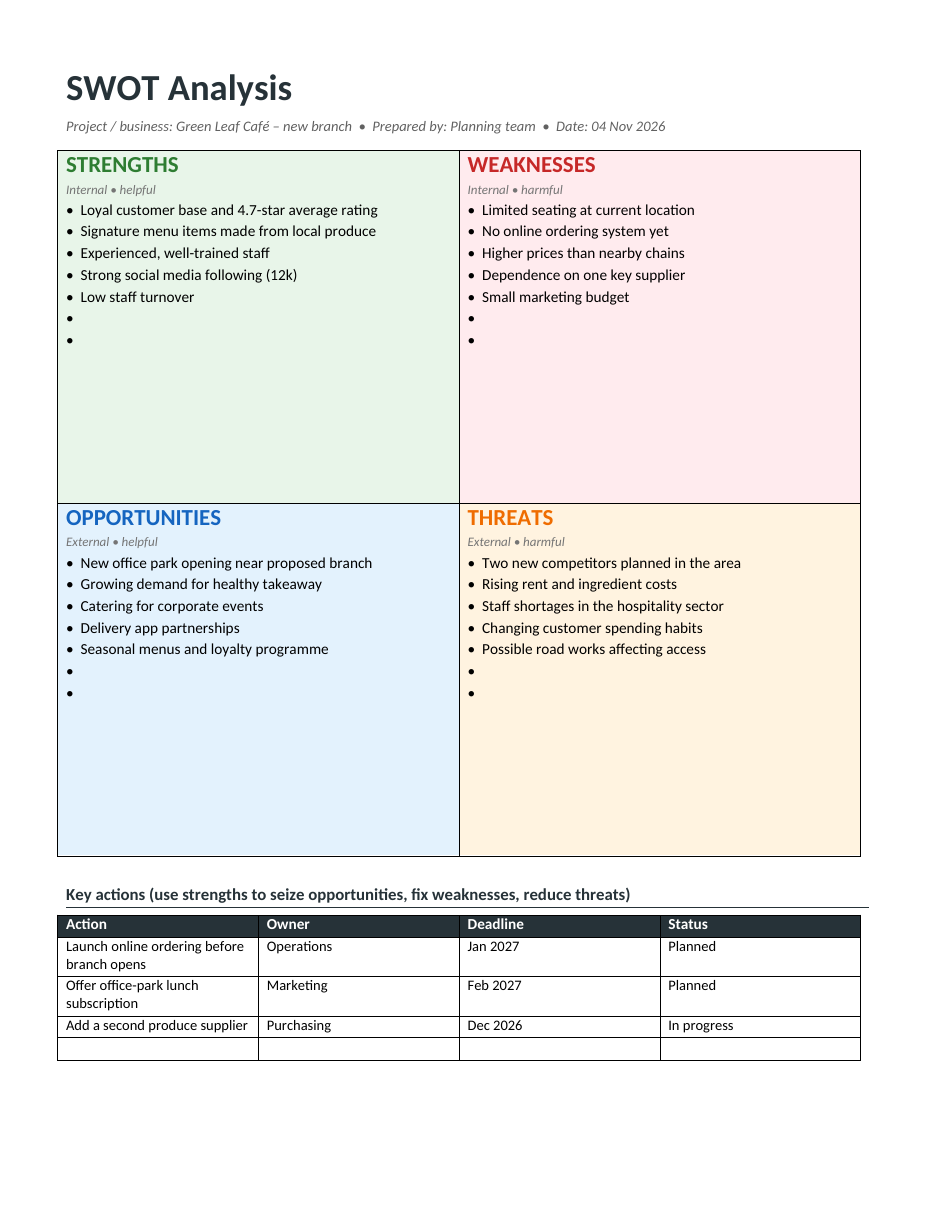
The template opens in Microsoft Word, Google Docs, LibreOffice Writer and Pages. Replace the example bullets with your own, add or remove lines as needed and print it for workshops or share it digitally with your team.
What is a SWOT analysis?
SWOT stands for Strengths, Weaknesses, Opportunities and Threats. The first two describe internal factors: things within your control, such as skills, resources, reputation and processes. The last two describe external factors: conditions in the market or environment that you cannot control but must respond to, such as customer trends, competitors, regulations and the economy. Arranging these four lists in a grid shows at a glance what helps and what harms your goals.
Features of the SWOT template
- A colour-coded four-box matrix: green for strengths, red for weaknesses, blue for opportunities and orange for threats.
- Labels showing whether each quadrant is internal or external, helpful or harmful.
- Example entries that show the level of detail to aim for.
- Spare bullet lines in every quadrant.
- A header for the project name, author and date.
- A key actions table with action, owner, deadline and status.
- Clean, printable layout on a single page.
The four quadrants explained
Strengths
What do you do well? What advantages do you have over competitors? Think about skills, experience, reputation, loyal customers, unique products, location, technology, finances and culture. Strengths should be real and specific, ideally supported by evidence such as reviews, sales figures or awards.
Weaknesses
Where do you fall short? What do customers complain about? What do competitors do better? Common weaknesses include limited budget, gaps in skills, outdated systems, high costs, poor visibility or reliance on a single customer or supplier. Be honest; a SWOT analysis is only useful if weaknesses are named clearly.
Opportunities
What trends or changes could you take advantage of? Look at growing markets, new customer needs, technology, partnerships, changes in regulation, gaps left by competitors and seasonal events. Opportunities are external, so describe what is happening in the world, not what you plan to do.
Threats
What could harm your business or project? Consider new competitors, rising costs, economic downturns, supply problems, changing customer habits, new laws and staff shortages. Identifying threats early gives you time to prepare.
How to do a SWOT analysis step by step
- Define the objective, such as "Open a second café branch in 2027".
- Invite a small, diverse group: managers, front-line staff and, if possible, a customer or adviser.
- Gather facts first: sales data, customer feedback, competitor information and market research.
- Brainstorm strengths and weaknesses, focusing on internal factors.
- Brainstorm opportunities and threats, focusing on external factors.
- Write short, specific bullet points; avoid vague words like "good service".
- Prioritize the top three to five items in each quadrant.
- Discuss how strengths can be used to seize opportunities.
- Plan how to fix or reduce weaknesses and defend against threats.
- Record actions with an owner and deadline in the key actions table.
- Share the completed analysis and review it every few months.
From analysis to action: the TOWS approach
A SWOT analysis becomes powerful when you connect the quadrants. Use strengths to take advantage of opportunities (S-O strategies), for example using the café's loyal following to promote a lunch subscription at the new office park. Use strengths to reduce threats (S-T), such as relying on quality local produce to stand apart from new chains. Fix weaknesses to unlock opportunities (W-O), like launching online ordering to capture delivery demand. Finally, minimize weaknesses and avoid threats together (W-T), such as adding a second supplier to reduce supply risk while costs are rising.
SWOT analysis example: café opening a new branch
The sample in the template shows a café planning a second location. Its strengths include a loyal customer base, a strong rating and local signature dishes. Weaknesses include limited seating and no online ordering. Opportunities include a new office park and growing demand for healthy takeaway, while threats include new competitors and rising rent. The resulting actions are specific: launch online ordering before the branch opens, offer a lunch subscription to office workers, and add a second supplier.
Ways to use a SWOT analysis
- Business plans and investor presentations.
- Launching a new product, service or location.
- Annual strategy and goal-setting sessions.
- Marketing plans and competitor research.
- Project planning and risk assessment.
- Non-profit and community programme planning.
- School and university assignments.
- Personal SWOT for career development and job interviews.
Personal SWOT analysis
You can also use the template to analyse yourself. List your skills, qualifications and achievements as strengths; areas you want to improve as weaknesses; growing industries, courses or contacts as opportunities; and obstacles such as competition for jobs or changing technology as threats. A personal SWOT is a great preparation exercise before a job interview, performance review or career change.
Tips for a better SWOT analysis
- Keep it focused on one clear objective.
- Use evidence and data, not just opinions.
- Be specific and measurable wherever possible.
- Do not confuse internal and external factors.
- Limit each quadrant to the most important points.
- Involve people with different perspectives.
- Compare yourself with real competitors.
- Always end with actions, owners and deadlines.
- Review and update the analysis regularly.
Common SWOT mistakes
The most common mistake is listing actions as opportunities, such as "launch a new website"; opportunities should describe external conditions, while actions belong in the action plan. Another mistake is producing long, vague lists that are hard to act on. Some teams are too optimistic and ignore weaknesses, or treat the analysis as a one-off exercise that is filed away and forgotten. Keep the analysis short, honest and connected to decisions.
Running a SWOT workshop
A SWOT session works best when it is short and well prepared. Book sixty to ninety minutes, share the objective and key data with participants in advance and print a large copy of the matrix or project it on a screen. Ask everyone to write ideas on sticky notes silently for ten minutes before discussion, so quieter team members are heard. Group similar notes, vote on the most important items in each quadrant and then spend the second half of the session on actions. Finish by agreeing owners and deadlines, and send the completed template to everyone the same day.
SWOT for teams, schools and non-profits
SWOT is not only for companies. A school can use it to review a new teaching programme, listing experienced teachers as a strength, limited classroom space as a weakness, new government funding as an opportunity and falling enrolment in the area as a threat. A non-profit might analyse a fundraising campaign, and a sports club could evaluate its plans for a new season. Department heads can run a SWOT for their own team before annual planning. In every case, the four-box format keeps the discussion structured and makes it easy to share conclusions with others.
Frequently asked questions
Is this SWOT analysis template free?
Yes. Download, edit and use it for business, school or personal planning.
How many points should each quadrant have?
Aim for three to seven points per quadrant. Prioritize the most important ones rather than listing everything.
Can I edit the colours?
Yes. Click a quadrant and change the shading under Table Design (or Borders and Shading) to match your brand.
Can I use the template in Google Docs?
Yes. Upload the DOCX file to Google Drive and open it with Google Docs.
How often should I update a SWOT analysis?
Review it at least once a year, and whenever there is a major change such as a new competitor, product launch or shift in the market.
What is the difference between SWOT and PEST analysis?
PEST looks only at external political, economic, social and technological factors, while SWOT combines internal and external factors. Many teams use PEST to find opportunities and threats, then add them to the SWOT matrix.
Related templates
- Action plan templates
- Plan templates
- Cost-benefit analysis template
- Executive summary templates
- Personal development plan templates