A great poster stops people in their tracks. Whether you are promoting a community festival, a concert, a school fair, a grand opening or a sale, a bold, well-designed poster can fill seats and bring customers through the door. You do not need expensive design software to make one. Our free event poster template for Microsoft Word gives you a modern, eye-catching layout with a bold headline, clear event details and highlight statistics that you can customize in minutes.
Preview the poster below, download the editable DOCX file, and learn the poster design principles that make people stop, read and act.
Download the free event poster template
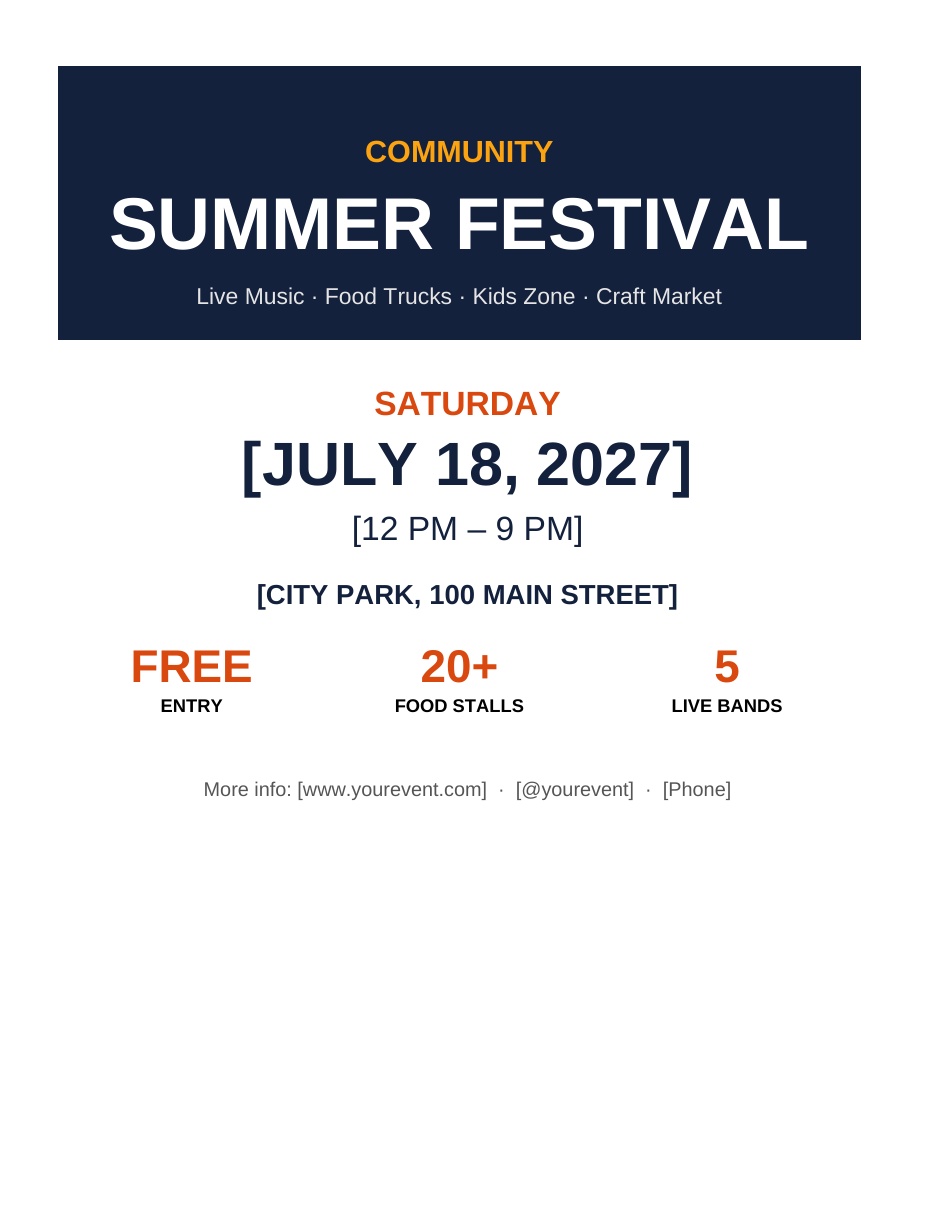
The template opens in Microsoft Word, Google Docs, LibreOffice Writer and Pages. It is designed for A4 or US Letter paper and can be enlarged to A3 or tabloid size at a print shop, or exported as an image for social media.
Features of this poster template
- A bold navy header block with a high-contrast headline that is readable from a distance.
- A short tagline listing the main attractions.
- Large, colourful date and time text so people instantly know when the event happens.
- A clear venue line with the address.
- Three highlight stats, such as free entry, number of food stalls and number of bands, to create excitement.
- A footer for your website, social media handle and phone number.
- A strong orange, gold and navy colour palette that stands out on noticeboards.
- Easy-to-edit text in standard Word tables and paragraphs.
What to include on an event poster
- A headline that names the event in as few words as possible.
- A tagline or list of highlights explaining why people should come.
- The date, including the day of the week.
- The start and end time.
- The venue name and address.
- The price or "free entry".
- How to get tickets or more information: website, QR code, phone or social media.
- The organizer's name or logo, and sponsors if required.
- Any important notes, such as age limits or accessibility information.
How to customize the poster
- Open the template in Word and save a copy with your event name.
- Replace "Community Summer Festival" with your event name. Keep it short so the text stays large.
- Update the tagline with your main attractions.
- Enter the date, time and venue.
- Change the three highlight stats to the most exciting facts about your event, such as "50% OFF", "3 DAYS" or "100+ ARTISTS".
- Update the website, social handle and phone number.
- Change colours to match your brand by selecting the header cell and choosing Table Design > Shading, and selecting text to change the font colour.
- Add a photo or logo with Insert > Pictures. A large, high-quality image above the date can make the poster even more striking.
- Add a QR code linking to tickets or your event page.
- Print a test copy and view it from a few metres away to check readability.
Poster design tips that get results
Make the headline huge
People glance at posters for only a few seconds. The event name should be readable from across the room or street.
Use a clear visual hierarchy
Order information by importance: what, when, where, then details. Use size, weight and colour to guide the eye.
Limit fonts and colours
Stick to one or two fonts and three main colours. Too many styles make a poster look cluttered.
Use contrast
Light text on a dark background, or dark text on a light background, is easier to read. Avoid placing text over busy images.
Embrace white space
Empty space around text makes posters easier to read and look more professional.
Include a call to action
Tell people what to do next: "Buy tickets at", "Register now" or "Scan for details".
Poster ideas for different occasions
- Community events: festivals, fairs, farmers' markets and fun runs.
- Music and entertainment: concerts, open mic nights, DJ events and theatre shows.
- Business promotions: grand openings, sales, product launches and open days.
- Education: school fairs, workshops, seminars, enrolment days and club recruitment.
- Sports: tournaments, matches, sign-up days and fitness classes.
- Charity: fundraisers, donation drives and awareness campaigns.
- Religious and cultural events: Eid, Diwali, Christmas markets and community celebrations.
- Real estate: open houses and property launches.
- Lost and found or missing pet notices (see also our missing person poster templates).
Printing your poster
- Print A4 or Letter at home for small noticeboards and shop windows.
- For larger posters, export the document as a high-quality PDF and take it to a print shop to print at A3, A2 or tabloid size.
- Use glossy or satin paper for vivid colours and matte paper to reduce glare.
- For outdoor use, consider laminating or printing on weather-resistant material.
- Check whether your printer can print to the edge; if not, keep important content away from the margins.
Promoting your event beyond posters
Posters work best as part of a wider promotion plan. Export the poster as a PNG or JPG image from Word or a PDF viewer and share it on Facebook, Instagram, WhatsApp groups and community forums. Create a matching flyer for handouts, an email announcement and a short event page on your website. Ask local businesses, libraries, schools and community centres to display the poster, and put up posters one to three weeks before the event so people have time to plan.
Accessibility and inclusivity
An accessible poster reaches more people. Use large, high-contrast text and avoid relying on colour alone to convey important information. Write in plain language and include accessibility information, such as wheelchair access, quiet areas or sign language interpretation. When sharing the poster online, add alt text describing the event details so screen reader users can access the information.
Common poster mistakes to avoid
- Too much text that nobody will read.
- A small or unclear headline.
- Missing date, time or location.
- Low-resolution images that look blurry when printed.
- Clashing colours and too many fonts.
- No call to action or contact information.
- Typos in key details such as dates and web addresses.
Choosing images for your poster
A striking image can double the impact of a poster. Choose one strong photo or illustration rather than several small ones, and make sure it relates directly to your event, such as a band performing, delicious food or happy families. Use high-resolution images of at least 300 dpi at the printed size so they look sharp. Free stock photo sites offer thousands of royalty-free images, but always check the licence before using them commercially. Place text on a solid area of the image or on a coloured block, like the header in this template, to keep it readable. If you use photos of people from previous events, make sure you have permission.
Poster sizes explained
Common poster sizes include A4 (210 × 297 mm) and US Letter (8.5 × 11 inches) for small notices, A3 (297 × 420 mm) and tabloid (11 × 17 inches) for noticeboards and shop windows, and A2 or A1 for large wall displays and outdoor boards. This template is designed for A4 or Letter but scales proportionally to larger A-series sizes because they share the same aspect ratio. For social media, export the poster and crop it to a square or portrait format, such as 1080 × 1350 pixels for Instagram, keeping the headline and date clearly visible.
Writing poster copy that sells
Every word on a poster must earn its place. Lead with benefits rather than features: "A day of music, food and fun for the whole family" is more appealing than a list of facilities. Use action verbs, keep sentences short and highlight what makes your event special. Numbers attract attention, which is why the template includes three highlight stats. Finish with a clear call to action so readers know exactly what to do next.
Frequently asked questions
Is this poster template free?
Yes. Download, edit and print it free for your event or business.
Can I print the poster in a larger size?
Yes. Export the document as a PDF and ask a print shop to scale it to A3, A2 or tabloid. Text and shapes scale cleanly; use high-resolution images.
Can I edit the poster in Google Docs?
Yes. Upload it to Google Drive and open with Google Docs.
How do I add a QR code?
Generate a QR code with a free online QR generator, download it as an image and insert it into the footer with Insert > Pictures.
Can I share the poster on social media?
Yes. Save the document as a PDF, then export the page as a PNG or JPG image and post it on Facebook, Instagram, WhatsApp or your website, adding a short caption and event link.
Related templates
Promote your events further with our tear-off flyer templates, basketball flyer template, missing person poster templates and birthday invitation templates.