Great lessons rarely happen by chance. Behind every engaging class is a teacher who has thought carefully about what students should learn, how they will learn it and how to check that they did. A clear lesson plan makes that thinking visible, keeps the lesson on track and makes it easy for a substitute teacher to step in. Our free lesson plan template for Microsoft Word gives teachers a clean, practical one-page planner that covers everything from learning objectives to reflection.
Preview the template below, download the editable DOCX file, and use our step-by-step guide to writing effective lesson plans for any subject or grade level.
Download the free lesson plan template
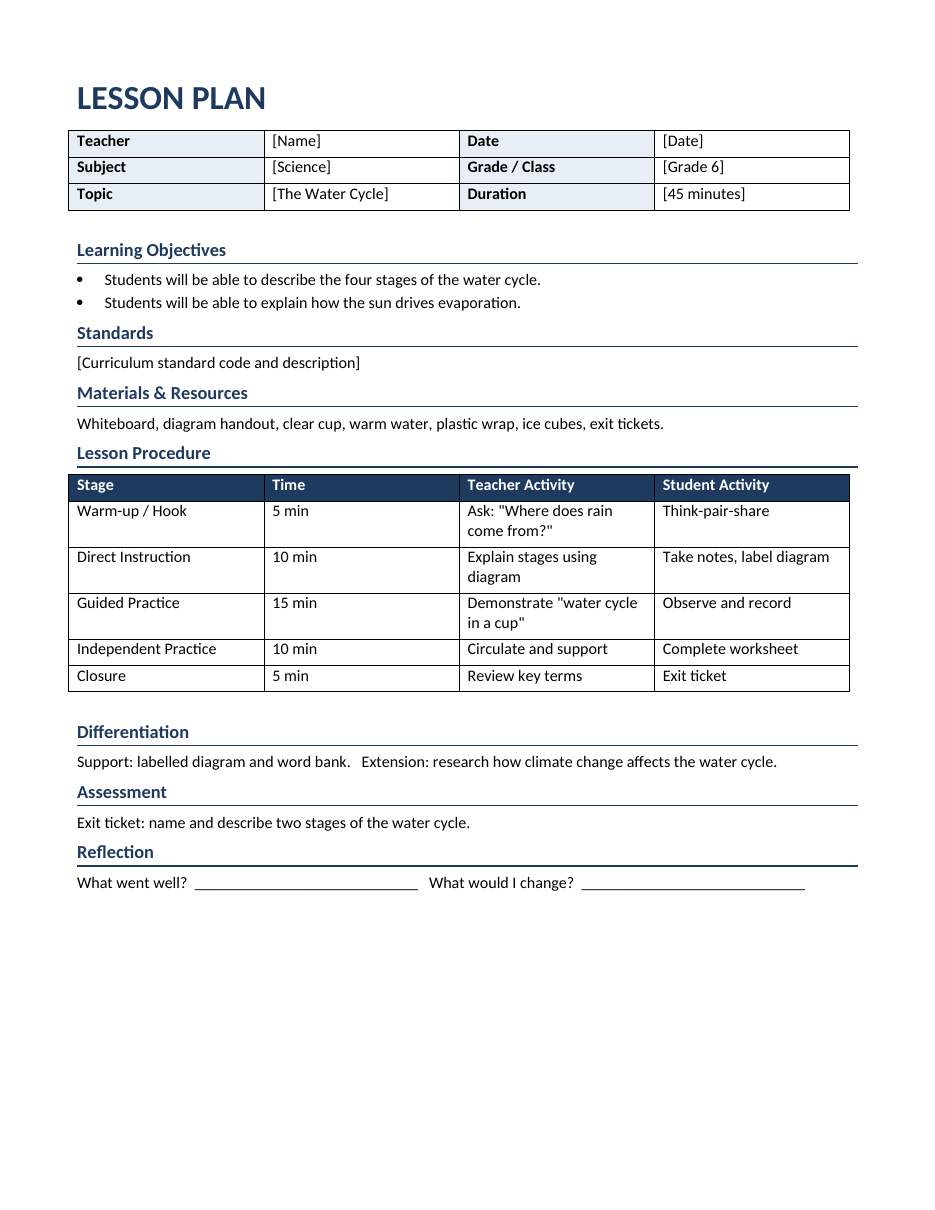
The template opens in Microsoft Word, Google Docs, LibreOffice Writer and Pages. It includes a completed example on the water cycle so you can see how each section works before writing your own.
What is a lesson plan?
A lesson plan is a teacher's detailed guide for a single lesson. It describes the learning objectives, the activities students will complete, the materials needed, how much time each part will take and how learning will be assessed. Lesson plans help teachers align lessons with curriculum standards, manage time, meet the needs of different learners and reflect on what works. Many schools also require lesson plans for observations, inspections and substitute cover.
What this lesson plan template includes
- Lesson details – teacher, date, subject, grade or class, topic and duration.
- Learning objectives – what students will be able to do by the end of the lesson.
- Standards – the curriculum standard or learning outcome the lesson addresses.
- Materials and resources – everything you need to prepare.
- Lesson procedure – a timed table with stages, teacher activity and student activity.
- Differentiation – support and extension strategies for different learners.
- Assessment – how you will check understanding.
- Reflection – space to note what went well and what to change next time.
How to write a lesson plan step by step
- Start with the objective. Write one to three measurable objectives using action verbs such as describe, explain, compare, solve or create. Avoid vague verbs like "understand".
- Link to standards. Note the curriculum standard so you can show how the lesson fits your scheme of work.
- Plan the assessment. Decide how you will know students met the objective, for example an exit ticket, quiz, presentation or worksheet.
- Design a hook. Open with a question, image, short video or demonstration that sparks curiosity.
- Plan direct instruction. Explain new content clearly and briefly, modelling examples.
- Add guided practice. Work through tasks together, checking understanding as you go.
- Plan independent practice. Give students a task to apply what they learned on their own or in groups.
- Plan the closure. Summarize key points and connect them to the next lesson.
- Allocate time to each stage so the total matches your lesson length.
- Plan differentiation for students who need extra support and those ready for a challenge.
- Gather materials before the lesson.
- Reflect afterwards and note changes for next time.
Lesson plan example: the water cycle
The template includes a 45-minute Grade 6 science lesson. The warm-up asks students "Where does rain come from?" using think-pair-share. During direct instruction, the teacher explains evaporation, condensation, precipitation and collection with a diagram. In guided practice, the class builds a "water cycle in a cup" with warm water, plastic wrap and ice, observing condensation form. Students then complete a labelling worksheet independently, and the lesson closes with an exit ticket asking them to describe two stages of the cycle. Differentiation includes a word bank for support and a research extension on climate change.
Popular lesson planning models
The 5E model
Engage, Explore, Explain, Elaborate and Evaluate. Popular in science, it encourages inquiry and hands-on learning.
Gradual release of responsibility
Often summarized as "I do, we do, you do". The teacher models, then guides, then lets students work independently. The template's procedure stages follow this model.
Madeline Hunter's lesson design
A classic structure with objectives, anticipatory set, input, modelling, checking for understanding, guided practice, independent practice and closure.
Backward design
Start with the desired results and assessment, then plan learning activities. This approach, from Understanding by Design, keeps lessons focused on outcomes.
Tips for effective lesson planning
- Write objectives from the student's point of view: "Students will be able to…"
- Plan for active learning; students should do more than listen.
- Build in checks for understanding throughout, not only at the end.
- Over-plan slightly and mark optional activities in case you have extra time.
- Plan transitions and instructions so groups move smoothly between activities.
- Include different modes of learning: visual, verbal, hands-on and digital.
- Keep plans in one folder or drive so you can reuse and improve them each year.
- Share plans with colleagues teaching the same subject to save time.
Differentiation strategies to include
- Provide word banks, sentence starters or partially completed notes.
- Offer visual aids, diagrams and videos.
- Group students flexibly by readiness or interest.
- Give extension tasks such as research questions or real-world problems.
- Allow choice in how students show their learning.
- Support English language learners with key vocabulary and visuals.
- Adjust time and workload for students with additional needs.
Adapting the template
The template works for primary, middle and high school, as well as tutoring, homeschooling, adult education and corporate training. For longer units, copy the page for each lesson and add a unit overview at the front. For online or hybrid classes, add a column for links and digital tools in the procedure table. To create a weekly lesson plan, combine five daily plans into one document or use our weekly planner templates.
Classroom management in your lesson plan
Even a perfectly designed lesson can fall apart without clear routines. Use the procedure table to plan not just what students will learn but how the classroom will run. Note how you will gain attention, for example a countdown or call-and-response, how materials will be distributed, how groups will be formed and how long each transition should take. Write clear, short instructions for each activity and plan to check understanding of instructions before students begin. Think ahead about potential challenges, such as early finishers or students who are off task, and plan responses like extension questions or a quick check-in. Including these details in the lesson plan makes lessons run more smoothly and is especially helpful for substitute teachers or teaching assistants supporting the class.
Using technology in lesson plans
Digital tools can make lessons more interactive and accessible when used with purpose. Add a column to the procedure table, or a line in the materials section, to note links to slides, videos, simulations and online quizzes. Tools such as interactive whiteboards, quiz platforms and collaborative documents let students respond in real time, so you can check understanding instantly. Keep technology aligned with your learning objectives: ask whether each tool helps students learn better or simply adds novelty. Always prepare an offline backup in case of connectivity problems, test links before the lesson and consider students who may not have devices at home when setting homework. Storing your lesson plans in a shared drive also makes it easy to collaborate with colleagues, reuse successful lessons and build a bank of high-quality plans for every unit you teach.
Frequently asked questions
Is this lesson plan template free?
Yes. You can download, edit and print it for free for classroom use.
Can I use it in Google Docs?
Yes. Upload the DOCX to Google Drive and open it with Google Docs to edit and share with colleagues.
How detailed should a lesson plan be?
Detailed enough that another teacher could teach the lesson from it. New teachers usually write more detail; experienced teachers may use shorter plans.
What makes a good learning objective?
A good objective is specific, measurable and achievable within the lesson, such as "Students will be able to label the four stages of the water cycle."
Can I use this template for online teaching?
Yes. Add links to your video platform, slides and digital activities in the materials section, and plan breakout room tasks in the procedure table. Build in short interactive checks, such as polls or chat responses, every few minutes to keep students engaged.
How long does it take to write a lesson plan?
A detailed plan may take 30 to 60 minutes at first. With a reusable template and a bank of activities, most teachers can plan a lesson in 15 to 20 minutes and reuse plans in later years.
How long should a lesson plan be?
Most daily lesson plans fit on one or two pages. The goal is a plan that is detailed enough to guide the lesson and allow a substitute teacher to follow it, but short enough to prepare quickly. New teachers and teachers being observed often write more detailed plans, including timings, key questions and expected student responses. Experienced teachers may use briefer notes for routine lessons. Whatever the length, every lesson plan should state clear learning objectives, the main activities, the materials needed and how you will assess learning. This one-page Word template keeps these essentials in a consistent layout.
Related templates
Plan your whole teaching week with our weekly planner templates, quiz templates, homework planner templates, lined paper templates and certificate of completion templates.