The holiday season is the busiest time of year for shipping. Online shops, home businesses and families sending gifts all need clear, accurate labels so parcels arrive on time. A neat printed shipping label is easier for couriers to read than handwriting, reduces delivery errors and makes your business look professional when the parcel reaches the customer's door.
Our free shipping label template for Microsoft Word prints four labels on one page. Each label has a "From" block for your business, a large "Ship to" block for the recipient, an order number, weight and piece count, a barcode area and checkboxes for Fragile, Priority and Keep Dry. Preview the page below, download the editable DOCX and start labelling your parcels today.
Download the free shipping label template
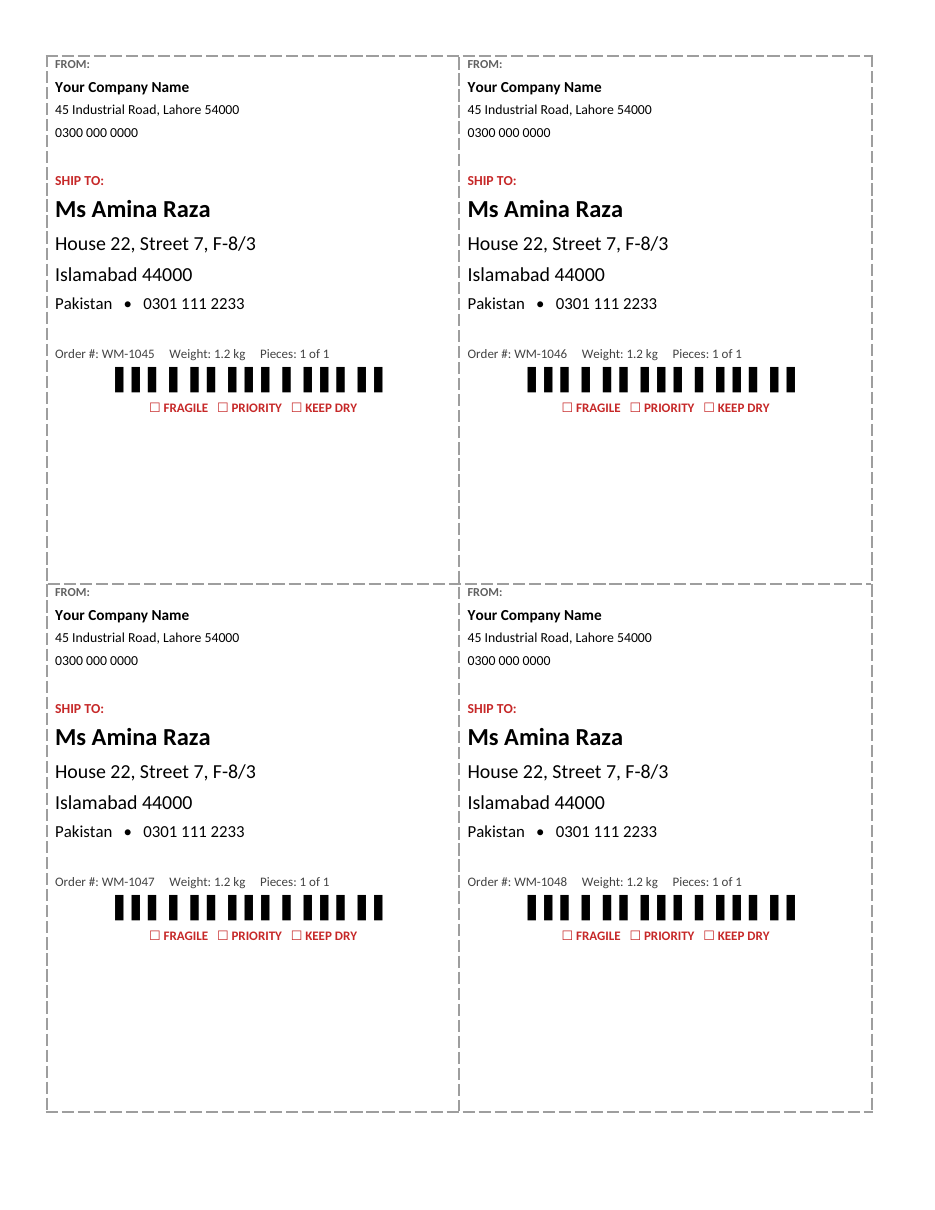
The template opens in Microsoft Word, Google Docs, LibreOffice Writer and Pages. Print on plain paper and tape it to the parcel, or print on full-sheet adhesive label paper and cut it into four labels.
What the shipping label includes
- A sender block with company name, address and phone number.
- A large, bold recipient name and address for easy reading.
- The recipient's phone number for courier contact.
- Order number, parcel weight and piece count.
- A barcode area that you can replace with your courier's barcode or a QR code.
- Fragile, Priority and Keep Dry checkboxes.
- Four labels per page with dashed cut lines.
- Clear fonts sized for reading at a distance.
How to use the template
- Download the DOCX file and open it in Word.
- Replace the "From" details with your business name, address and phone number on all four labels.
- Save this version as your master file.
- For each order, type the recipient's name, full address and phone number in the "Ship to" block.
- Enter the order number, weight and number of pieces.
- Tick any handling boxes that apply, such as Fragile.
- Print on plain paper or adhesive label sheets.
- Cut along the dashed lines.
- Attach the label to the largest flat side of the parcel.
- Cover it with clear tape to protect it from rain and scuffs, without covering any barcode.
How to write a shipping address correctly
Most delivery problems come from incomplete or unclear addresses. Write the recipient's full name on the first line, followed by house or flat number and street, then area or sector, city and postal code, and the country on the last line for international parcels. Always include a phone number so the courier can call if they cannot find the address. Avoid abbreviations that the courier may not understand, and double-check spelling against the customer's order.
Domestic address example
Ms Amina Raza, House 22, Street 7, F-8/3, Islamabad 44000, Pakistan, 0301 111 2233.
International parcels
Write the country in capital letters on the last line, and include a customs declaration if required by your courier. Many couriers also require a commercial invoice for business shipments.
Mail merge for many labels
If you ship dozens of orders a day, use Word's mail merge. Export your orders from your shop or spreadsheet with columns for name, address, city, postal code, phone and order number. In Word, choose Mailings, Start Mail Merge, Labels, then select your order list and insert the fields into the "Ship to" block. Word creates one label for every order, saving time and avoiding typing mistakes.
Holiday shipping tips
- Check your courier's last shipping dates for delivery before holidays and the New Year.
- Ship early in December to avoid delays during peak weeks.
- Use sturdy boxes and enough padding for fragile gifts.
- Weigh parcels accurately to avoid extra charges.
- Send customers their tracking number by email or message.
- Keep a packing list inside the parcel so customers can check the contents.
- Print a few spare labels in case one is damaged.
Choosing label paper
Plain paper labels are cheap and fine when you tape over them. Full-sheet adhesive label paper is quicker to use: print, cut and stick. Some businesses use pre-cut sheets with four labels per page, which match this layout closely, although you may need to adjust margins in Page Layout so each label lines up with the pre-cut shapes. For thermal printers, copy the label design into your printer's software at the correct label size.
Adding barcodes and QR codes
The barcode area on the template is a placeholder. If your courier provides a barcode or tracking label, place it there or stick the courier's label next to yours. You can also insert a QR code that links to your order tracking page or a thank-you message. Make sure barcodes are printed sharply and are not covered by shiny tape, which can make them hard to scan.
Packing the parcel properly
A good label is only part of safe delivery. Choose a box that is just big enough for the item with room for padding, wrap fragile items in bubble wrap or paper, and fill empty spaces so items cannot move. Seal all seams with strong packing tape. Remove or cover old labels and barcodes on reused boxes so the courier does not scan the wrong code. Place the label on top of the box, not on a seam or corner, where it can be read easily.
Branding your labels
Your shipping label is the first thing a customer sees when the parcel arrives. Add your logo to the "From" block, use your brand colour for the "Ship to" heading and print a short thank-you message or your website at the bottom. These small touches turn a plain parcel into part of your customer experience and remind customers where to shop next time.
Who uses this template?
- Online shops selling on social media or marketplaces.
- Home bakers, crafters and small producers.
- Offices sending documents and samples.
- Warehouses and small distributors.
- Families sending holiday gifts to relatives.
- Schools and charities posting newsletters or donations.
Shipping label checklist
- Recipient's full name exactly as on the order.
- House or flat number, street, area or sector.
- City and postal code on the same line.
- Country name for international parcels.
- Recipient phone number with the correct area or mobile code.
- Your return address in case the parcel cannot be delivered.
- Order number that matches your invoice or packing list.
- Weight and number of pieces for multi-box orders.
- Handling instructions such as Fragile or Keep Dry.
- A courier barcode or tracking label placed flat and unobstructed.
Multi-piece shipments
When one order is sent in several boxes, label every box and use the "Pieces" field to show the box number and total, such as "1 of 3", "2 of 3" and "3 of 3". This helps the courier keep the boxes together and lets the customer know immediately if one box is missing. Put a packing list in the first box that lists the contents of every box, and use the same order number on all labels.
Returns labels
Many online shops include a returns label in the parcel to make exchanges easy, especially after the holidays. Simply swap the "From" and "Ship to" blocks: the customer's address goes in the sender area and your warehouse or shop address goes in the recipient area. Add the original order number and a short note, such as "RETURN", so you can match the parcel to the order quickly when it arrives.
Saving time on busy days
During the December rush, preparing labels can take longer than packing. Save time by keeping your master file with the sender details already filled in, printing a full sheet of labels at once, and using mail merge for large batches. Set up a packing station with labels, tape, boxes, padding and a scale in one place. Prepare labels at the same time each day before the courier pickup so parcels are ready when the driver arrives.
It also helps to batch similar orders. Pack all orders for the same product together, print their labels in one run and check each label against the order list before sealing the box. A quick final check catches most errors, such as a label stuck on the wrong parcel, before they become expensive redeliveries.
Frequently asked questions
Is this shipping label template free?
Yes. Download, edit and print it as often as you need.
How many labels are on a page?
Four labels fit on one page in a 2 × 2 layout.
Can I use it with label sticker paper?
Yes. Print on full-sheet adhesive paper and cut along the lines, or adjust margins to match pre-cut label sheets.
Is the barcode real?
No. It is a placeholder. Use the barcode or tracking label provided by your courier.
Can I print labels from a spreadsheet?
Yes. Use Word's mail merge to fill labels automatically from a list of orders.
Where should I place the label on the parcel?
Place it flat on the top of the largest side, away from seams, edges and old labels, and cover it with clear tape without covering any barcode.
Can I use this template for return labels?
Yes. Swap the sender and recipient details and add the original order number and the word "RETURN".
Related templates
- Packing list templates
- Purchase order template
- Invoice templates
- Letterhead templates
- Sales report templates