Medical certificates are among the most frequently requested documents in any clinic. Employees need them for sick leave, students need them to excuse absences, athletes and new hires need proof of fitness, and travellers sometimes need confirmation that they are fit to fly. A clear, consistent medical certificate format saves doctors time, reduces errors and makes the certificate easy for employers and schools to verify. Our free medical certificate template for Microsoft Word gives clinics, hospitals and medical practitioners a professional, ready-to-use reference format.
Preview the template below, download the editable DOCX file, and read our guide to what a valid medical certificate should contain and how to complete it correctly.
Download the free medical certificate template
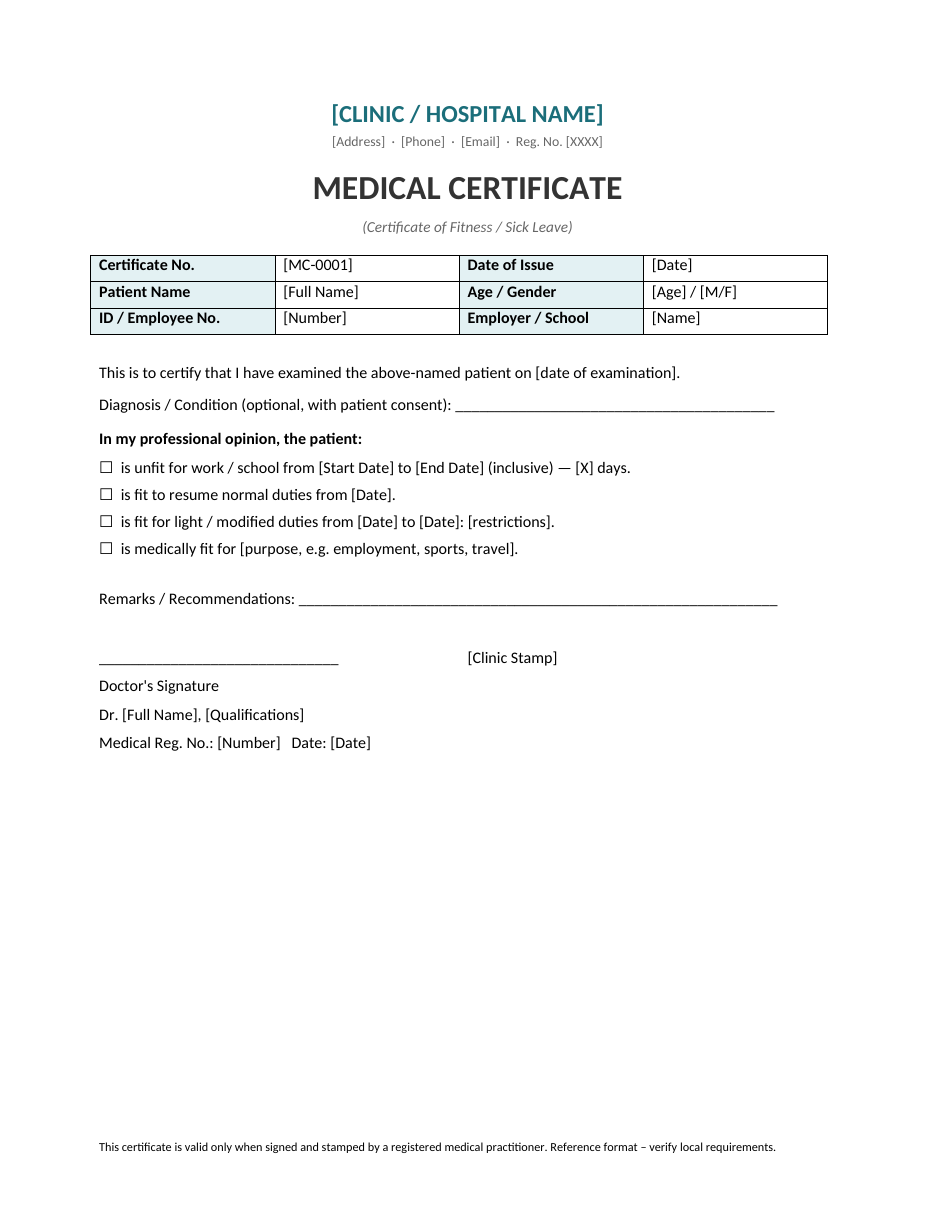
This template is intended for use by registered medical practitioners and healthcare facilities. A medical certificate is only valid when issued, signed and stamped by a qualified doctor after examining the patient. Creating or using a medical certificate without a genuine medical examination is fraudulent and may be a criminal offence. Requirements vary by country, employer and institution, so always check local rules.
What is a medical certificate?
A medical certificate, sometimes called a doctor's note, sick note, fit note or certificate of fitness, is a written statement from a registered medical practitioner confirming a patient's health status. Most commonly, it confirms that a person was unfit for work or school for a specific period, or that they are fit to resume duties, take part in an activity or start a new job. Employers use medical certificates to manage sick leave and statutory sick pay, schools use them to excuse absences or exams, and organizations use fitness certificates to confirm that a person can safely perform particular tasks.
What this medical certificate template includes
- Clinic header – the name of the clinic or hospital, address, phone, email and registration number.
- Certificate number and date of issue – a unique reference for verification and record keeping.
- Patient details – full name, age, gender, ID or employee number and employer or school.
- Examination statement – confirms the date the patient was examined.
- Diagnosis or condition – an optional field, completed only with the patient's consent.
- Fitness options – checkboxes for unfit for work or school, fit to resume duties, fit for light or modified duties and medically fit for a stated purpose.
- Remarks and recommendations – for restrictions, follow-up or advice.
- Doctor's signature block – full name, qualifications, medical registration number, date and space for the official clinic stamp.
- Footer – a validity statement that the certificate must be signed and stamped.
Types of medical certificates
Sick leave certificate
Confirms that the patient is unfit for work or study for a specified period, with exact start and end dates. This is the most common type and is used for employer sick leave policies and statutory sick pay.
Fitness to work or return-to-work certificate
Confirms that a patient who was ill or injured can safely resume normal duties, sometimes with temporary adjustments such as reduced hours or no heavy lifting.
Medical fitness certificate
Confirms that a person is fit for employment, sports, adventure activities, military service, a driving licence or study abroad, often after a specific examination.
Fit-to-fly certificate
Confirms that a patient, for example a pregnant traveller or someone recovering from surgery, is fit to travel by air. Airlines often have their own requirements and forms.
Medical certificate for school or exams
Excuses a student from classes, exams or physical education, or supports a request for special consideration.
How to fill out a medical certificate correctly
- Assign the next sequential certificate number and enter the date of issue.
- Enter the patient's full name exactly as it appears on their ID, along with age, gender and any ID or employee number required by the employer or school.
- Record the date of examination. Certificates should reflect a genuine consultation on or before the date of issue.
- Include a diagnosis only if the patient consents; many certificates simply state "medical condition" to protect privacy.
- Tick the appropriate fitness option and enter exact dates. For sick leave, state whether the dates are inclusive and the total number of days.
- Add any restrictions or recommendations, such as light duties, follow-up appointments or reasonable adjustments.
- Sign the certificate, print your full name, qualifications and medical registration number, and apply the official clinic stamp.
- Give the original to the patient and keep a copy in the patient's medical record.
What makes a medical certificate valid?
- It is issued by a registered medical practitioner or other authorized health professional.
- It is based on a genuine examination or consultation.
- It contains the patient's identifying details.
- It states clear dates or the period of incapacity or fitness.
- It includes the practitioner's name, registration number, signature and the date.
- It carries the official stamp or letterhead of the clinic or hospital.
- It is legible, complete and has not been altered.
Employers and institutions may verify certificates by contacting the clinic using the certificate number, which is why a unique number and accurate records are important.
Best practices for clinics and doctors
- Use a standard template across the practice so all certificates look consistent and professional.
- Number certificates sequentially and keep a log of every certificate issued.
- Store copies securely in line with medical confidentiality and data protection laws.
- Avoid backdating certificates beyond what your local regulations allow.
- Be precise about dates and restrictions to prevent misunderstandings with employers.
- Protect privacy by including diagnoses only with consent and only when necessary.
- Consider converting the template into a fillable PDF or integrating it with your practice management system.
- Train reception staff to check that all fields are complete before the certificate is handed over.
Guidance for employers and HR teams
When you receive a medical certificate, check that it includes the employee's name, the dates of absence, the practitioner's details, a signature and a stamp. Record the certificate in your absence management system and keep it confidential, as health information is sensitive personal data in most jurisdictions. If a certificate recommends light duties or adjustments, discuss them with the employee and consider whether they can be accommodated. If you have genuine concerns about authenticity, contact the issuing clinic to verify the certificate number rather than questioning the employee's health details.
Medical certificate wording examples
- "This is to certify that Mr. John Smith was examined by me on 28 October 2026 and is unfit for work from 28 October 2026 to 31 October 2026 inclusive, a period of four days."
- "Ms. Ayesha Khan has recovered from her illness and is fit to resume normal duties from 3 November 2026."
- "The above-named patient is fit for light duties only, with no lifting over 5 kg, from 1 to 14 November 2026."
- "This is to certify that the above-named person has been examined and found medically fit for employment."
Digital medical certificates and telemedicine
Many clinics now issue certificates electronically, especially after telehealth consultations. If your local regulations permit remote certification, the same template can be completed digitally, signed with a secure electronic signature and exported as a PDF. Include the type of consultation, such as video or telephone, in the remarks section, and keep an audit trail of when the certificate was issued and to whom it was sent. Some employers and authorities require a QR code or online verification portal, which you can add to the footer.
Customizing the template for your practice
Replace the bracketed clinic details with your own, insert your logo in the header and change the teal accent colour to match your branding. If your practice issues mostly one type of certificate, you can remove the unused checkboxes or create separate versions, such as a sick leave certificate and a fitness certificate. Add language required by local law, for example references to statutory sick pay rules, and translate the certificate if you serve patients in more than one language.
Frequently asked questions
Is this medical certificate template free?
Yes. Clinics and practitioners can download, edit and use it free of charge.
Can I write my own medical certificate?
No. Only a registered medical practitioner can issue a valid medical certificate after examining you. Using a self-made or fake certificate can lead to disciplinary action or prosecution.
Does a medical certificate have to include a diagnosis?
Not always. Many employers only need confirmation of unfitness and dates. A diagnosis should only be included with the patient's consent.
How long is a medical certificate valid?
It covers the dates stated on it. A fitness certificate for employment or sports may have a validity period set by the organization requesting it.
Can the template be used for dental or veterinary certificates?
The structure can be adapted by dentists or vets, but the wording and professional registration details must reflect their profession and local rules.
Related templates
Healthcare and administrative professionals may also find our incident report templates, police report template, meeting minutes template and attendance tracking templates useful.