The arrival of a new baby is one of life's most precious moments, and a beautiful keepsake birth certificate is a wonderful way to remember it. Our free printable birth certificate template for Microsoft Word lets parents, grandparents, midwives, photographers and baby shower hosts create an elegant commemorative certificate with the baby's name, date and time of birth, birth weight and length, and the names of the proud parents.
Preview the design below, download the editable DOCX file, and read our guide to customizing, printing and framing your keepsake birth certificate.
Download the free birth certificate template
Important: this is a decorative keepsake certificate. It is not an official birth record and cannot be used for passports, identification, school enrolment or any legal purpose. Official birth certificates are issued only by the civil registration or vital records office in the country or state where the baby was born.
About this keepsake birth certificate design
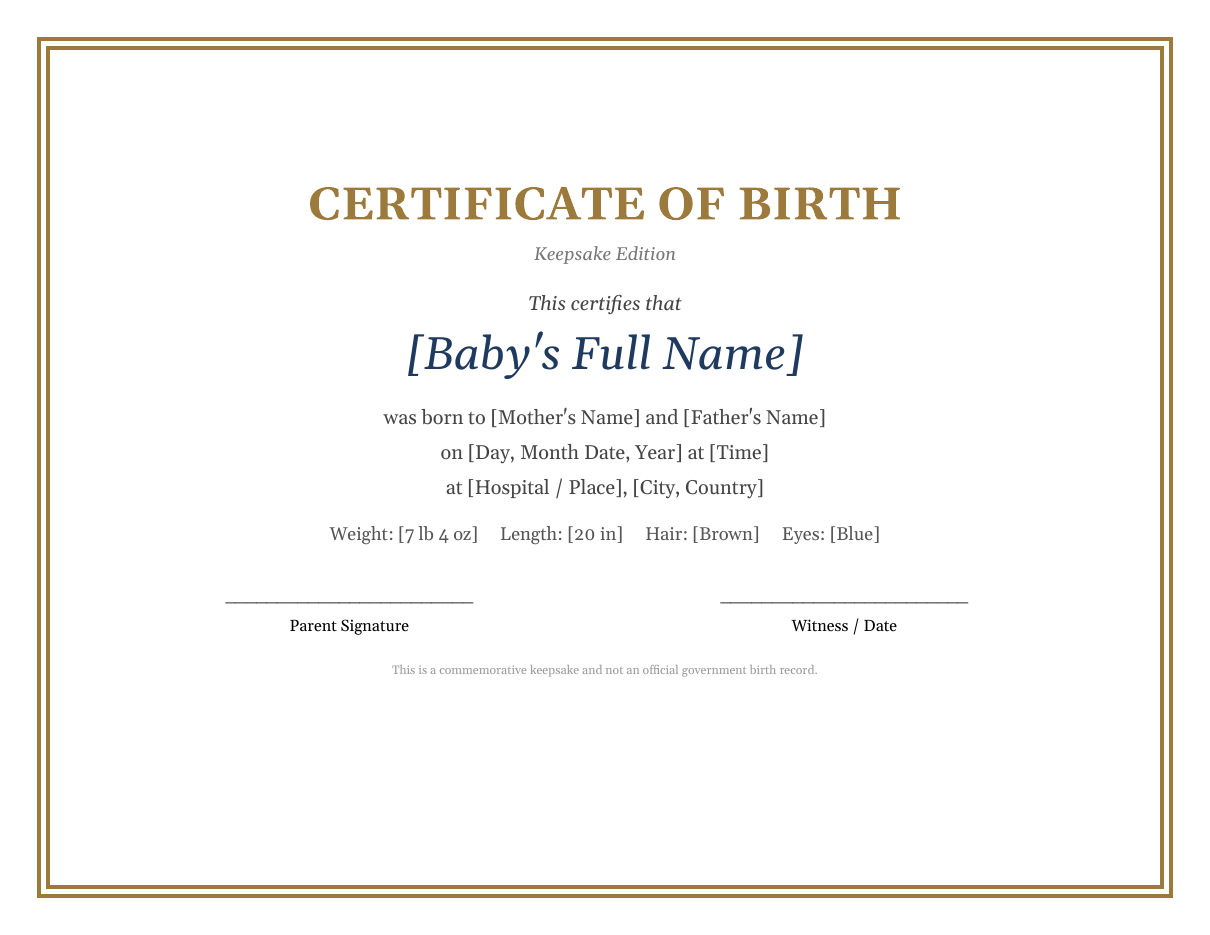
- A landscape layout with an elegant gold double border that looks beautiful in a standard frame.
- A classic serif typeface with the baby's full name as the centrepiece in large navy lettering.
- Fields for both parents' names, the date and time of birth, and the hospital or place of birth.
- A birth statistics line for weight, length, hair colour and eye colour.
- Signature lines for a parent and a witness, midwife or doctor.
- A discreet footer stating that the certificate is a commemorative keepsake.
What to include on a keepsake birth certificate
Because a keepsake certificate is personal rather than official, you can include whatever details mean the most to your family. Popular details include:
- The baby's full name, including middle names.
- Date of birth, written out in full, and the exact time of birth.
- Place of birth: hospital, birth centre or home, plus city and country.
- Parents' full names, and optionally grandparents' names.
- Birth weight and length, in pounds and inches or kilograms and centimetres.
- Hair and eye colour at birth.
- The name of the doctor, midwife or doula who delivered the baby.
- A tiny footprint or handprint, added with baby-safe ink after printing.
- A short blessing, poem or quote.
How to personalize the template in Word
- Download and open the template in Microsoft Word, then save a copy with the baby's name.
- Click on each placeholder in square brackets and type the real details.
- Change the colour of the name to soft pink, baby blue, sage green or another nursery colour by selecting the text and using the Font Color tool.
- Change the border colour under Design > Page Borders to match your chosen palette.
- Add a photo or illustration, such as a stork, moon and stars or a teddy bear, using Insert > Pictures.
- Adjust spacing by adding or removing blank lines so the design stays centred.
- Proofread every detail, especially the spelling of names and the date and time.
- Print a test copy on plain paper before printing on premium card stock.
Ideas for using a keepsake birth certificate
- Frame it for the nursery wall alongside a newborn photo.
- Add it to a baby memory book or scrapbook.
- Give it as a gift to grandparents, godparents or close relatives.
- Include it in a birth announcement package.
- Use it as a page in a professional newborn photography session.
- Create matching certificates for twins or siblings.
- Make a certificate for an adopted child to mark their "gotcha day" or adoption day.
- Prepare a fun certificate for a new puppy or kitten using the same design.
Printing and framing tips
- Print on heavyweight matte or linen-textured card stock of 250 gsm or more for a premium finish.
- Ivory or cream paper complements the gold border and gives a classic heirloom look.
- Choose the highest print quality setting and let the ink dry completely before handling.
- The landscape layout fits standard 8.5 x 11 inch or A4 frames; for an 8 x 10 inch frame, reduce the margins slightly.
- Use an acid-free mat and UV-protective glass if you want the certificate to last for decades without fading.
- For a footprint, use a baby-safe ink pad and press the foot gently in the space below the birth statistics.
Keepsake certificate vs. official birth certificate
It is important to understand the difference between a commemorative certificate and an official document. An official birth certificate is a government-issued vital record created when a birth is registered with the civil registry or vital statistics office. It carries a registration number, an official seal and the signature of a registrar, and it is used to prove identity, age and citizenship. A keepsake birth certificate, like this template, is purely decorative. It celebrates the birth but has no legal value, and it must never be presented as an official record.
How to get an official birth certificate
In most countries, the hospital or midwife helps parents register the birth, or parents register it themselves within a set period, often between a few days and six weeks. Once registered, you can request certified copies from the vital records or civil registration office, usually online, by post or in person, for a small fee. Contact your local registry for exact requirements.
Birth certificate wording ideas
Want to add a personal message to the certificate? Try one of these short verses below the birth statistics:
- "A little miracle, a lifetime of love."
- "Welcome to the world, little one. You are loved more than you will ever know."
- "Ten tiny fingers, ten tiny toes, a heart full of love from your head to your nose."
- "The day you were born, our world became brighter."
- "Every good and perfect gift is from above."
Make it a family keepsake set
Using the same fonts, colours and border, you can create a coordinated set of baby keepsakes: a birth announcement card, a baby shower invitation, a "first year" milestone certificate, a baptism or naming ceremony certificate and thank-you cards for gifts. A matching set looks thoughtful and polished and makes a lovely gift box for new parents. Keep a master copy of the design so you can reuse it when siblings arrive.
Choosing colours and fonts for your certificate
The design you choose sets the mood of the keepsake. The default gold and navy palette feels timeless and formal, and it works for both boys and girls. For a softer look, change the baby's name to blush pink, dusty rose, powder blue, mint or lavender, and switch the border to a matching pastel. Neutral palettes such as sage green, oatmeal and warm grey are popular for modern nurseries and gender-neutral themes. For fonts, pair an elegant script such as Great Vibes or Allura for the baby's name with a classic serif such as Garamond or Georgia for the details. Avoid using more than two fonts, keep the details at 12 points or larger so they are easy to read in a frame, and make sure there is good contrast between text and paper.
Gift ideas to pair with a keepsake certificate
A personalized birth certificate makes a thoughtful gift on its own, but it becomes truly special when paired with something meaningful. Consider presenting it in a ready-made frame with a newborn photo, tucking it into a baby memory book with space for first milestones, or including it in a hospital bag gift basket with a hand-knitted blanket and a soft toy. Grandparents often treasure a copy of their own, and many families create a second certificate to place in a time capsule that the child can open on an eighteenth birthday. For baby showers, guests can sign the back of the certificate with wishes for the baby, turning it into an heirloom filled with love from family and friends. Add the date of the shower, a short note from the hosts and a ribbon to complete the gift.
Frequently asked questions
Is this birth certificate template free?
Yes. You can download, edit and print the keepsake birth certificate template free for personal use.
Can I use this as an official birth certificate?
No. This is a decorative keepsake only. Official birth certificates must be requested from the government office where the birth was registered.
Can I edit the template in Google Docs?
Yes. Upload the DOCX to Google Drive and open it with Google Docs. Some decorative borders may display slightly differently, so check the layout before printing.
Can I make a certificate for twins?
Yes. Create one certificate per baby, or add a second name and set of statistics to a single certificate by duplicating the lines.
What paper size should I use?
The template is designed for landscape US Letter or A4 paper, which fits most standard certificate frames.
Related templates
Celebrate more milestones with our greeting card templates, birthday invitation templates, gift certificate templates and certificate of completion templates.