Tear-off flyers are one of the simplest and most effective forms of local advertising. Pinned to a community noticeboard, café wall or campus bulletin board, they let interested people tear off a small tab with your phone number, email or website and contact you later. They are ideal for tutoring, babysitting, pet sitting, cleaning services, rooms for rent, yard sales, music lessons, fitness classes and lost pet appeals.
This page provides three free tear-off flyer templates for Microsoft Word, each supplied in a ZIP file: a flyer template with tear-off tabs in Word template (DOTX) format and two editable DOCX tear-off flyers. Preview the designs, download the one you like and follow our tips for writing a flyer that gets people to tear off a tab.
Download free tear-off flyer templates
Tear Off Flyer Templates:


See Tear-Off Flyer Examples Below

Academic Tear-Off Flyer

Tear-Off Flyer For Sales

Lesson Announcement Tear-Off Flyer

Company Tear-Off Flyer

Student Movement Tear-Off Flyer

Company Sales Tear-Off Flyer

Tear-Off Flyer With 11 Tabs

Product Marketing Tear-Off Flyer

Babysitter Tear-Off Flyer

Tear-Off Flyer For Class Announcement

Tear-Off Flyer Printable

Blank Editable Tear-Off Flyer

House For Sale Tear-Off Flyer

Lottery Tear-Off Flyer
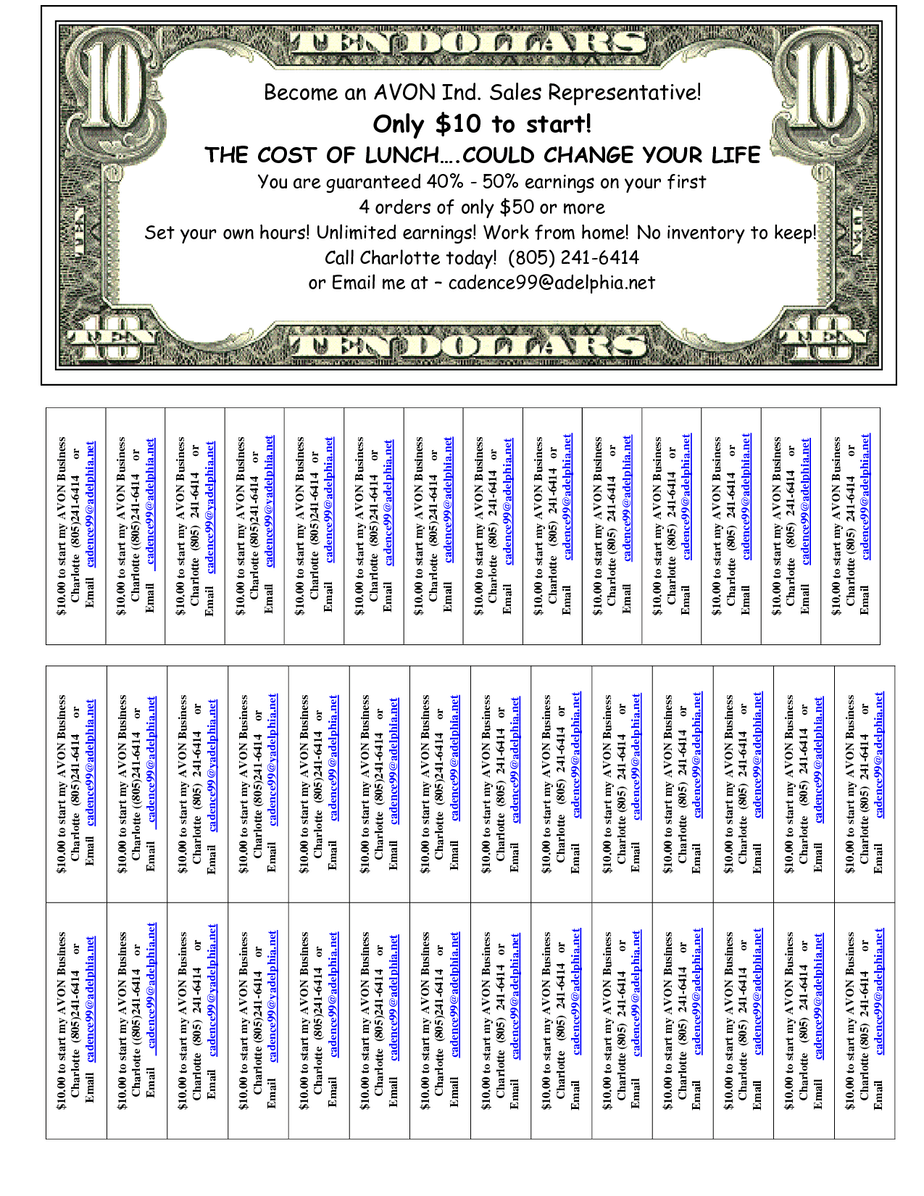
Services Tear-Off Flyer

Simple Good Looking Tear-Off Flyer

Dog Walk Tear-Off Flyer

Extract each ZIP file to access the Word file. The DOTX template opens as a new untitled document each time, so the original design stays intact. The DOCX flyers can be edited directly in Microsoft Word, Google Docs or LibreOffice Writer.
What is a tear-off flyer?
A tear-off flyer is a printed notice with a row of vertical tabs along the bottom edge. Each tab repeats key contact information, such as a phone number, email address, website or short description. The paper is cut between tabs, so people can tear one off without removing the whole flyer. Tear-off flyers are cheap to produce, easy to distribute and work especially well in places where people browse noticeboards, such as supermarkets, libraries, universities, gyms and community centres.
What to include on a tear-off flyer
- A bold headline that states the offer, such as "Math Tutoring – Grades 6–12".
- A short description of the service, item or event.
- Key benefits or features in a few bullet points.
- Price or "starting from" rate, if appropriate.
- Location or service area.
- Dates and times for events or availability.
- An image, logo or simple illustration.
- A call to action, such as "Tear off a tab and call today".
- Tear-off tabs with your name or service, phone number, email or website.
How to create a tear-off flyer step by step
- Download and extract a template from this page.
- Replace the headline with a clear, specific offer.
- Write two or three short lines describing what you offer and why people should contact you.
- Add a picture or logo to catch attention.
- Enter your contact information in the first tab, then copy it to the other tabs.
- Keep tab text short: service name plus phone number or web address works best.
- Proofread every tab carefully; a wrong digit makes the flyer useless.
- Print on bright or coloured paper to stand out.
- Cut along the lines between tabs with scissors or a craft knife, stopping at the flyer edge.
- Post flyers in busy locations with permission and check them regularly.
Tips for an effective tear-off flyer
- Use a headline that can be read from two metres away.
- Focus on one offer per flyer.
- Use bright colours or coloured paper to stand out on crowded boards.
- Keep the design uncluttered with plenty of white space.
- Include a price or special offer to encourage action.
- Tear off one or two tabs yourself; people are more likely to take one when others have.
- Add a QR code to the main flyer for quick online access.
- Use a dedicated phone number or email if you prefer to keep personal details private.
Ideas for tear-off flyers
- Tutoring and homework help.
- Music, language and art lessons.
- Babysitting, pet sitting and dog walking.
- House cleaning, gardening and handyman services.
- Rooms, apartments and parking spaces for rent.
- Items for sale and garage sales.
- Fitness classes, yoga and personal training.
- Lost and found pets.
- Volunteer recruitment and club membership.
- Research study participants and surveys.
- Carpool and ride-sharing groups.
- Local events, workshops and meetups.
Where to post tear-off flyers
Choose locations where your target audience spends time. University noticeboards work well for tutoring, roommates and student services. Supermarkets, libraries and community centres reach local families. Gyms and health food shops suit fitness and wellness services. Pet shops and veterinary clinics are good for pet sitting and lost pet flyers. Always ask permission before posting, respect noticeboard rules and remove flyers when they are no longer relevant.
Printing tips
- Print on 90 to 120 gsm paper so tabs do not tear too easily.
- Use coloured paper or a coloured border to attract attention.
- Check the print preview to ensure tabs are not cut off by printer margins.
- Print a test copy and check text sizes before printing in bulk.
- Use a paper trimmer for straight cuts between tabs.
- Print in black and white on coloured paper to save ink.
Using the DOTX template
A DOTX file is a Word template. When you double-click it, Word creates a new document based on the design, so you can save each version separately without changing the original. To edit the template itself, right-click it and choose Open. Save your customized flyer as a DOCX file or export it as a PDF for printing at a print shop.
Measuring results
To see which locations work best, use slightly different contact details for each, such as different email addresses or website links with tracking codes, or simply ask new customers where they saw your flyer. Check your flyers regularly: if many tabs are gone, replace the flyer; if none are taken, try a different headline, colour or location. Tear-off flyers are inexpensive, so testing different versions is easy.
Safety and privacy tips
Flyers are public, so think about what information to share. Use a business phone number, a dedicated email address or a messaging app rather than your home address. For rentals and items for sale, meet new contacts in public places or with someone else present. For lost pet flyers, avoid sharing every identifying detail so you can verify genuine finders.
Writing a headline that works
The headline is the most important part of a tear-off flyer, because people scanning a crowded noticeboard decide in a second or two whether to read more. Make it specific and benefit-focused. "Piano Lessons for Beginners – First Lesson Free" works better than "Music Lessons". "Room for Rent Near Campus – 15,000/Month" tells students exactly what they need to know. Use large, bold type and limit the headline to six to eight words. If possible, include a number, a price or a location to make the offer concrete.
Tear-off flyers for students and campus life
Universities and colleges are among the best places for tear-off flyers. Students look for roommates, tutors, textbooks, part-time jobs, study groups and events. Post flyers at the start of each term, when demand is highest, and include details students care about, such as distance from campus, price and availability. Many campuses have rules about where flyers may be posted, so check with the student union or facilities office first.
Designing tabs that people take
Make the tabs easy to read and easy to tear. Rotate the tab text vertically so it fits neatly, use a clear font of at least 10 points and include just the essentials: a short description and a contact method. Leave enough paper between the bottom of the main flyer and the tabs to prevent the flyer tearing.
Tear-off flyers for small businesses
Local service businesses can get real results from tear-off flyers at very low cost. A cleaner, plumber, tutor or personal trainer can print a batch of flyers for very little money and reach hundreds of local people each week. Use your business name and logo for brand recognition, mention a special offer for first-time customers and keep the same design across all your flyers. Update flyers every few weeks so they look fresh, and replace any that are faded or have lost all their tabs.
Frequently asked questions
Are these tear-off flyer templates free?
Yes. All three templates are free to download, edit and print.
How many tabs should a tear-off flyer have?
Most flyers have 8 to 12 tabs along the bottom, depending on paper size and text length.
Can I edit the flyers in Google Docs?
Yes. Upload the DOCX files to Google Drive and open them with Google Docs. For the DOTX template, open it in Word or save it as DOCX first.
How do I open the ZIP files?
Right-click and choose Extract All on Windows, or double-click on a Mac, then open the Word file.
What paper should I use for tear-off flyers?
Use 90 to 120 gsm paper. Thinner paper tears too easily, while thick card makes tabs hard to tear off.
Can I add a QR code to my flyer?
Yes. Generate a QR code for your website or booking page and insert it as an image on the main flyer.