Missed calls cost businesses opportunities. When a colleague is away from their desk, in a meeting or out of the office, someone else often takes the call. If the message is scribbled on a scrap of paper or missing key details, the caller may never get a reply. A phone message template gives every message the same clear structure, so the recipient knows who called, why and what to do next.
This page includes a free editable phone message template in Excel, along with a gallery of phone message samples, including "while you were out" slips, important message sheets, phone message books and simple printable formats. Preview the designs, download the Excel template and follow our tips for taking messages that lead to quick, effective callbacks.
Download the free phone message template
Download free Phone Message Template:


See More Phone Message Samples Here
 .
Phone Message While You Were Out

Phone Message Example

Important Phone Message

Phone Message Book
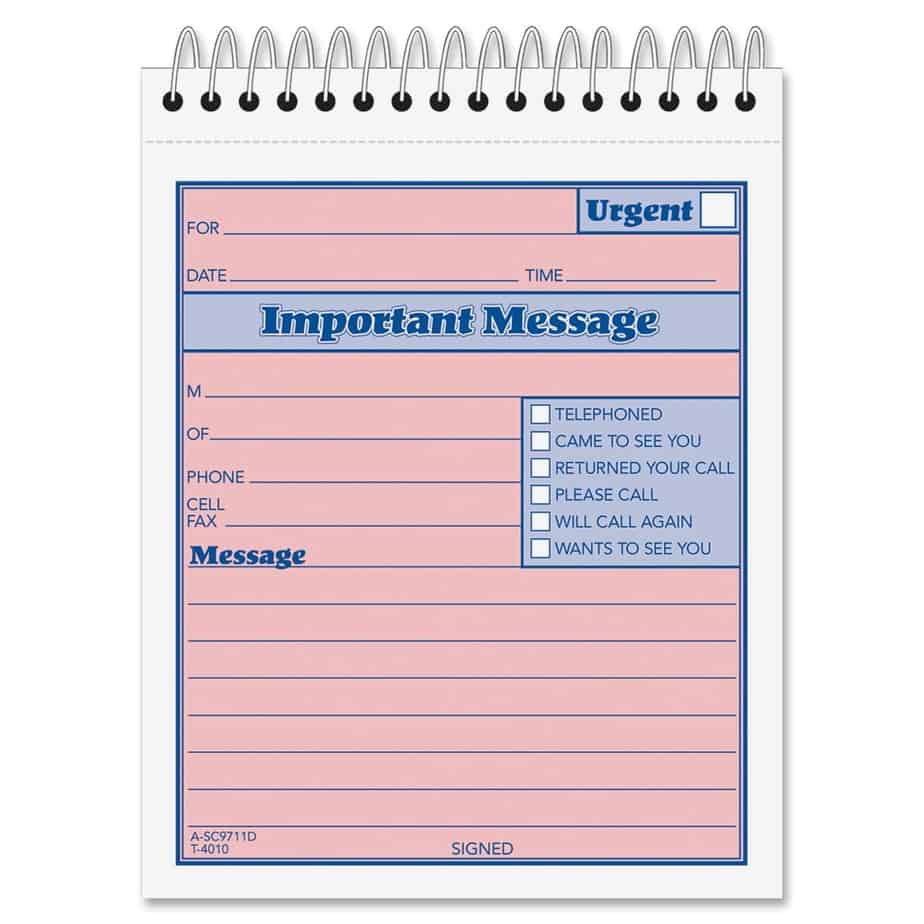
Important Message Sheet

Phone Message For Business Use

Template For Phone Message

Message Sheet Sample

Simple Phone Message Format

Printable Phone Message

The XLSX phone message template opens in Microsoft Excel, Google Sheets and LibreOffice Calc. Print several message slips per page and keep them by the phone, or fill in messages on screen and email them to colleagues. The remaining images on this page are preview examples you can recreate in Word or Excel.
What is a phone message template?
A phone message template is a pre-formatted form for recording telephone messages taken on behalf of someone else. The best-known format is the "while you were out" slip, which has fields for the recipient, the caller's name and company, phone number, date and time, the reason for the call and checkboxes such as "please call back", "will call again" or "urgent". Templates ensure that every message contains the information needed to respond.
What to include in a phone message
- Recipient: the person the message is for.
- Date and time of the call.
- Caller's full name.
- Caller's company or organization.
- Phone number, with extension, and best time to call back.
- Email address, if provided.
- Reason for the call or a short message.
- Action checkboxes: please call back, will call again, returned your call, wants to see you, urgent.
- Message taken by: the name of the person who took the call.
How to take a professional phone message
- Answer politely and explain that the person is unavailable, without sharing unnecessary details such as "she is at the dentist".
- Offer to take a message.
- Ask for the caller's name and spell it back if unsure.
- Ask for the company name and the best phone number to reach them, and repeat the number to confirm it.
- Ask briefly what the call is about and whether it is urgent.
- Ask when is a good time to call back.
- Write the message clearly on the template, including date and time.
- Tick the correct action checkbox.
- Sign the message with your name.
- Deliver the message promptly, by placing it on the recipient's desk, emailing a photo or entering it in the shared message log.
Example phone message
"To: Mr. Khan. Date: 5 November 2026, 11:20. From: Sarah Lee, Bright Office Supplies. Phone: 0300 555 0142, extension 12. Message: Calling about the delayed delivery of printer toner; she can deliver on Friday if you confirm today. Please call back before 4 PM. Urgent: yes. Taken by: Ali." This message gives the recipient everything needed to respond immediately.
Benefits of using phone message templates
- Consistent, complete messages every time.
- Faster callbacks and better customer service.
- Fewer lost or misunderstood messages.
- A professional image for your business.
- An easy record of who called and when.
- Simple training for receptionists, temporary staff and new employees.
Phone message book vs. message slips vs. digital log
Message slips
Individual slips are torn off and handed to the recipient, ideal for small offices.
Phone message book
Carbon-copy message books keep a duplicate of every message for reference, useful in reception areas and clinics.
Digital message log
An Excel log records every message in rows, making it searchable and easy to share. The Excel template on this page can be used as printable slips or adapted into a log by adding one message per row.
Using the Excel template as a call log
To turn the template into a call log, create a sheet with columns for date, time, caller, company, phone, message, recipient, action required, taken by and status. Add a filter to the header row so recipients can view only their messages, and use a status column such as "open" and "called back" to track follow-up. Shared on a network drive or Google Sheets, the log lets everyone see messages in real time and gives managers insight into call volumes and response times.
Phone etiquette tips
- Answer within three rings with a friendly greeting and your company name.
- Speak clearly and at a moderate pace.
- Never leave callers on hold for long without checking back.
- Protect colleagues' privacy when explaining their absence.
- Confirm spelling of names and repeat phone numbers back.
- Thank the caller and tell them when they can expect a response.
- Deliver messages promptly and follow up if they are urgent.
Who uses phone message templates?
- Receptionists and front-desk staff.
- Office administrators and personal assistants.
- Medical, dental and veterinary clinics.
- Law firms and accounting practices.
- Schools and colleges.
- Hotels and property management offices.
- Small businesses and family-run shops.
- Home offices and households with shared phones.
Customizing the template
Add your company name and logo to the top of each slip. Adjust the checkboxes to match your office's needs, for example adding "sent email" or "left voicemail". Change the colours to make urgent messages stand out, such as a red header for urgent slips. Set the print area to print four or six slips per page, then cut them with a paper trimmer and keep a stack by each phone.
Delivering messages effectively
A message only helps if it reaches the right person quickly. Agree on a standard place for messages, such as a tray on each desk or a shared inbox, and deliver urgent messages immediately by email, chat or a quick phone call. For remote and hybrid teams, take a photo of the completed slip or type the message into an email with a clear subject line, such as "Phone message: Sarah Lee, Bright Office Supplies, urgent". Recipients should mark messages as handled once they have returned the call.
Common mistakes when taking phone messages
- Writing the caller's name or phone number incorrectly.
- Forgetting to record the date and time.
- Writing vague messages such as "call him back" with no reason.
- Not marking urgent messages clearly.
- Leaving messages where the recipient might not see them.
- Forgetting to sign the message so the recipient cannot ask for more details.
- Sharing too much information about the recipient's whereabouts.
Taking messages for medical and legal offices
Clinics, law firms and other offices handling sensitive information need extra care when taking messages. Record only the details needed for the callback, avoid writing sensitive health or legal information on slips left in public areas and deliver messages directly to the right person. Store completed message slips securely or shred them once the call has been returned, and follow your organization's confidentiality and data protection policies.
Phone messages in a busy reception
Busy reception desks can receive dozens of calls an hour. Keep a stack of message slips and a pen at every phone, number slips sequentially so none go missing and use a tray or digital log for each team. Review open messages at the end of each day to make sure every caller received a response.
Frequently asked questions
Is this phone message template free?
Yes. Download, edit and print it for your office.
Can I use the template in Google Sheets?
Yes. Upload the XLSX file to Google Drive and open it with Google Sheets.
How many message slips fit on one page?
Usually four to six, depending on size. Adjust row heights and the print area to fit your preferred layout.
What does "while you were out" mean?
It is the traditional heading for phone message slips, letting the recipient know a call came in while they were away.
Can I use the template for voicemail messages?
Yes. Use the same fields to transcribe voicemail, so every message is recorded in a consistent format.
How long should I keep phone message slips?
Keep them until the call has been returned. For important business records, log messages in a spreadsheet before discarding slips securely.
Can I add my company logo?
Yes. Insert your logo at the top of the slip in Excel using Insert > Pictures, then resize it to fit.
Should messages be taken on paper or digitally?
Both work. Paper slips are quick and visible on a desk, while a digital log is searchable and easy to share with remote colleagues. Many offices use paper slips at reception and copy important messages into a shared spreadsheet or email.
Who should sign the phone message?
The person who took the call, so the recipient can ask them for more details if needed.