A professional quotation can be the difference between winning and losing a job. When a potential customer asks "how much will it cost?", a clear, itemized price quote shows that you are organized, transparent and easy to work with. Our free quotation template for Excel helps you prepare accurate quotes in minutes, with automatic line totals, discounts, tax and grand total calculations, so you can respond to enquiries faster and close more sales.
Preview the template below, download the editable XLSX file, and read our guide to writing quotations that customers say yes to.
Download the free quotation template
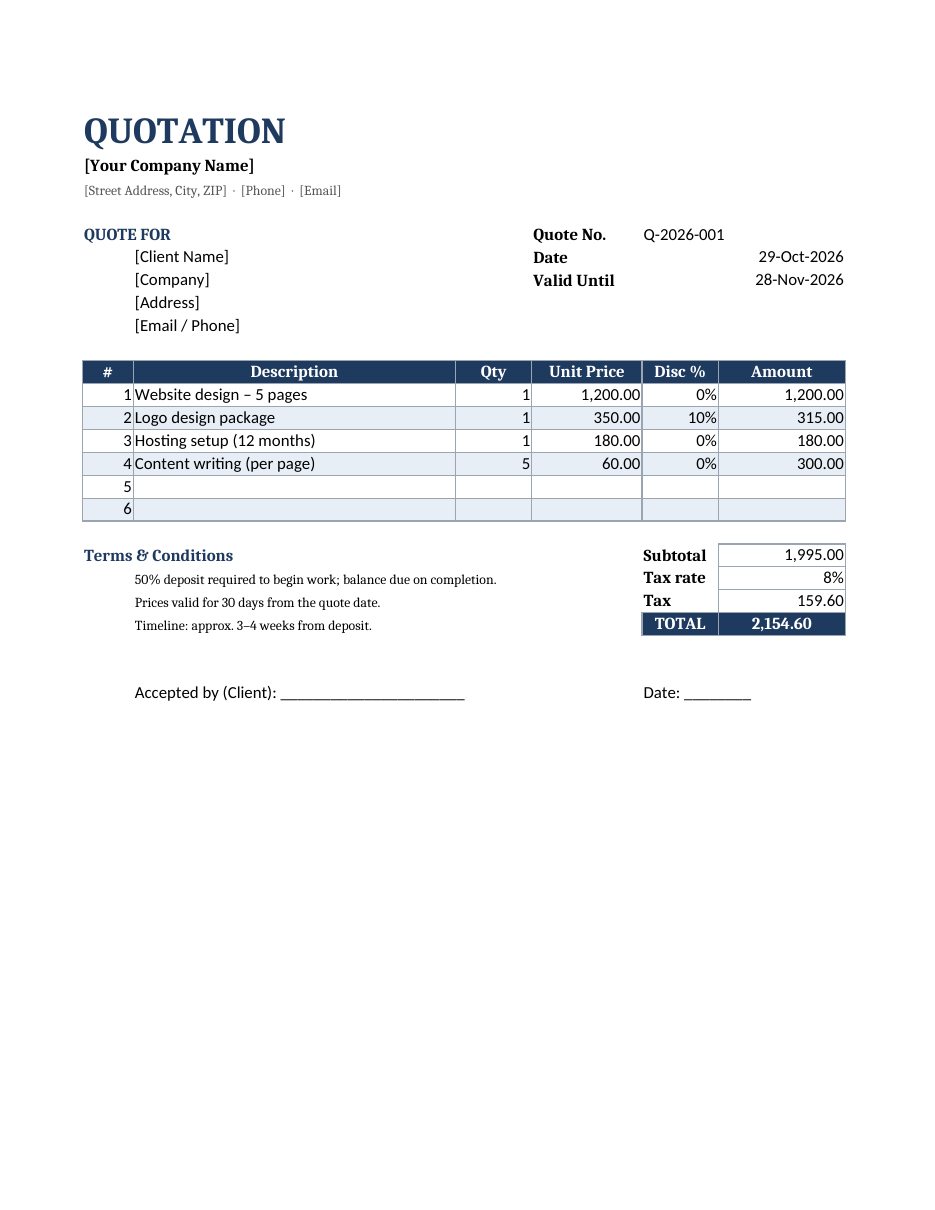
The file opens in Microsoft Excel, Google Sheets, LibreOffice Calc and Numbers. The formulas are unlocked and the sheet prints on one page, ready to save as a PDF and email to your client.
What is a quotation?
A quotation, also called a quote, price quote, sales quote or estimate, is a document a seller sends to a prospective buyer listing the goods or services offered, their prices and the terms of the offer. Once the customer accepts the quotation, it typically becomes the basis for a purchase order, contract or invoice. Quotations are used by tradespeople, contractors, freelancers, agencies, manufacturers, wholesalers and service businesses of every size.
Features of this Excel quotation template
- Company header with your business name, address, phone and email.
- Quote number, quote date and an automatic "valid until" date set 30 days after the quote date.
- "Quote for" section for the client's name, company, address and contact details.
- Itemized table with description, quantity, unit price, discount percentage and amount.
- Automatic line totals that apply each line's discount.
- Automatic subtotal, tax and total, with an editable tax rate.
- Terms and conditions section covering deposits, validity and timeline.
- Client acceptance line for a signature and date.
- Professional navy colour scheme with alternating row shading.
How to create a quotation step by step
- Replace the placeholder company details with your own and add your logo using Insert > Pictures.
- Enter a unique quote number. A simple format like Q-2026-001 keeps quotes easy to track.
- Check the quote date; the valid-until date updates automatically. Change the +30 in the formula for a different validity period.
- Enter the client's details exactly as they should appear on the final invoice.
- List each product or service on its own line with a clear description, quantity and unit price.
- Add a discount percentage to any line if you are offering a reduced price.
- Set your local tax rate in the Tax rate cell, or 0% if tax does not apply.
- Review the terms and conditions and adjust deposits, payment terms and timelines to your business.
- Save the quote as a PDF and email it with a short, friendly cover message.
- Follow up within a few days if you have not heard back.
Worked example
The sample data shows a web design quote: a five-page website design at 1,200.00, a logo package at 350.00 with a 10% discount, hosting setup at 180.00 and five pages of content writing at 60.00 each. The template calculates each line, applies the discount to the logo, adds 8% tax and displays the grand total automatically. You only type the inputs; every total is calculated by formula, which prevents costly arithmetic mistakes.
What to include in a professional quote
- Your business name and contact details.
- Client name and contact details.
- Quote number and date.
- Validity period, so prices are not held indefinitely.
- An itemized breakdown of products, services, labour and materials.
- Unit prices, quantities, discounts and totals.
- Taxes and any additional charges such as delivery or installation.
- Payment terms, including any deposit.
- Estimated timeline or delivery date.
- Terms and conditions and an acceptance signature line.
Quotation vs. estimate vs. invoice
Quotation
A fixed price offer for a defined scope of work. Once accepted, the seller is generally expected to honour the price within the validity period.
Estimate
An approximate cost based on the information available. Estimates allow for changes and are common for repairs or projects where the full scope is not yet known.
Invoice
A request for payment issued after goods are delivered or work is completed. When a client accepts your quote, you can copy the line items straight into one of our invoice templates.
Tips for winning more quotes
- Respond quickly; the first professional quote often wins.
- Use clear, benefit-focused descriptions instead of jargon.
- Offer options, such as basic, standard and premium packages.
- Show discounts explicitly so clients see the value.
- Set a validity date to create gentle urgency.
- Keep the design clean and branded.
- Include testimonials or a short portfolio link in your email.
- Follow up politely after three to five days.
Customizing the template
Add columns such as SKU, unit of measure or delivery date by inserting a column and updating the amount formula. To remove the discount column, delete it and change the amount formula to quantity multiplied by unit price. Change the colour theme by selecting the header row and choosing a new fill colour. If you send many quotes, keep a separate log sheet listing each quote number, client, total, status (sent, accepted, declined) and follow-up date to track your sales pipeline.
Industry examples for quotations
The template's flexible line items make it suitable for almost any type of business. A builder or contractor might list labour, materials, equipment hire and waste removal as separate lines, with a note that prices depend on a site inspection. A cleaning company could quote by room or by hour, with optional extras such as carpet or window cleaning. A photographer might offer packages for coverage hours, edited images and printed albums. A wholesaler or manufacturer typically lists product codes, unit prices and volume discounts, plus shipping and delivery terms. IT and software providers often quote for setup, licences and monthly support. In each case, the same principle applies: break the price down clearly so the customer understands exactly what they are paying for, and the value behind each line.
Keeping track of your quotes
Sending a quote is only the first step; following up and tracking results helps you win more work and price more accurately over time. Save every quotation as a PDF using a consistent naming system, for example Q-2026-014_ClientName.pdf, and keep a simple quote register in a separate worksheet with the quote number, date, client, total value, status and follow-up date. Review the register every week, follow up on open quotes before they expire, and note why quotes were declined, whether price, timing or scope. Over a few months, this data shows your win rate, average deal size and the services customers value most, which helps you refine your pricing and focus your marketing. When a quote is accepted, convert it to an invoice with the same line items so the customer sees consistent figures from first contact to final payment.
Quotation etiquette and presentation
How you present a quote matters as much as the numbers. Address the client by name in your email, summarize the key benefits of your offer in two or three sentences and attach the quotation as a PDF rather than an editable spreadsheet so figures cannot be changed accidentally. Name the file clearly, for example Quote_Q-2026-001_ClientName.pdf. Explain any assumptions, such as site access or client-supplied materials, in the terms section, and invite questions. A polite, well-organized quote signals that the project itself will be handled professionally.
Frequently asked questions
Is this quotation template free?
Yes. Download and use it for unlimited quotes for your business.
Can I use it in Google Sheets?
Yes. Upload the file to Google Drive and open it with Google Sheets. All formulas continue to work.
Is a quotation legally binding?
A quotation is an offer. Once the customer accepts it, it can form part of a binding agreement, so make sure prices and terms are correct before sending.
How long should a quote be valid?
Thirty days is common. Use a shorter period if your material costs change frequently.
Can I add my logo to the quote?
Yes. Click cell A1, choose Insert > Pictures, select your logo and resize it so it sits neatly beside or above the title. Move the company details down a row if you need more space.
How do I convert an accepted quote into an invoice?
Copy the line items into one of our invoice templates, change the document title to Invoice, add an invoice number and due date, and reference the original quote number so the client can match the two documents.
Should I include tax in my quote?
Yes, wherever tax applies. Showing tax separately makes the final cost clear and avoids surprises when the client receives the invoice.
What is the difference between a quotation and an estimate?
An estimate is an approximate price based on the information available, and the final cost may change as the work progresses. A quotation is a fixed price for a clearly defined scope of work, usually valid for a set period such as 30 days. Use an estimate when the job is uncertain, for example repairs where hidden problems may appear, and a quotation when you can define the materials, labour and deliverables in detail. If the scope changes after the client accepts your quote, send a revised quotation or a written change order so both sides agree on the new price before any extra work begins.
Related templates
Manage the rest of your sales cycle with our invoice templates, blank invoice templates, cash receipt template and service agreement template.