
A payslip is one of the most important documents an employer gives an employee. It shows how much was earned in a pay period, what was deducted for tax, social security, pensions or loans, and the final net pay transferred to the employee's account. For employees, payslips are proof of income needed for bank loans, rental applications, credit cards and visa applications. For employers, accurate payslips build trust, reduce payroll queries and support compliance with labour and tax laws.
This page offers seven free payslip templates in Microsoft Word format, each supplied in a ZIP file. The collection includes a basic salary slip, salary slip formats for IT companies, factories, temporary workers and private-sector jobs, a salary slip format suitable for visa applications and a modern editable payslip. Preview each design below, download the one that fits your organization and use our guide to preparing clear, accurate payslips every month.
Download free payslip templates


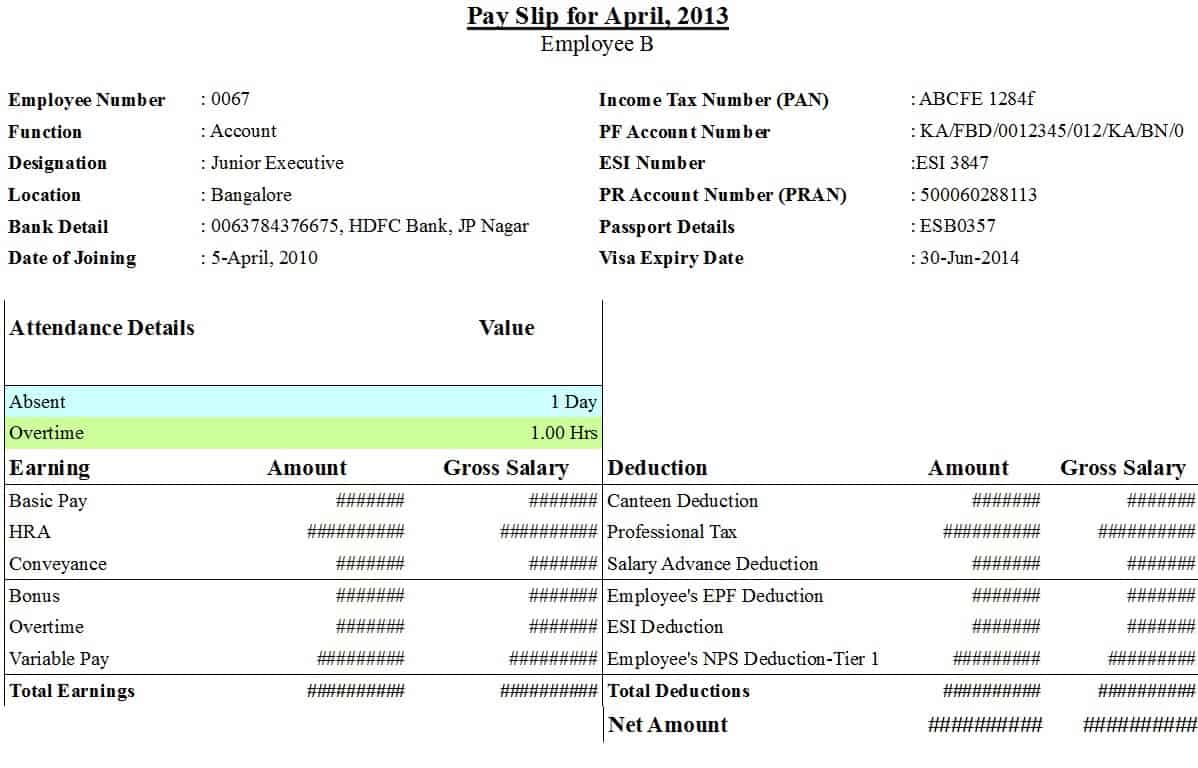

Each ZIP file contains one editable Word document: six are in DOC format and one (the first design) is a DOCX file. Extract the ZIP, open the file in Microsoft Word, Google Docs or LibreOffice Writer and replace the sample details with your company and employee information.
Which payslip template should I choose?
- Basic salary slip format – a simple layout with earnings, deductions and net pay, ideal for small businesses and shops.
- Salary slip format for IT companies – includes allowances common in technology firms, such as conveyance, medical and special allowances.
- Salary slip format as per the Factory Act – suited to manufacturing units that track attendance, overtime and statutory deductions.
- Salary slip format for temporary workers – for contract, seasonal and daily-wage staff paid for days or hours worked.
- Private job salary slip format – a general format for private-sector employers of any size.
- Salary slip format for visa – a clear, formal payslip layout that presents income details neatly for embassy or bank requirements.
- Modern editable payslip (DOCX) – a clean design for organizations that want a contemporary look.
What is a payslip?
A payslip, also called a pay stub, salary slip or wage slip, is a document issued by an employer to an employee for each pay period. It itemizes gross earnings, deductions and net pay, along with employee and employer details. In many countries, employers are legally required to provide payslips, either on paper or electronically, and to keep payroll records for several years. Even where it is not mandatory, issuing payslips is a sign of a professional, transparent employer.
What to include on a payslip
- Company name, address and logo.
- Employee name, employee ID, job title and department.
- Pay period and payment date.
- Bank account or payment method.
- Tax identification and social security numbers, where applicable.
- Days worked, leave taken and overtime hours.
- Earnings: basic salary, house rent allowance, conveyance, medical allowance, overtime, bonus and commission.
- Deductions: income tax, social security or provident fund, pension, health insurance, loan repayments and advances.
- Gross earnings, total deductions and net pay, with net pay in words.
- Year-to-date totals for earnings and tax, if your payroll system tracks them.
- Signature of the authorized person or a note that the payslip is computer-generated.
How to prepare a payslip step by step
- Download and extract the template that suits your organization.
- Add your company name, address and logo to the header.
- Enter the employee's details, pay period and payment date.
- Record days worked, leave and overtime from attendance records.
- Enter each earnings component and calculate gross pay.
- Calculate deductions according to current tax rates and statutory rules.
- Subtract total deductions from gross pay to get net pay.
- Write net pay in figures and words, and double-check the arithmetic.
- Have the payslip reviewed and signed by an authorized person.
- Send the payslip to the employee securely and keep a copy in your payroll records.
Understanding earnings and deductions
Common earnings
Basic salary is the fixed core of pay. Allowances, such as housing, transport, medical and meal allowances, are added on top. Overtime, shift allowances, bonuses and commission vary from month to month. Some allowances may be taxable while others are partly exempt, depending on local tax rules.
Common deductions
Income tax is usually withheld at source by the employer. Social security, provident fund or pension contributions are deducted according to law or company policy. Other deductions can include health insurance, union fees, loan repayments, salary advances and unpaid leave. Every deduction should be clearly labelled so the employee understands it.
Payslip example
Employee: Ali Hassan, Software Engineer. Pay period: October 2026. Basic salary 120,000; house rent allowance 48,000; medical allowance 12,000; conveyance 10,000; gross earnings 190,000. Deductions: income tax 14,500; provident fund 12,000; loan repayment 5,000; total deductions 31,500. Net pay 158,500 (one hundred fifty-eight thousand five hundred only), paid by bank transfer on 31 October 2026. A layout like this lets the employee check every figure in seconds.
Why payslips matter for employees
- Proof of income for loans, mortgages, credit cards and rental agreements.
- Required for many visa and immigration applications.
- A way to check that salary, overtime and deductions are correct.
- A record for filing personal tax returns.
- Evidence in case of employment disputes.
- Helpful for budgeting and financial planning.
Payslips for visa and loan applications
Embassies, consulates and banks often ask for the last three to six months of payslips. They look for consistent income, the employer's name and contact details, the employee's name and position, and clear earnings and deductions. Payslips should be on company letterhead or include the company name and logo, be signed or stamped where required and match bank statements. The salary slip format for visa on this page provides a clean layout for this purpose, but it must always reflect genuine payroll information; never alter figures.
Best practices for employers
- Issue payslips on or before payday every pay period.
- Use one consistent format for all employees.
- Keep tax and statutory deduction rates up to date.
- Protect payslips as confidential documents; send them securely.
- Keep payroll records for the period required by law.
- Explain new deductions or changes to employees in advance.
- Respond quickly to payslip queries and correct errors promptly.
Paper vs. electronic payslips
Many organizations now send payslips electronically by email or through an employee portal. Electronic payslips are faster, cheaper and easier to store, but they must be protected with passwords or secure access. Paper payslips remain common in factories, shops and organizations where employees do not have regular computer access. Whichever method you use, keep a copy and make sure employees can access past payslips when they need them.
Customizing the Word templates
Open the template and replace the sample company name and logo with your own. Add or remove earnings and deduction rows to match your pay structure. Adjust currency symbols and date formats for your country. Save a master copy for each pay structure, such as monthly staff or hourly workers, then create a new file for each employee and month. For larger teams, consider keeping calculations in Excel and pasting final figures into the Word payslip, or moving to payroll software as your team grows.
Common payslip mistakes to avoid
- Using outdated tax rates or thresholds after a budget change.
- Forgetting to include overtime, bonuses or arrears.
- Deducting unpaid leave incorrectly.
- Spelling the employee's name differently from official records.
- Missing the pay period or payment date.
- Net pay in words that does not match the figure.
- Sending payslips to the wrong email address, exposing confidential data.
Year-end payroll checklist
The end of the year is a good time to review payroll. Reconcile total salaries and deductions with your accounts, check that tax withheld matches amounts paid to the tax authority and prepare annual tax certificates or statements for employees. Update templates with new tax rates, minimum wage changes and salary increases that take effect in January.
Frequently asked questions
Are these payslip templates free?
Yes. All seven templates are free to download and edit for your business.
How do I open the ZIP files?
Right-click and choose Extract All on Windows, or double-click on a Mac, then open the Word document.
Can I edit the payslips in Google Docs?
Yes. Upload the DOC or DOCX file to Google Drive and open it with Google Docs. Check alignment of tables after converting.
Is a payslip the same as a salary certificate?
No. A payslip shows pay for one period, while a salary certificate is a letter confirming an employee's salary and employment, often requested by banks or embassies.
How long should payslips be kept?
Employers should keep payroll records for the period required by local law, often several years. Employees should keep payslips at least until they have filed their tax return for the year, and longer if they may need proof of income for loans or visas.
Related templates
- Salary increase letter templates
- Employee tracking templates
- Attendance tracking templates
- Cash receipt template
- General ledger templates



You must be logged in to post a comment.