
The end of the year is the most generous time of the year. Giving Tuesday, the holiday season, Ramadan and year-end tax planning all encourage people to support the causes they care about, and many charities receive a large share of their annual donations in just a few weeks. A clear, professional donation form makes it easy for supporters to give, ensures you collect the information you need for receipts and thank-you letters and helps you keep accurate records for your accounts and reports.
Our free donation form template for Microsoft Word is designed for charities, non-profits, schools, mosques, churches, community groups and fundraising events. It includes donor information, suggested gift amounts, donation frequency, designation, payment method, an optional dedication, recognition and privacy choices and a signature block. Preview the form below, download the editable DOCX file and use our guide to collecting donations professionally.
Download the free donation form template
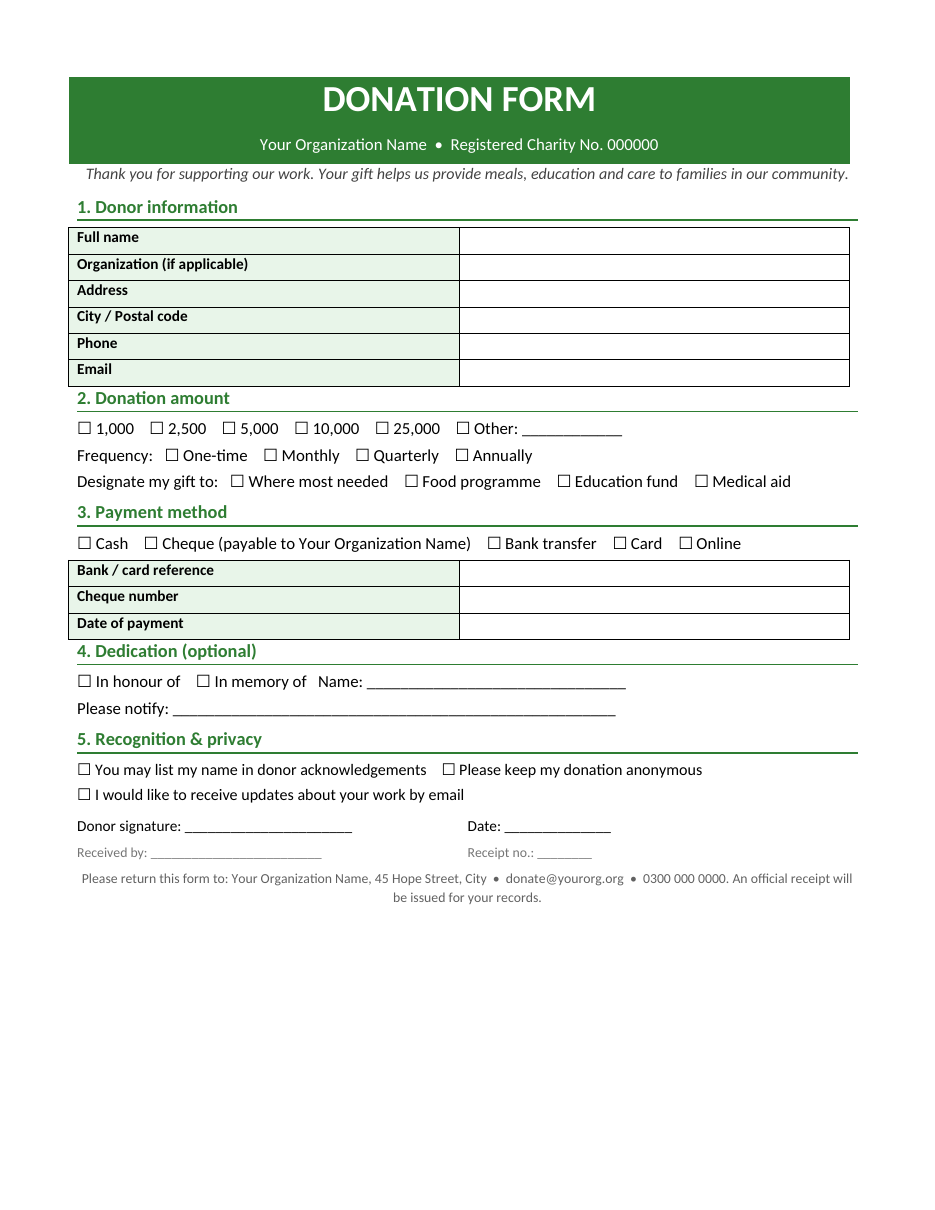
The form opens in Microsoft Word, Google Docs, LibreOffice Writer and Pages. Add your organization's name, logo, registration number and contact details, then print copies for events or share it as a fillable PDF.
What is a donation form?
A donation form is a document that donors complete when making a gift to a charity or non-profit organization. It records who is giving, how much, how often, how they are paying and how the gift should be used. Donation forms are used at fundraising events, in collection boxes and mailings, at reception desks and online. A well-designed form reassures donors that your organization is trustworthy and handles their money and personal data responsibly.
What this donation form includes
- Organization header – name, registered charity or non-profit number and a short thank-you message.
- Donor information – name, organization, address, phone and email.
- Donation amount – suggested amounts plus an "other" option.
- Frequency – one-time, monthly, quarterly or annual giving.
- Designation – where most needed or a specific programme.
- Payment method – cash, cheque, bank transfer, card or online, with reference fields.
- Dedication – optional gifts in honour or in memory of someone, with a notification name.
- Recognition and privacy – consent to be acknowledged publicly or remain anonymous, and to receive updates.
- Signature and date, plus "received by" and receipt number fields for your records.
- Return address and contact details at the bottom.
How to customize the donation form
- Download the DOCX file and save it with your organization's name.
- Replace the header text with your organization name and registration number.
- Insert your logo above or beside the title.
- Edit the thank-you line to describe the impact of a gift in one sentence.
- Adjust the suggested amounts to suit your donors and currency.
- Rename the designation options to match your programmes or appeals.
- Update the payment instructions, including bank details if you accept transfers.
- Review the privacy and consent wording to match your data protection policy.
- Add your return address, email and phone number.
- Print a test copy and ask a colleague to fill it in to check the flow.
Choosing suggested donation amounts
Suggested amounts guide donors and often increase average gifts. Base your amounts on what your supporters typically give, then add one or two higher levels to encourage larger donations. Link amounts to impact where possible, for example "2,500 provides a week of meals for a family" or "10,000 sponsors a child's school supplies for a year". Always include an "other" option so donors can give what they are comfortable with, and make monthly giving visible, because regular donations provide predictable income for your work.
Encouraging regular giving
Monthly donors are among the most valuable supporters a charity can have. They give more over time, cost less to retain and help you plan programmes with confidence. Highlight the monthly option on your form, explain what a small regular gift achieves and make it easy to set up by bank standing order, direct debit or recurring card payment. Thank monthly donors regularly with updates that show the difference their ongoing support makes.
Collecting donations at events
Fundraising dinners, charity runs, school fairs and community events are ideal places to use printed donation forms. Place forms and pens on every table, explain the cause briefly during the event and invite guests to complete a form before they leave. Assign a volunteer to collect forms and payments securely and to issue receipts. After the event, enter details into your donor database or spreadsheet promptly and send thank-you messages within a few days while the event is still fresh in donors' minds.
Thanking donors and issuing receipts
Every donation deserves a prompt thank-you. Send a receipt that confirms the donor's name, the amount, the date, the payment method and your organization's registration details. Many donors need receipts for tax purposes, so check the requirements for tax-deductible donations in your country, such as specific wording or registration numbers. Personal thank-you notes, phone calls and impact updates build loyalty and make donors more likely to give again.
- Send receipts within 48 hours where possible.
- Use the donor's name and mention their specific gift.
- Explain how the donation will be used.
- Share stories, photos or statistics that show impact.
- Invite donors to events or volunteering opportunities.
- Respect communication preferences recorded on the form.
Data protection and donor privacy
Donation forms collect personal information, so handle it carefully. Explain how you will use donors' details, store completed forms securely, limit access to authorized staff and follow applicable data protection laws, such as GDPR in Europe. Only send marketing communications to donors who have given consent, and make it easy to opt out. Never store full card numbers on paper forms; process card payments through a secure payment provider instead.
Online vs. paper donation forms
Online forms are convenient for donors who prefer to give on their phone or computer, process payments instantly and reduce data entry. Paper forms remain important at events, in places of worship, for older supporters and for donors who prefer to give by cash or cheque. The best approach is to offer both: use this Word template for printed forms and include a QR code or web address that leads to your online donation page.
Tips for a successful year-end appeal
- Start your appeal early, ideally before Giving Tuesday.
- Tell one powerful story that shows the need and the solution.
- Set a clear fundraising goal and share progress updates.
- Include a donation form with every mailing and event.
- Offer a matching gift if a sponsor can double donations.
- Remind donors of year-end tax benefits where applicable.
- Follow up with a final reminder in the last week of December.
Donation forms for different organizations
Schools and parent associations
Use the form for annual funds, building appeals, scholarship programmes and school trips. Rename the designation options to match your school's projects.
Mosques, churches and places of worship
Adapt the form for zakat, sadaqah, tithes, building funds and community programmes. Add separate checkboxes for each type of giving so funds are allocated correctly.
Community groups and clubs
Sports clubs, youth groups and residents' associations can use the form for equipment, events and seasonal appeals.
Disaster relief and emergency appeals
For urgent appeals, simplify the form to the essentials: donor name, contact details, amount and payment method, so supporters can give quickly.
Keeping donation records
Enter each completed form into a donor spreadsheet or database with the donor's details, amount, date, payment method, designation and receipt number. Reconcile donations with your bank statements every month, and store paper forms securely for the period required by your accounting and audit rules. Accurate records make it easy to send year-end giving statements, report to your board and funders and identify loyal supporters to thank personally.
Frequently asked questions
Is this donation form template free?
Yes. Download, edit and print it for your charity, school or community group.
Can I make the donation form fillable?
Yes. Use Word's content controls under the Developer tab, or export the form to PDF and add form fields in a PDF editor.
Should donation forms include bank details?
Include bank details only if you accept transfers, and verify them carefully. Never ask for card details on a paper form.
Can I use the form for in-kind donations?
Yes. Add a section describing donated goods or services and their estimated value.
Do donors need a receipt?
Yes. A receipt confirms the gift and may be required for tax purposes. Check local rules for tax-deductible donations.
How can I increase donations with my form?
Keep the form short, show the impact of each suggested amount, highlight monthly giving and include a QR code for online giving. Always thank donors quickly.
What should I write on a donation receipt?
Include the donor's name, amount, date, payment method, your organization's name and registration number, and any wording required for tax relief in your country.
Related templates
- Cash receipt template
- Certificate of completion templates
- Greeting card templates
- Fact sheet templates
- Poster templates for Word