
Holiday shopping can quickly get out of hand. Between festive meals, guests, gifts, decorations and everyday groceries, it is easy to forget important items, buy things twice or spend far more than planned. A good shopping list keeps you focused in the store, saves time and helps you stay within your budget. When the list also adds up costs as you go, you know before you reach the checkout whether you are on track.
Our free shopping list template for Excel organizes items by category, records quantities and estimated costs and automatically compares your total with your budget, showing how much you have left to spend. It works for weekly groceries, festive and holiday shopping, party supplies, back-to-school lists and household restocking. Preview the template below, download the XLSX file and use our tips to shop smarter and save money.
Download the free shopping list template
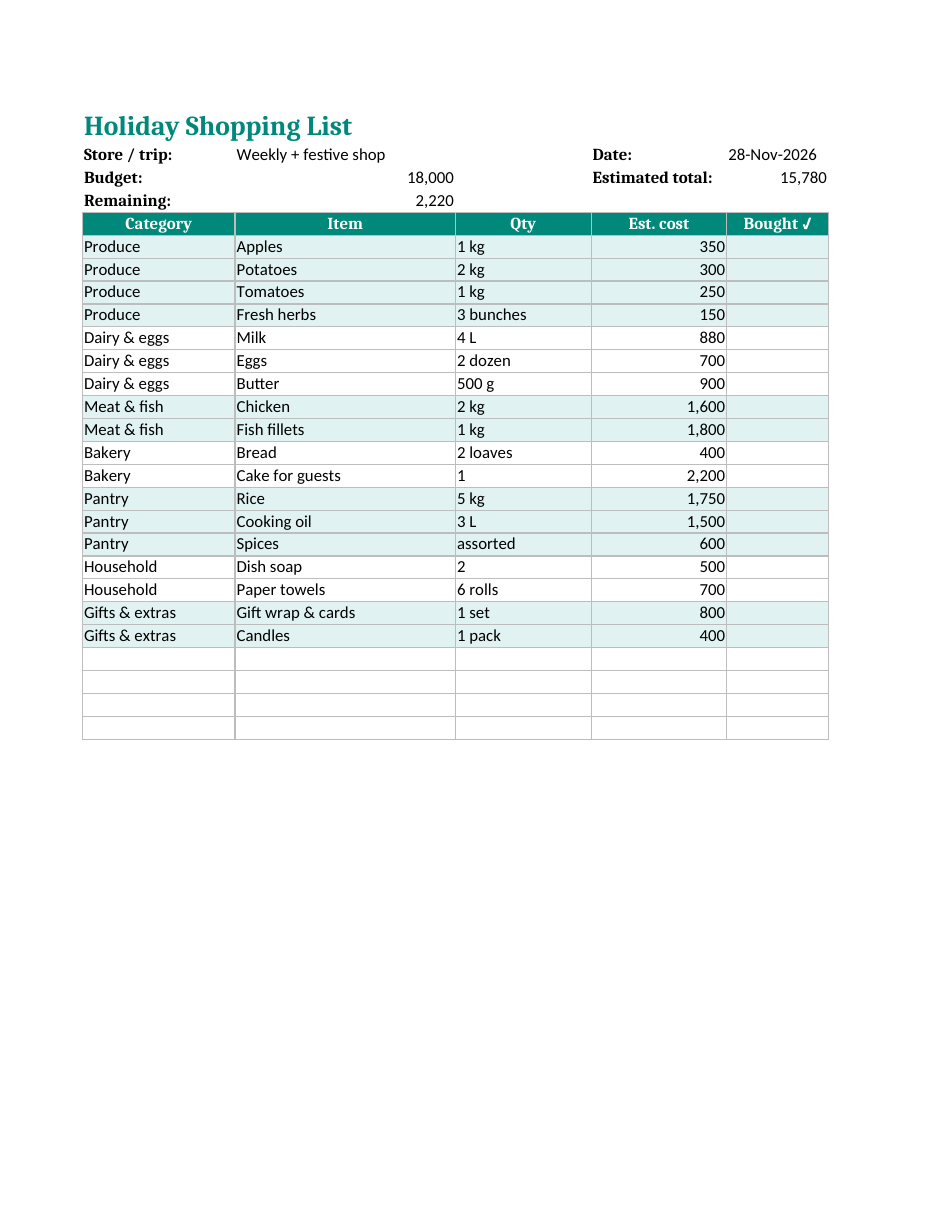
The spreadsheet opens in Microsoft Excel, Google Sheets, LibreOffice Calc and Numbers. Use it on your phone or tablet while you shop, or print a copy and tick items off with a pen.
Features of the shopping list template
- A title and trip line to name each list, such as "weekly shop" or "Christmas dinner".
- A date field so you can keep past lists for reference.
- A budget cell where you enter how much you plan to spend.
- An estimated total that adds up all item costs automatically.
- A remaining amount that shows instantly whether you are under or over budget.
- Category, item, quantity and estimated cost columns.
- A bought column with a tick drop-down for checking items off in the store.
- Alternating colour bands for each category, making the list easy to scan.
- Blank rows for extra items and a print-ready layout that fits on one page.
How to use the shopping list template
- Download the XLSX file and save a copy named for your trip or week.
- Enter your store or trip name and the date.
- Type your total budget in the budget cell.
- Check your fridge, freezer and cupboards before writing the list, so you only buy what you need.
- Add items under each category in the order you walk through the store.
- Enter quantities and an estimated cost for each item, using recent receipts or online prices.
- Watch the estimated total and remaining amount update automatically.
- If you are over budget, remove or replace non-essential items before you leave home.
- Take the list with you on your phone or printed and tick items as you buy them.
- After shopping, compare actual spending with your estimate and adjust future lists.
Shopping list categories
Grouping items by category speeds up shopping because you visit each aisle only once. The template includes common categories that you can rename or extend.
- Produce – fruit, vegetables and fresh herbs.
- Dairy and eggs – milk, yoghurt, cheese, butter and eggs.
- Meat and fish – fresh, frozen or deli items.
- Bakery – bread, cakes and baked goods.
- Pantry – rice, flour, pasta, oil, spices, tins and sauces.
- Frozen – vegetables, desserts and ready meals.
- Drinks – juice, water, tea, coffee and soft drinks.
- Household – cleaning products, paper towels and laundry supplies.
- Personal care – toiletries and medicines.
- Gifts and extras – wrapping paper, cards, decorations and candles.
Holiday shopping list tips
Festive seasons such as Christmas, Eid, Diwali, Thanksgiving and New Year mean bigger meals, more guests and extra spending. Plan your menu first and write down every ingredient for each dish, then check what you already have. Buy non-perishable items, drinks and decorations early, when stores are quieter and stock is plentiful, and leave fresh produce, meat and bread until the last few days. Make separate tabs in the spreadsheet for gifts, food and decorations so each budget is visible. Keep the list from this year so next year's holiday planning takes minutes.
Holiday items people often forget
- Aluminium foil, cling film and food storage containers.
- Extra serving dishes, napkins and disposable plates.
- Batteries for toys and gadgets.
- Gift tags, tape and ribbon.
- Ice, drinks and mixers for guests.
- Dietary alternatives for guests with allergies or special diets.
- Candles, matches and table decorations.
How a shopping list saves money
- Reduces impulse buying, one of the biggest causes of overspending.
- Prevents duplicate purchases of items you already have.
- Encourages meal planning, which reduces food waste.
- Helps compare prices and choose store brands or deals.
- Shows spending before you reach the checkout.
- Creates a record of prices you can use to plan future budgets.
Meal planning with your shopping list
The most effective shopping lists start with a meal plan. Spend ten minutes each week deciding what you will cook for breakfast, lunch and dinner, then list the ingredients needed for each meal. Plan meals that share ingredients, such as using leftover roast chicken in sandwiches or soup, to reduce waste and cost. Keep a list of family favourites with their ingredients so planning becomes quicker every week. Over time, your saved lists become a valuable record of what your household actually uses.
Using the list on your phone
Upload the spreadsheet to Google Drive, OneDrive or Dropbox and open it with the Google Sheets or Excel mobile app. Share the file with family members so everyone can add items during the week, such as when someone uses the last of the milk. In the store, tap the bought column to tick items off. Because the file is shared, two people can shop at once, each taking different categories, without buying the same item twice.
Customizing the template
Rename categories to match your store layout or the way you cook. Add columns for store, brand or coupon details if you compare prices. Insert rows for more items, and the totals will continue to work as long as you stay within the formula range. Change the colours or font size for easier reading. For large events such as weddings or community dinners, add a column for the person responsible for buying each item.
Shopping on a budget
- Set a realistic budget based on past receipts.
- Shop with a full stomach to avoid impulse snacks.
- Compare unit prices rather than package prices.
- Choose store brands for basics such as flour, rice and cleaning products.
- Buy seasonal produce, which is usually cheaper and fresher.
- Use loyalty cards, coupons and weekly offers.
- Buy in bulk only items you use often and can store safely.
- Review spending each month and adjust the budget if needed.
Reducing food waste with smarter lists
Households throw away a surprising amount of food every year, much of it bought without a plan. A shopping list is one of the easiest ways to cut waste. Before shopping, check use-by dates and plan meals around food that needs eating first. Buy fresh produce in quantities you will use within a few days and choose frozen fruit and vegetables for longer storage. After big holiday meals, plan leftovers into the following days' menus and freeze portions you will not eat soon. Note on your list which items were wasted last time, so you can buy less of them next time.
Shopping lists for different needs
Weekly grocery shopping
Keep a master list of staples you buy every week, then add extras for planned meals.
Party and event shopping
List food, drinks, decorations, disposable tableware and ice, with quantities based on your guest count.
Back-to-school shopping
Rename categories to stationery, uniforms, books and lunchbox items, and track spending per child.
Household restocking
Use the household and personal care categories to restock cleaning products and toiletries once a month, buying larger packs when prices are low.
Frequently asked questions
Is this shopping list template free?
Yes. Download, edit and print it as often as you like.
Can I use the template in Google Sheets?
Yes. Upload the XLSX file to Google Drive and open it with Google Sheets. The formulas and drop-down work there too.
Can I print the shopping list?
Yes. The print area is set to fit the list on one page. Print it and tick items off by hand.
How do I add more items?
Insert new rows above the last blank row so they remain inside the totals range, or extend the SUM formula to include extra rows.
Can I use it for gift shopping?
Yes. Rename the categories to people's names and use the cost column to track spending on each person.
Can several people edit the same list?
Yes. Save the file in Google Drive or OneDrive and share it. Family members can add items during the week from their own phones, and everyone sees updates instantly.
How accurate do the estimated costs need to be?
Rough estimates are fine. Use recent receipts or online prices, round up slightly and compare with your actual receipt after shopping so your estimates improve each week.
Related templates
- Packing list template for Excel
- To-do list templates
- Recipe card templates
- Weekly planner templates
- Cash receipt template