Meetings take up a large share of the working week, yet many end without clear decisions or next steps. The single most effective way to make meetings shorter and more productive is a good agenda. A well-written agenda tells participants why the meeting is happening, what will be discussed, how long each topic will take and what decisions need to be made. It helps people prepare, keeps discussions on track and makes follow-up easy.
Our free professional meeting agenda template for Microsoft Word uses a clean navy and teal design with dedicated areas for objectives, participants, preparation, timed discussion topics, decisions, risks and action items. Preview the agenda below, download the editable DOCX file and follow our guide to planning meetings that achieve real outcomes.
Download the professional meeting agenda template
Professional Meeting Agenda Template Preview
This editable Word meeting agenda uses a clean navy and teal design with dedicated areas for objectives, participants, preparation, timed discussion topics, decisions, risks, and action items.
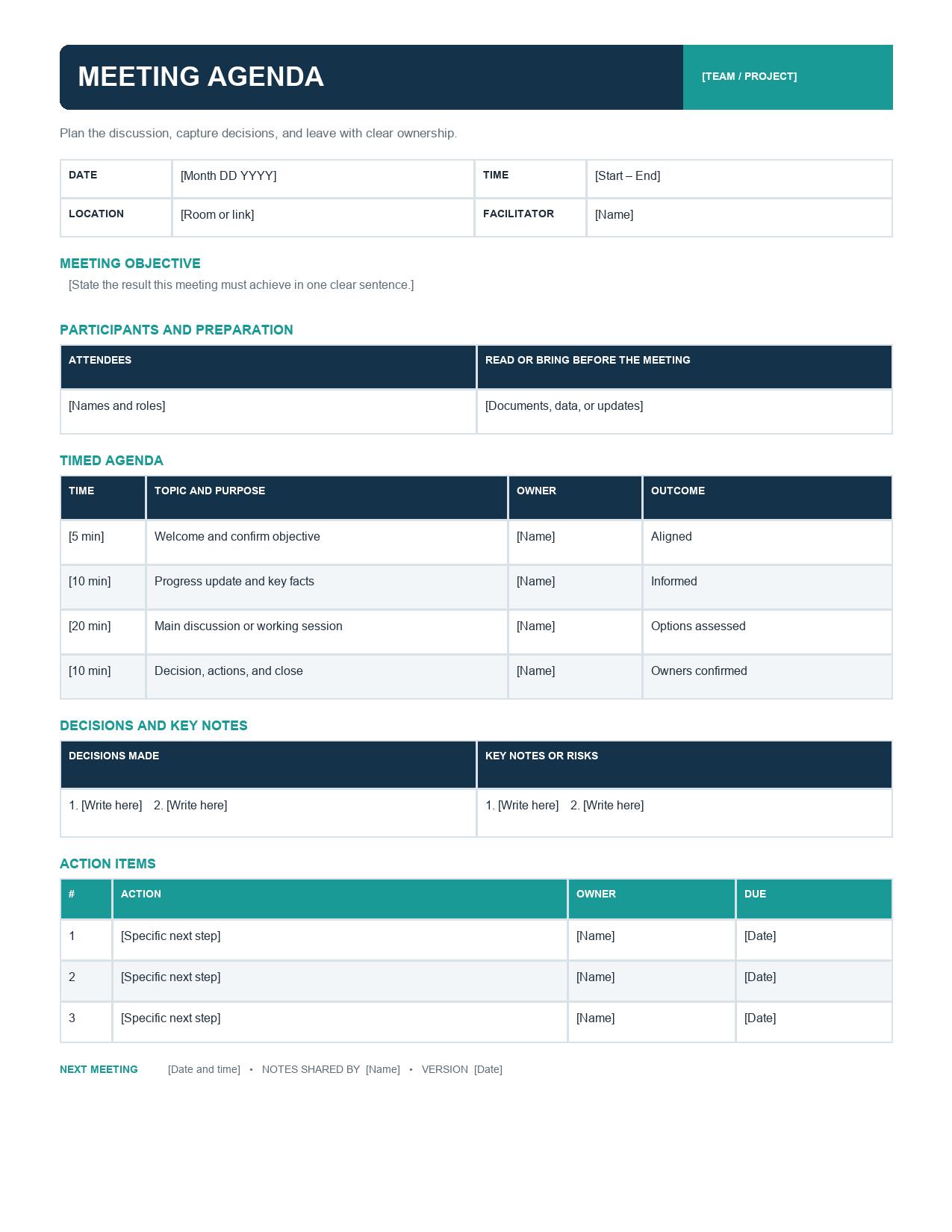
The template opens in Microsoft Word, Google Docs and LibreOffice Writer. Edit the headings, add or remove agenda items and share the agenda as a Word document or PDF before the meeting.
What is a meeting agenda?
A meeting agenda is a document that outlines the purpose, topics, order and timing of a meeting. It is usually shared with participants in advance so they can prepare. A good agenda goes beyond a list of topics: it explains the objective of each item, who will lead it, how much time it will take and whether the item is for information, discussion or decision. During the meeting, the agenda acts as a roadmap; afterwards, it forms the structure for the meeting minutes.
Sections of the template
Meeting details
Meeting title, date, time, location or video link and organizer, so everyone knows when and where to join.
Objectives
One to three clear outcomes the meeting must achieve, such as "Agree the Q1 marketing budget".
Participants
Attendees and their roles, including the facilitator, note-taker and decision makers.
Preparation
Documents to read, data to bring or tasks to complete before the meeting.
Timed discussion topics
Each agenda item with a time allocation and the person leading it, so the meeting stays on schedule.
Decisions
A place to record decisions made during the meeting.
Risks and issues
Space to capture risks or blockers raised during discussion.
Action items
Tasks agreed in the meeting, with owners and due dates.
How to create an effective meeting agenda
- Define the purpose of the meeting. If you cannot state a clear objective, consider whether a meeting is necessary.
- Invite only the people needed to achieve the objective.
- List the topics required to reach the objective.
- Write each topic as a question to answer or an outcome to achieve, for example "Which supplier should we select?" instead of "Suppliers".
- Mark each item as information, discussion or decision.
- Assign a leader to each topic.
- Allocate realistic time to each item and put the most important topics first.
- List required preparation and attach documents.
- Share the agenda at least 24 hours before the meeting.
- Use the agenda during the meeting to keep discussions focused, and record decisions and actions in the template.
Sample meeting agenda
- 9:00 – 9:05 Welcome and objectives (Chair).
- 9:05 – 9:15 Review of actions from last meeting (Project Manager).
- 9:15 – 9:35 Q1 marketing budget: decision on allocation across channels (Marketing Lead).
- 9:35 – 9:50 Website launch status and risks (Web Manager).
- 9:50 – 9:55 Any other business.
- 9:55 – 10:00 Summary of decisions and action items (Chair).
Types of meetings this agenda works for
- Team meetings and weekly stand-ups.
- Project kick-off and status meetings.
- Board and committee meetings.
- Client and supplier meetings.
- Strategy and planning sessions.
- Department and management meetings.
- One-to-one meetings with employees.
- Workshops and brainstorming sessions.
- Non-profit, school and community group meetings.
Tips for running productive meetings
- Start and finish on time, even if some people are late.
- Appoint a facilitator to keep discussion on track and a note-taker to record decisions.
- Review the objectives at the start of the meeting.
- Use a parking lot for off-topic ideas to discuss later.
- Encourage everyone to contribute, especially quieter participants.
- Summarize decisions after each agenda item.
- Confirm action items, owners and due dates before closing.
- Send minutes within 24 hours.
- Cancel the meeting if the objective can be achieved by email.
How long should a meeting be?
Shorter is usually better. Many regular team meetings can be completed in 30 minutes, while stand-ups often take 15 minutes or less. Strategy sessions and workshops may need several hours but should include breaks. Use the timed topics section to plan the length realistically: add up the time for each item and add a few minutes for transitions. If the total is too long, remove lower-priority topics or schedule a separate meeting.
Meeting agenda vs. meeting minutes
The agenda is prepared before the meeting and shows what will be discussed. The minutes are written during or after the meeting and record what was actually discussed, decided and assigned. Using the same structure for both makes minutes faster to write: simply add notes, decisions and actions under each agenda item. After the meeting, transfer the decisions and action items into our meeting minutes template and share it with attendees.
Virtual and hybrid meeting tips
Online and hybrid meetings need extra planning. Include the video conference link, dial-in details and any passwords in the meeting details section. Ask participants to test their audio and video before joining. Share documents on screen when discussing them, and use the chat or raise-hand features to manage contributions. Keep virtual meetings shorter than in-person meetings, as screen fatigue sets in quickly, and schedule short breaks for sessions longer than an hour.
Customizing the template
Change the navy and teal colours to match your company branding under Table Design > Shading. Add your logo to the header. Insert extra rows in the timed topics table for longer meetings, or delete rows you do not need. For recurring meetings, create a master version with standing items, such as actions review and any other business, and save a new copy for each meeting with the date in the file name.
Common agenda mistakes
- No clear objective for the meeting.
- Vague topic names such as "Updates" or "Marketing".
- Too many items for the time available.
- No time allocations.
- Sending the agenda too late for preparation.
- Inviting people who do not need to attend.
- Not recording decisions and actions.
Writing agenda items as outcomes
The difference between a vague agenda and an effective one is often in how items are written. "Budget" tells participants nothing about what will happen. "Decide the final Q1 budget for paid advertising (decision, 20 minutes, led by Sara)" tells everyone the purpose, the type of discussion, the time and the leader. Writing items as questions or desired outcomes, such as "Agree launch date" or "Which vendor will we select?", focuses the discussion and makes it clear when an item is complete. It also helps participants prepare relevant information and arrive ready to contribute.
Roles in an effective meeting
- Organizer: defines the objective, prepares the agenda and invites participants.
- Facilitator or chair: guides the discussion, keeps time and ensures everyone is heard.
- Timekeeper: tracks time for each agenda item and signals when to move on.
- Note-taker: records key points, decisions and action items.
- Decision maker: has the authority to approve decisions on the agenda.
- Participants: prepare in advance and contribute constructively.
Following up after the meeting
A meeting is only as useful as what happens afterwards. Within 24 hours, send a short summary or minutes listing decisions, action items, owners and due dates. Add actions to your project plan or task tracker, and check progress at the start of the next meeting under a standing "review of actions" item. Consistent follow-up builds accountability and shows participants that meetings lead to real results, which makes them more willing to engage next time.
Frequently asked questions
Is this meeting agenda template free?
Yes. Download, edit and use it for any meeting.
When should I send the agenda?
Ideally at least 24 hours before the meeting, or several days ahead for board and client meetings.
Can I use the template in Google Docs?
Yes. Upload the DOCX file to Google Drive and open it with Google Docs.
How many items should an agenda have?
Most effective meetings cover three to six main items. More items usually mean the meeting should be longer or split into two.
Should every meeting have an agenda?
Yes, even short meetings benefit from a brief agenda listing the objective and topics. For quick stand-ups, a standing three-question agenda works well: what was done, what is next and what is blocking progress.
Who should prepare the agenda?
Usually the meeting organizer or chair, with input from participants who need agenda time. Sharing a draft agenda early lets attendees request changes before the meeting.