Recruiters often spend less than ten seconds on an initial scan of a resume. In that time, they need to see who you are, what you have achieved and why you fit the role. A clean, modern resume layout makes that scan easy, guiding the reader's eye to your most impressive experience and skills. A cluttered or outdated design, on the other hand, can bury strong qualifications.
Our free modern professional resume template for Microsoft Word uses a polished one-page charcoal and coral layout with clear experience sections, a focused skills panel and editable placeholders for contact details, achievements, education and professional history. Preview the resume below, download the editable DOCX file and follow our step-by-step guide to writing a resume that gets interviews.
Download the modern professional resume template
Download the Modern Professional Resume Template
This polished one-page Word resume uses a modern charcoal-and-coral layout, clear experience sections, a focused skills panel, and editable placeholders for contact details, achievements, education, and professional history.
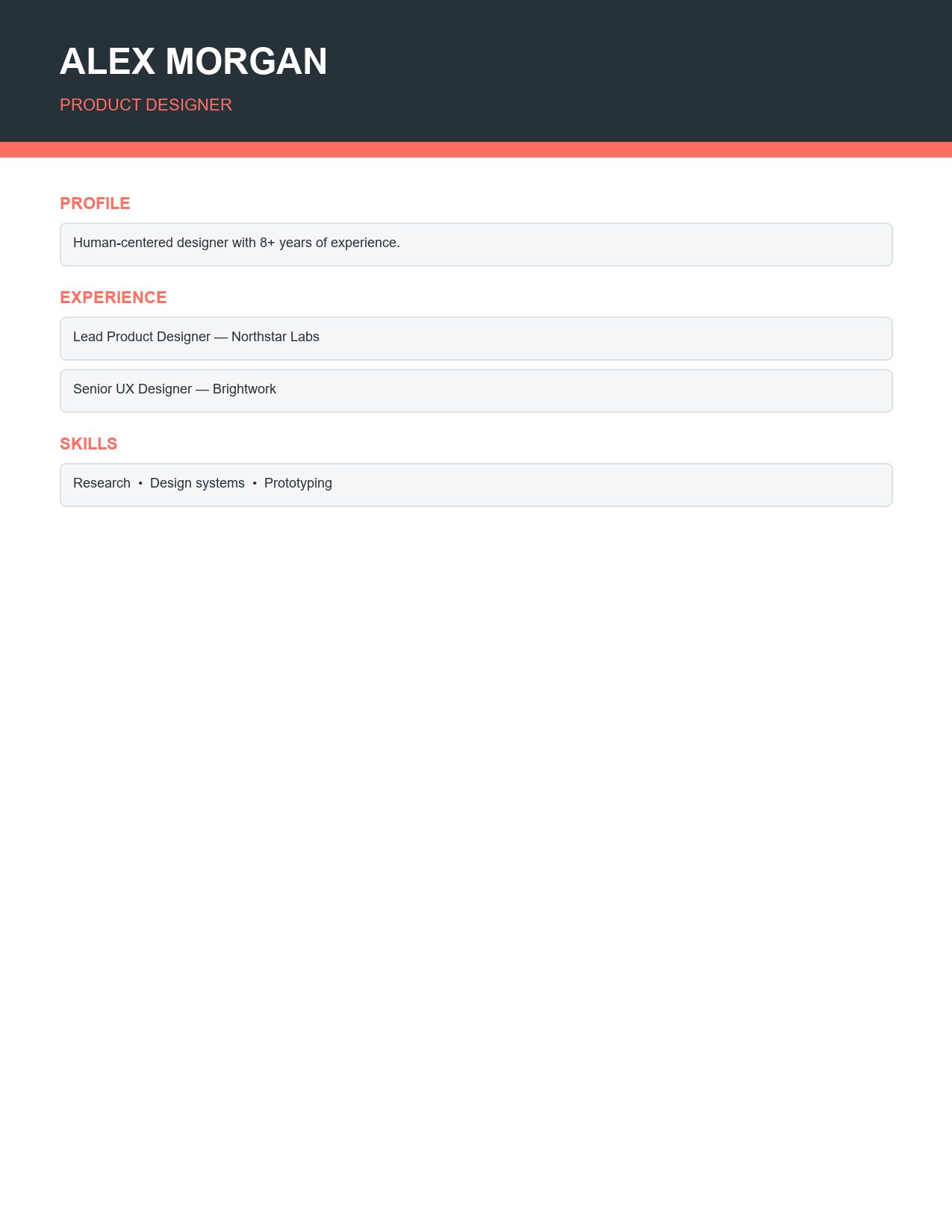
The resume opens in Microsoft Word, Google Docs and LibreOffice Writer. All text, colours and sections are editable. When you are finished, save it as a PDF to keep the formatting identical on every device.
Features of this resume template
- A modern one-page layout that respects recruiters' time.
- A charcoal and coral colour scheme that looks professional without being distracting.
- A prominent name and job title header.
- Contact details section for phone, email, location and LinkedIn profile.
- A professional summary area for a short, targeted introduction.
- Experience sections with space for job titles, employers, dates and achievement bullet points.
- A focused skills panel for technical and soft skills.
- Education and certifications sections.
- Clean typography and consistent spacing that are easy for applicant tracking systems to read.
How to write your resume step by step
- Read the job description carefully and highlight the key skills and requirements.
- Enter your name, target job title and contact details in the header.
- Write a three- to four-line professional summary that matches the role.
- List your work experience in reverse chronological order, starting with your current or most recent job.
- For each role, write three to five bullet points focused on achievements, not duties.
- Add measurable results wherever possible, such as percentages, revenue, savings or customers served.
- Fill the skills panel with the most relevant technical and soft skills from the job description.
- Add education, certifications and relevant training.
- Remove anything that does not support your application for this role.
- Proofread carefully, then save as a PDF with a professional file name such as Firstname-Lastname-Resume.pdf.
Writing a professional summary
The professional summary sits at the top of your resume and acts as your elevator pitch. In three or four lines, state who you are professionally, your years of experience, your key strengths and what you bring to the role. For example: "Results-driven marketing manager with 7 years of experience in B2B technology. Led campaigns that increased qualified leads by 60% and reduced cost per acquisition by 25%. Skilled in content strategy, marketing automation and team leadership." Tailor the summary for each application to reflect the employer's priorities.
Turning duties into achievements
The most common resume mistake is listing job duties instead of accomplishments. Employers already know what a sales representative or accountant does; they want to know how well you did it. Use the formula action verb plus task plus result. Instead of "Responsible for customer service", write "Resolved an average of 45 customer queries per day with a 96% satisfaction rating." Instead of "Managed social media", write "Grew Instagram following from 2,000 to 18,000 in 12 months through a weekly content calendar." Strong action verbs include led, increased, reduced, launched, improved, negotiated, delivered and streamlined.
Choosing skills for the skills panel
- Include hard skills such as software, languages, tools, certifications and technical abilities.
- Add a few soft skills such as leadership, communication or problem solving, ideally backed up in your experience bullets.
- Mirror keywords from the job description so applicant tracking systems recognize your fit.
- Keep the list focused: eight to twelve skills is usually enough.
- Remove outdated or basic skills, such as general internet use.
Resume formatting tips
- Keep the resume to one page unless you have more than ten years of highly relevant experience.
- Use consistent date formats and alignment.
- Keep fonts between 10 and 12 points for body text.
- Use bullet points instead of long paragraphs.
- Leave enough white space so the page does not feel crowded.
- Avoid photos, unless they are standard in your country or industry.
- Do not include personal details such as age, marital status or full address unless required locally.
- Save and send as a PDF unless the employer requests a Word file.
Making your resume ATS-friendly
Many employers use applicant tracking systems (ATS) to scan and rank resumes before a person reads them. To pass ATS screening, use standard section headings such as Experience, Skills and Education. Include keywords from the job description naturally throughout your resume. Avoid placing important information in headers, footers or images, and use common fonts. This template uses a clean, logical structure with real text, which most ATS software reads well. If an employer requests a plain text or Word file, submit it in that format.
Tailoring your resume for each job
A generic resume sent to every employer rarely performs as well as a tailored one. For each application, adjust your professional summary, reorder bullet points so the most relevant achievements appear first and update the skills panel with the keywords used in the job posting. Save a master resume with all your experience, then create a tailored copy for each role. This takes a few extra minutes but significantly increases your chances of being shortlisted.
Resume mistakes to avoid
- Spelling and grammar errors.
- Unprofessional email addresses.
- Listing duties instead of achievements.
- Unexplained employment gaps.
- Including irrelevant jobs or hobbies.
- Using the same resume for every application.
- Overly creative designs that are hard to read.
- Exaggerating or misrepresenting experience.
Who is this resume template for?
The modern professional design suits a wide range of roles and career stages, including office and administrative professionals, sales and marketing specialists, finance and accounting staff, project managers, IT professionals, engineers, healthcare administrators, teachers and recent graduates. Its balanced design works for both conservative industries and creative workplaces. If you are a student or graduate with limited experience, place education above experience and add projects, internships and volunteer work.
Writing a matching cover letter
Most applications still benefit from a short cover letter. Use the same fonts and colours as your resume so the two documents look like a professional set. In three or four paragraphs, explain why you are interested in the role, highlight two or three achievements most relevant to the job and close with a confident request for an interview. Address the letter to a named person where possible and keep it to one page.
Resume sections for different career stages
Graduates and entry-level candidates
Place education near the top, followed by internships, part-time jobs, academic projects and volunteer roles. Highlight relevant coursework, awards and transferable skills such as teamwork and communication.
Mid-career professionals
Lead with a strong professional summary and focus on achievements from the last ten years. Older roles can be summarized briefly or removed.
Career changers
Emphasize transferable skills and relevant training. Consider a short "Key skills" section near the top that connects your experience to the new field, and use the summary to explain your career change positively.
Senior leaders
Focus on strategic achievements, leadership scope, budgets managed and organizational impact. Add board roles, publications or speaking engagements where relevant.
Customizing colours and fonts
If coral is not right for your industry, change the accent colour by selecting the coloured text or shapes and choosing a new colour, such as navy for finance or green for sustainability roles. Keep the colour subtle and consistent. Use the same font throughout, with bold for headings and job titles, and avoid decorative fonts that reduce readability.
Frequently asked questions
Is this resume template free?
Yes. Download, edit and use it for any job application.
Can I edit the resume in Google Docs?
Yes. Upload the DOCX to Google Drive and open it with Google Docs. Check spacing and fonts before downloading as a PDF.
Should my resume be one page?
For most professionals with under ten years of experience, yes. Senior professionals may use two pages if all content is relevant.
Resume or CV: what is the difference?
In the US and Canada, a resume is a concise one- to two-page summary, while a CV is a longer academic document. In the UK, Europe, Asia and many other regions, CV is the common term for what Americans call a resume. This template works for both uses.
Should I include references on my resume?
No. Simply provide references when the employer requests them. Use the space for achievements and skills instead. Most employers now expect references to be supplied separately after an interview.