
Meetings only create value when everyone leaves knowing what was decided and who is doing what next. Good meeting minutes capture that information in a clear, permanent record that keeps teams accountable and avoids "I thought we agreed" moments later. Our free meeting minutes template for Microsoft Word gives you a professional, structured format for recording discussions, decisions and action items in any type of meeting.
Preview the template below, download the editable DOCX file, and follow our practical guide to taking accurate, concise minutes.
Download the free meeting minutes template
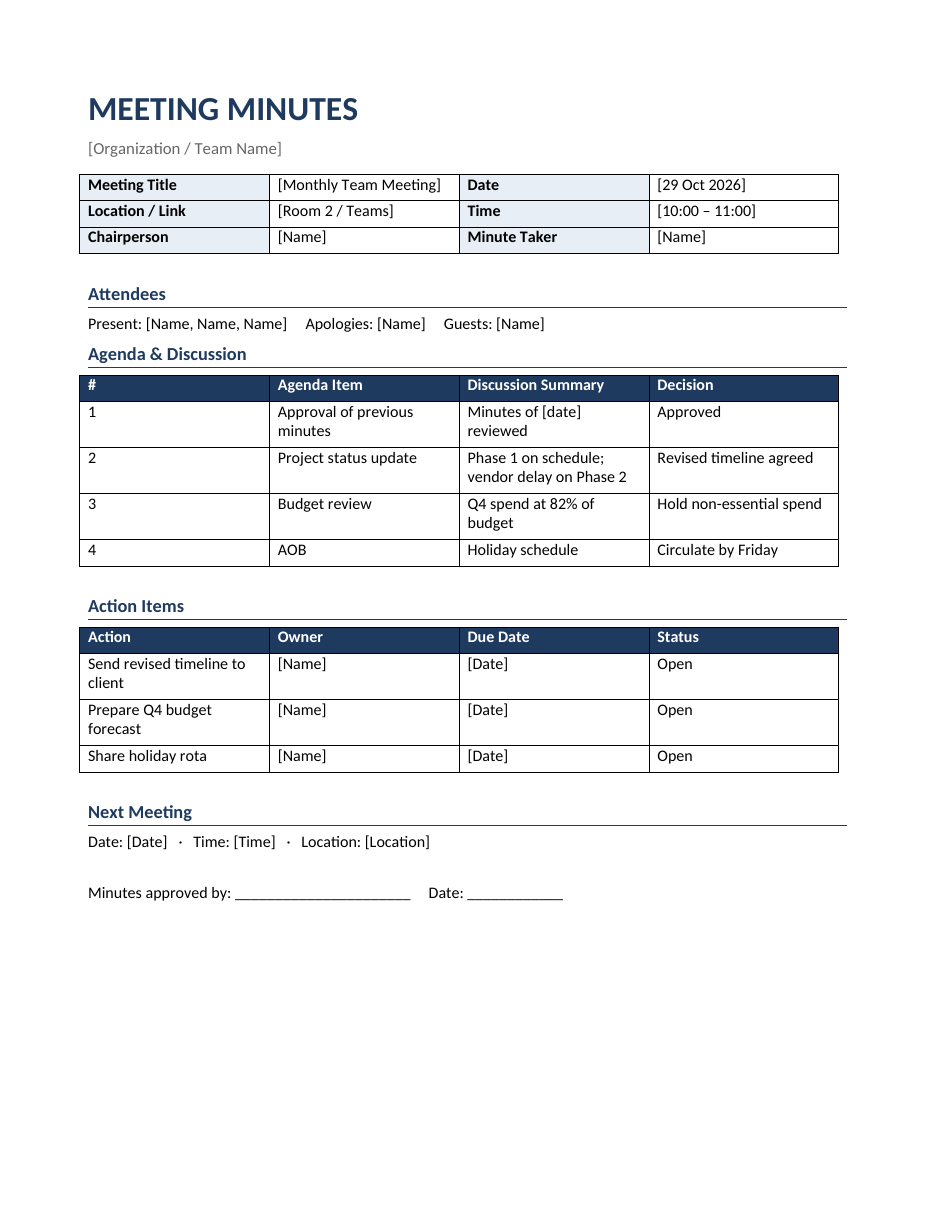
The template works in Microsoft Word, Google Docs, LibreOffice Writer and Pages. It includes sample entries so you can see how each section should be completed.
What are meeting minutes?
Meeting minutes are the official written record of a meeting. They summarize who attended, what was discussed, what decisions were made and what actions were assigned. Minutes are not a word-for-word transcript; they focus on outcomes. They are used by businesses, boards of directors, committees, non-profits, schools, homeowners' associations, clubs and government bodies. For formal organizations, approved minutes can also serve as legal evidence of decisions and compliance.
What this meeting minutes template includes
- Meeting details – title, date, time, location or video link, chairperson and minute taker.
- Attendees – people present, apologies for absence and guests.
- Agenda and discussion – a table with each agenda item, a summary of the discussion and the decision reached.
- Action items – a table listing each action, the owner, the due date and the status.
- Next meeting – date, time and location of the following meeting.
- Approval – a signature and date line for approving the minutes.
How to take meeting minutes step by step
Before the meeting
- Get a copy of the agenda and enter the agenda items in the template in advance.
- Fill in the meeting details and the list of expected attendees.
- Review the previous meeting's minutes and open action items.
- Agree with the chair on the level of detail required.
During the meeting
- Record attendance, apologies and the time the meeting starts.
- For each agenda item, note the key points discussed, not every comment.
- Record decisions exactly, including votes if your organization requires them.
- Capture every action item with a clear owner and deadline.
- Ask for clarification if a decision or action is unclear.
- Note the time the meeting ends and the date of the next meeting.
After the meeting
- Write up the minutes as soon as possible, ideally within 24 hours, while details are fresh.
- Use clear, neutral, past-tense language.
- Ask the chair to review the draft.
- Distribute the minutes to attendees and relevant stakeholders.
- Store the approved minutes in a shared, organized location.
- Follow up on action items before the next meeting.
Tips for writing better minutes
- Focus on decisions and actions, not on who said what.
- Be objective; avoid personal opinions or emotional language.
- Use names or roles consistently.
- Write action items starting with a verb: "Send revised timeline to client".
- Keep summaries short; one to three sentences per agenda item is usually enough.
- Use the same template for every meeting so readers know where to find information.
- Number agenda items to match the agenda.
- Attach or link supporting documents rather than copying them into the minutes.
Types of meeting minutes
Action minutes
Record only decisions and actions. Ideal for team meetings and project check-ins, and the default style of this template.
Discussion minutes
Summarize the main points of discussion as well as outcomes. Useful when the reasoning behind decisions needs to be recorded.
Formal or verbatim minutes
Used by boards, councils and legal proceedings. They include motions, who proposed and seconded them, and vote counts. Add columns for motions and votes if you need this level of detail.
Meeting minutes example
The template shows a monthly team meeting. The first item, approval of the previous minutes, is recorded as approved. The project status update notes that Phase 1 is on schedule but a vendor delay affects Phase 2, leading to an agreed revised timeline. The budget review shows Q4 spend at 82% of budget, so the team decides to hold non-essential spending. Three action items are assigned with owners and due dates, making follow-up easy at the next meeting.
Who should take meeting minutes?
Minutes are usually taken by a secretary, administrator, project coordinator or a rotating team member. The minute taker should not be the person chairing the meeting, because it is difficult to lead a discussion and record it accurately at the same time. Rotating the role in team meetings spreads the workload and helps everyone appreciate the value of clear notes.
Using minutes to improve meetings
Well-kept minutes reveal patterns. If the same item appears on every agenda without progress, it may need a dedicated working session. If action items are often overdue, deadlines may be unrealistic or owners overloaded. Review open actions at the start of every meeting, celebrate completed ones and close items that are no longer relevant. Over time, this habit makes meetings shorter, more focused and more productive.
Digital and remote meetings
For video meetings, paste the meeting link into the Location field and note any participants who joined by phone. Share the minutes document in a collaborative tool such as Microsoft Teams, SharePoint or Google Drive so attendees can see action items in real time. If you record meetings, remember that a recording does not replace minutes; few people will rewatch an hour-long video, but everyone can read a one-page summary.
Board and committee meeting minutes
Boards of directors, trustees and committees usually need more formal minutes than everyday team meetings. In addition to the sections in this template, formal minutes typically record whether a quorum was present, any declarations of conflicts of interest, the exact wording of each motion, the names of the people who proposed and seconded it and the result of each vote, including abstentions. Reports presented to the board are usually attached as appendices rather than summarized in full. Once approved, formal minutes are signed by the chair and kept in a minute book or secure digital archive, because they may be needed for audits, legal matters or regulatory inspections. To adapt the template, add a short "Quorum and declarations" section after attendees and a "Motion / Proposed / Seconded / Result" column in the agenda table.
Meeting minutes checklist
- Meeting title, date, time and location are recorded.
- Attendees, apologies and guests are listed.
- Previous minutes were approved or amended.
- Each agenda item has a short discussion summary.
- Every decision is recorded clearly.
- Each action has one owner and a due date.
- The next meeting date is confirmed.
- Minutes were reviewed by the chair.
- Minutes were distributed within 24 to 48 hours.
- The final version is stored in the agreed location.
Storing and sharing meeting minutes
Minutes are only useful if people can find them later. Save each set of minutes with a consistent file name, such as 2026-10-29_Team-Meeting-Minutes.docx, in one shared folder for each team or committee. Convert approved minutes to PDF so they cannot be accidentally edited, and keep the editable Word version for the minute taker. Link the minutes in your calendar invitation for the next meeting so attendees can review open action items before they arrive. For regulated or formal organizations, follow your record retention policy and restrict access where minutes contain confidential information.
Frequently asked questions
Is this meeting minutes template free?
Yes. Download, edit and use it for any number of meetings.
How long should meeting minutes be?
For most team meetings, one or two pages. Formal board minutes may be longer.
Do meeting minutes need to be approved?
In formal organizations, minutes are usually approved at the next meeting. For informal team meetings, circulating them is often enough.
Can I use the template in Google Docs?
Yes. Upload the DOCX to Google Drive and open it in Google Docs to edit and share.
What is the difference between an agenda and minutes?
An agenda lists what will be discussed before the meeting; minutes record what was discussed and decided afterwards.
Should I record who said what in the minutes?
Generally no. Action minutes focus on outcomes. Name individuals only when they are assigned actions, when they present a report, or when formal rules require recording who proposed or voted on a motion.
How do I correct errors in approved minutes?
Corrections are usually proposed and agreed at the next meeting, then recorded in that meeting's minutes. Do not silently edit minutes after approval.
Can I use the template for virtual meetings?
Yes. Enter the video link in the Location field, note participants who joined remotely and share the document in your collaboration tool so everyone can track action items.
Related templates
Run better meetings with our professional meeting agenda template, action plan templates, executive summary templates and weekly marketing report templates.