
Every sale deserves a receipt. For customers, a receipt is proof of purchase needed for returns, exchanges, warranties and expense claims. For businesses, receipts create a record of every transaction for bookkeeping, tax returns and stock control. During the busy holiday season, when sales volumes rise and customers buy gifts that may need to be exchanged, clear and accurate receipts are more important than ever.
Our free sales receipt template for Excel produces a professional, itemized receipt with your store details, receipt number, date, cashier and payment method. Each line calculates quantity × unit price minus any discount, and the receipt totals the subtotal, sales tax, grand total, amount paid and change automatically. Preview it below, download the XLSX file and start issuing clear receipts in minutes.
Download the free sales receipt template
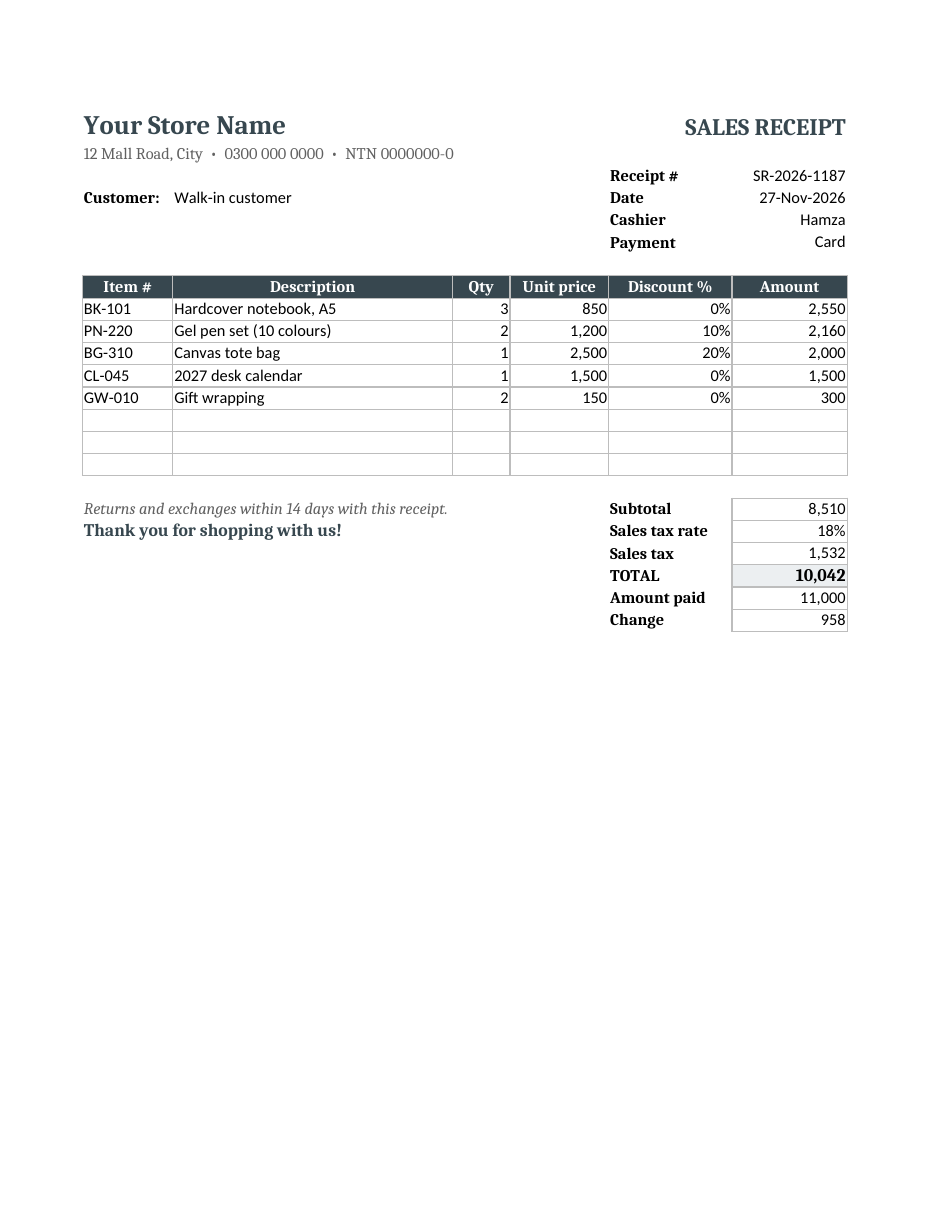
The spreadsheet works in Microsoft Excel, Google Sheets, LibreOffice Calc and Numbers. Enter item details and the amount paid; everything else calculates automatically. Print the receipt, save it as a PDF or email it to the customer.
What is a sales receipt?
A sales receipt is a document given to a customer at the time of sale to confirm that payment has been received. Unlike an invoice, which requests payment for goods or services, a sales receipt shows that the customer has already paid. It typically lists the seller's details, the date, the items purchased, prices, taxes, the total paid and the payment method.
What the template includes
- Store name, address, phone number and tax registration number.
- Receipt number, date, cashier and payment method.
- Customer name or "walk-in customer".
- An item table with item number, description, quantity, unit price, discount percentage and amount.
- Automatic line totals with discounts applied.
- Subtotal, editable sales tax rate, sales tax and total.
- Amount paid and automatic change calculation.
- A returns policy line and thank-you message.
- A clean print layout on one page.
How to fill out a sales receipt
- Enter your store name, address, phone number and tax number once and save the file as your master copy.
- For each sale, enter the next receipt number in sequence.
- Enter the date, cashier name and payment method.
- Add the customer's name if needed, or leave "walk-in customer".
- List each item with its code, description, quantity and unit price.
- Enter any discount percentage for promotional items.
- Check that the sales tax rate matches the rate that applies to you.
- Enter the amount the customer paid; the change calculates automatically.
- Print or email the receipt to the customer.
- Save a copy with the receipt number as the file name, or keep a printed copy.
Sales receipt vs invoice
An invoice is issued before payment and asks the customer to pay by a due date. A sales receipt is issued after payment and confirms the transaction is complete. Retail shops, cafés and market stalls usually issue sales receipts because customers pay immediately. Service businesses and wholesalers often send invoices first and then issue a receipt when the payment arrives.
How the calculations work
Each line amount equals quantity × unit price × (1 − discount). In the sample, three notebooks at 850 each make 2,550; two pen sets at 1,200 with a 10% discount make 2,160; and a tote bag at 2,500 with a 20% discount makes 2,000. The subtotal of all lines is 8,510. Sales tax at 18% adds 1,532, giving a total of 10,042. The customer paid 11,000, so the change due is 958. If your prices already include tax, set the tax rate to zero and note "prices include tax" on the receipt.
Numbering receipts
Use a consistent, sequential numbering system, such as SR-2026-0001, SR-2026-0002 and so on. Sequential numbers help you spot missing receipts, find transactions quickly and satisfy tax authorities and auditors. Never reuse a receipt number. If you void a receipt, keep a copy marked "VOID" rather than deleting it.
What to include for tax purposes
- The seller's legal or trading name and address.
- Your tax registration number, if registered.
- A unique receipt number and date.
- A description and quantity of each item.
- The price, discounts and tax amount.
- The total amount paid and payment method.
Tax rules on receipts vary by country and business type. Check the requirements that apply to your business, especially if you are registered for sales tax or VAT.
Handling holiday returns and exchanges
Holiday shoppers often buy gifts that need to be exchanged in January. A clear returns policy printed on every receipt, such as "returns and exchanges within 14 days with this receipt", sets expectations and reduces disputes. Consider offering an extended return period for purchases made in December, or gift receipts that show items without prices. When a return is processed, refer to the original receipt number in your records.
Tips for retail receipts
- Keep the layout simple and easy to read.
- Print the store's phone number for customer questions.
- Include your returns policy on every receipt.
- Offer email receipts to reduce paper and make records searchable.
- Match receipts to daily cash and card totals at closing time.
- Store copies securely for as long as local tax rules require.
- Use the same template across all tills or staff for consistency.
Customizing the template
Add your logo at the top, change the dark grey colour to match your brand and adjust the columns. A café might remove the item code column, while a hardware store might add a unit column. You can add a loyalty points line, a gift wrap charge or a delivery fee as extra rows. For a gift receipt, hide the unit price and amount columns before printing.
Who can use this receipt template?
- Retail shops and boutiques selling clothing, books, gifts or electronics.
- Cafés, bakeries and small restaurants.
- Market stalls, pop-up shops and holiday fairs.
- Home-based sellers who take orders by phone or social media.
- Repair shops selling parts with service.
- Freelancers and tutors who are paid in cash or by transfer.
- Schools, clubs and charities selling event items or merchandise.
Keeping good receipt records
Receipts are only useful if you can find them later. Keep a copy of every receipt, either printed in a numbered book or saved digitally in a folder for each month. At the end of each day, add up the receipts and compare the total with the cash in the till and the card machine report. Any difference should be investigated the same day while the details are fresh.
At the end of each month, total your receipts by payment method and tax amount. These totals feed directly into your sales records, general ledger and tax returns. A consistent receipt template makes this monthly work much faster because every receipt has the same fields in the same place.
Paper receipts vs digital receipts
Paper receipts are familiar and easy for walk-in customers, but they fade and get lost. Digital receipts sent as PDFs by email or messaging are easier to search, cost nothing to print and are better for the environment. Many businesses offer both: a printed receipt by default and a digital copy on request. This template works for both, because you can print it or save it as a PDF from the same file.
Sample receipt walkthrough
In the sample receipt, a walk-in customer pays by card at 12 Mall Road. The cashier, Hamza, records five items: three A5 hardcover notebooks, two gel pen sets with a 10% promotion, one canvas tote bag with a 20% holiday discount, one 2027 desk calendar and two gift wrapping charges. Every discount is shown clearly on its own line so the customer can see the savings. The tax is calculated on the discounted subtotal, which is the usual method, and the total and change are shown in bold so they are easy to read at a glance.
Frequently asked questions
Is this sales receipt template free?
Yes. Download, edit and use it for your business.
Can I change the sales tax rate?
Yes. Enter your rate in the sales tax rate cell. Set it to zero if prices already include tax or the sale is exempt.
How do I add more items?
Insert rows within the item table and copy the amount formula down. The subtotal includes all rows in the table.
Can I email the receipt?
Yes. Save it as a PDF and attach it to an email or send it by messaging app.
Is a sales receipt the same as a cash receipt?
A cash receipt confirms a payment of money, often without item detail. A sales receipt lists the items sold, prices and taxes as well as the payment.
How long should I keep sales receipts?
Keep copies for as long as your local tax rules require, which is often five to seven years. Digital copies take no space and are easy to search.
Can I use this template as a gift receipt?
Yes. Hide the unit price, discount and amount columns, and the totals, before printing so the recipient sees only the items.
Related templates
- Cash receipt template
- Rent receipt templates
- Invoice templates
- Purchase order template
- Quotation templates