November and December are the busiest shopping months of the year. Black Friday, Cyber Monday, year-end sales, holiday gifting and New Year promotions all bring customers out looking for a good deal. For small businesses, a simple printed coupon is one of the most effective and affordable ways to attract new customers, reward loyal ones and bring people back after the holidays. A well-designed coupon looks professional, communicates the offer instantly and gives you a way to measure results.
Our free coupon template for Microsoft Word includes three ready-to-edit coupon designs on one page: a 20% off holiday sale coupon, a buy one get one free weekend special and a fixed PKR 500 off thank-you offer. Each coupon has a headline offer, a short description, your business details, validity dates and terms, a coupon code, a serial number and a dashed cut line. Preview the page below, download the editable DOCX file and use our guide to run a successful coupon promotion.
Download the free coupon template
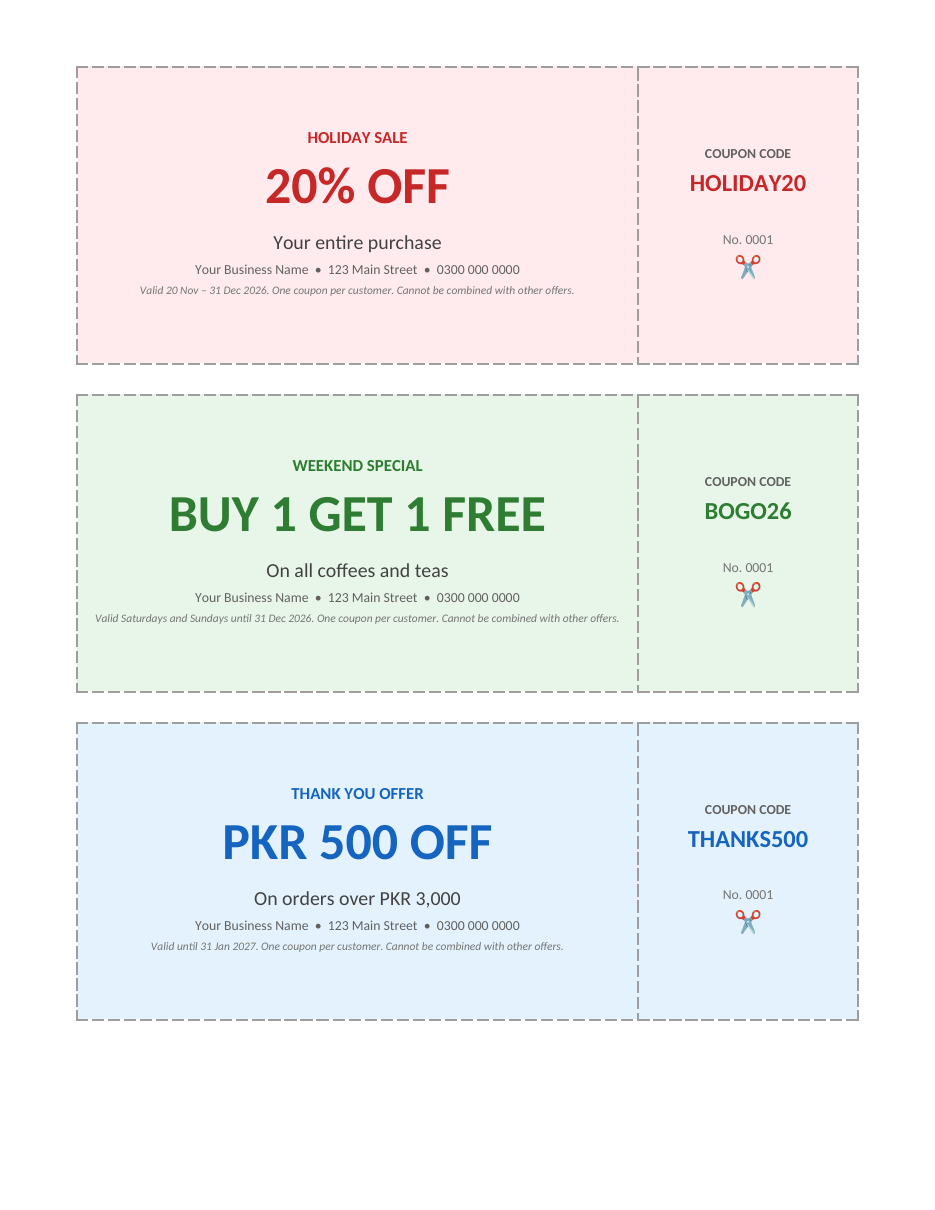
The template opens in Microsoft Word, Google Docs, LibreOffice Writer and Pages. Three coupons fit on one US Letter or A4 page. Edit the text and colours, print on card stock and cut along the dashed lines.
Features of the coupon template
- Three coupon designs on one printable page.
- Large, bold offer headlines that are easy to read at a glance.
- A short description line for the product or condition.
- Space for your business name, address and phone number.
- Validity dates and terms in small print.
- A coupon code panel for tracking redemptions.
- A serial number to prevent copying and track distribution.
- Dashed borders and a scissors icon showing where to cut.
- Soft colour backgrounds in red, green and blue, all fully editable.
Types of coupons you can create
Percentage off
"20% off your entire purchase" is simple and attractive, and works well for sales events such as Black Friday or year-end clearance.
Buy one get one free
BOGO offers move more stock and encourage customers to bring a friend. They suit cafés, restaurants, bakeries and retail products with good margins.
Fixed amount off
"PKR 500 off orders over PKR 3,000" encourages bigger baskets because the customer must reach a minimum spend to use the coupon.
Free gift or service
"Free gift wrapping" or "free dessert with any main course" adds value without discounting your main product.
Loyalty and thank-you coupons
Give a coupon to customers after a purchase to encourage a return visit, especially during the quieter weeks after the holidays.
How to make your own coupons
- Download the DOCX file and open it in Word.
- Decide the goal: new customers, bigger orders, repeat visits or clearing stock.
- Choose the offer type that fits the goal and your margins.
- Edit the headline, such as "25% OFF" or "FREE DELIVERY".
- Write a short description line explaining what the offer applies to.
- Replace the business name, address and phone number with yours.
- Set clear validity dates and terms, such as one coupon per customer.
- Create a unique coupon code for each campaign.
- Number the coupons if you want to track how many were used.
- Print a test page, check alignment and spelling, then print on card stock.
- Cut along the dashed lines with a paper trimmer for neat edges.
- Train staff on how to accept and record coupons.
Holiday coupon ideas for November and December
- Black Friday: "30% off everything, Friday only".
- Cyber Monday: "Free delivery on all online orders".
- Early-bird shopping: "Extra 10% off before 10 am".
- Gift cards: "Buy a PKR 5,000 gift card, get PKR 500 free".
- Holiday bundles: "Buy any two gifts, get the third half price".
- New Year: "Start 2027 with PKR 1,000 off your first order".
- After-holiday thank you: "15% off your next visit in January".
Writing coupon terms and conditions
Clear terms prevent confusion and disputes at the counter. Include the start and end dates, whether the coupon applies to all products or only certain items, any minimum spend, whether it can be combined with other offers, the number of uses per customer and whether it has a cash value. Keep the wording short and readable, and make sure staff understand the rules before the promotion starts. For example: "Valid 20 Nov – 31 Dec 2026. One coupon per customer. Not valid with other offers. No cash value."
How to distribute printed coupons
- Hand them to customers at checkout to encourage repeat visits.
- Place them inside shopping bags or delivery boxes.
- Include them in direct mail and local flyers.
- Share them at community events, markets and fairs.
- Partner with nearby businesses to exchange coupons.
- Pin them on community notice boards.
- Offer them to new residents or office workers nearby.
Tracking coupon results
Every coupon is a small marketing experiment. Use a different coupon code for each campaign or channel so you can see which one brings the most customers. Collect redeemed coupons at the counter, record the code, date and order value, and compare results at the end of the promotion. Calculate the redemption rate (coupons used divided by coupons distributed) and the average order value of coupon customers. These numbers help you decide which offers to repeat next year.
Protecting your margins
Discounts should bring in profitable sales, not give away your margin. Before choosing a discount, calculate the profit on a typical sale and make sure you still earn money after the discount. Minimum spend thresholds, BOGO offers on high-margin items and free add-ons are often more profitable than large across-the-board discounts. Set an end date so the offer creates urgency, and limit coupons to one per customer.
Design and printing tips
- Keep the offer headline large and the text short.
- Use your brand colours and add your logo.
- Leave enough white space so the coupon is easy to read.
- Print on 200 to 300 gsm card stock for a sturdy coupon.
- Use high-quality print settings for sharp text and colours.
- Print a test page on plain paper first.
- Use a paper trimmer for straight, professional edges.
Digital coupons from the same design
You can also share the coupon online. Save the page as a PDF or take a screenshot of a single coupon and post it on social media, send it by email or share it on messaging apps. Ask customers to show the coupon on their phone at checkout. Use a different code for digital coupons so you can compare online and printed results.
Coupon planning checklist
- Define one clear goal for the campaign and one main offer.
- Set a budget for the total discount you are willing to give.
- Estimate how many coupons you will print and expect to be redeemed.
- Choose start and end dates that match the shopping season.
- Create a separate code for each channel, such as in-store, mail and social media.
- Brief staff on the terms and how to record redemptions.
- Prepare enough stock for the promoted products.
- Review the results one week after the promotion ends.
Common coupon mistakes to avoid
The most common mistake is an unclear offer. If customers cannot understand the deal in two seconds, they will ignore it. Another mistake is leaving out an expiry date, which means old coupons keep appearing months later and the campaign never ends. Avoid discounts that are too small to notice, such as 2% off, and discounts so large that every sale loses money. Finally, do not forget to tell your staff: nothing frustrates a customer more than a cashier who refuses a valid coupon because they have never seen it before.
Small details also matter. Check that phone numbers and addresses are correct, that the code on the stub matches the code in your records and that the colours print well on your printer. Pale colours can disappear on some printers, so print a test page before printing hundreds of coupons.
Frequently asked questions
Is this coupon template free?
Yes. Download, edit and print it for your business as often as you like.
How many coupons fit on one page?
Three coupons fit on one page. Copy and paste a coupon table to create more pages.
Can I change the colours?
Yes. Click a coupon, choose Shading and pick your brand colour. Change text colours under Font.
How do I number the coupons?
Edit the "No. 0001" field on each coupon, or use Word's mail merge with a numbered list to print many unique coupons.
Should coupons have an expiry date?
Yes. An expiry date creates urgency, helps you control costs and makes it easier to measure the campaign's results.
What paper should I use for coupons?
Use 200 to 300 gsm matte or gloss card stock. It feels sturdy, survives being carried in a wallet and prints colours well.
Related templates
- Sale flyer templates
- Gift certificate templates
- Tear-off flyer templates
- Poster templates
- Thank you card template