When you sell time and expertise rather than products, your invoice needs to show more than a single total. Clients want to see what was done, when, how many hours it took and at what rate. Our free service invoice template for Excel is designed for freelancers, consultants, agencies and service businesses that bill by the hour or by project phase. It includes dated service lines, hourly rates, expenses, discounts, tax, deposits and an automatic balance due, all in a polished, professional layout.
Preview the invoice below, download the editable XLSX file, and read our guide to creating service invoices that clients understand and pay on time.
Download the free service invoice template
The template works in Microsoft Excel, Google Sheets, LibreOffice Calc and Numbers. It prints on one page and can be exported as a PDF to email to clients. If you prefer a minimal invoice for quick billing or handwritten use, see our blank invoice template instead.
Features of this service invoice
- Branded header with your business name, address, contact details and tax ID.
- Invoice number, invoice date, automatic due date (14 days later) and project name.
- Bill To section for your client's details.
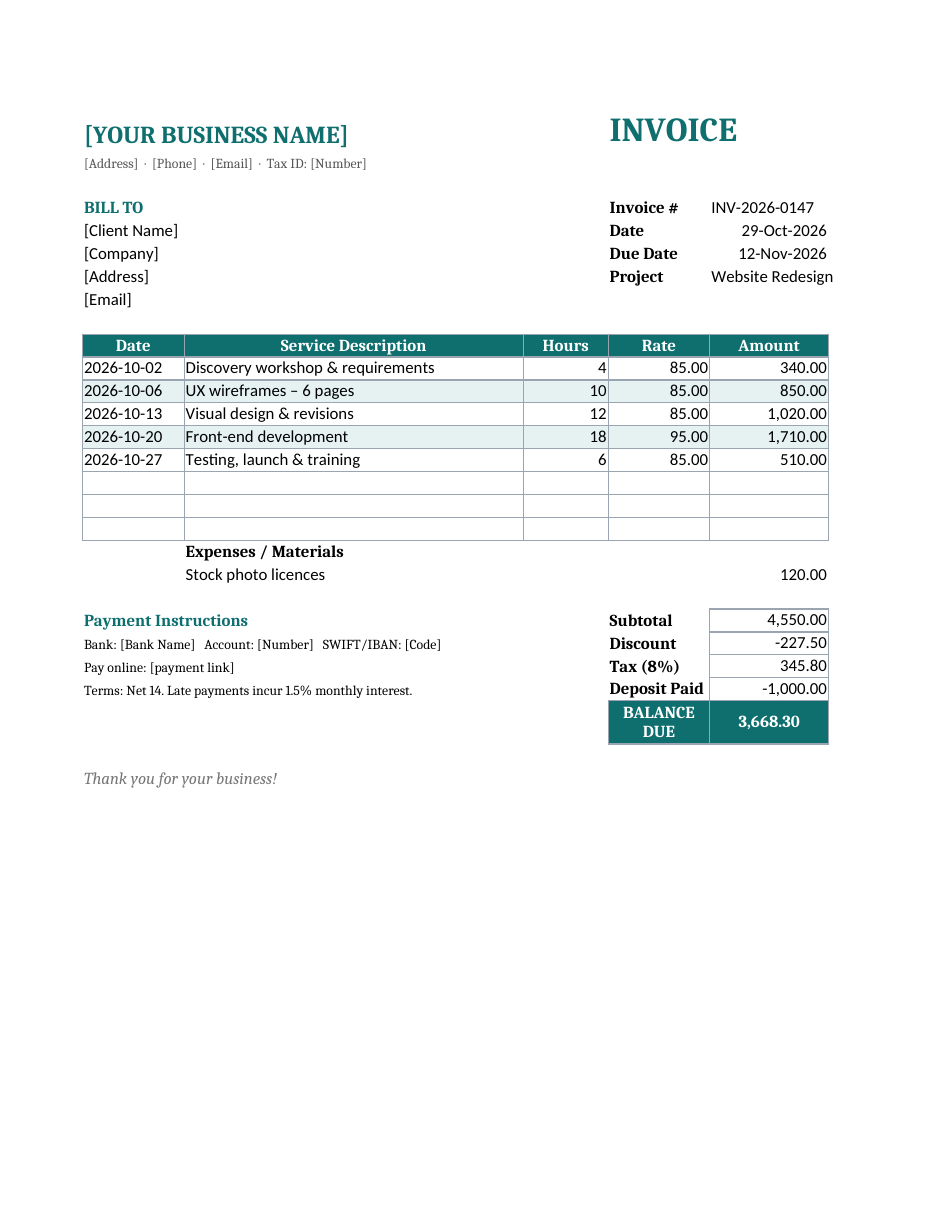
- Dated service lines with description, hours, hourly rate and amount.
- Different rates per line, so you can bill design and development at different prices.
- Spare rows for additional services.
- A separate expenses and materials section for reimbursable costs.
- Automatic subtotal, percentage discount, tax and deduction of any deposit already paid.
- A bold balance due box so clients see exactly what they owe.
- Payment instructions for bank transfer and online payment, plus payment terms and late fee wording.
- A professional teal colour scheme with alternating row shading.
How to create a service invoice step by step
- Enter your business name, address, phone, email and tax ID in the header, and save this as your master file.
- Assign a unique invoice number, such as INV-2026-0147.
- Check the invoice date; the due date calculates automatically. Change +14 in the formula to match your payment terms.
- Add the project name or purchase order number so your client can match the invoice to the work.
- Enter your client's name, company, address and email.
- For each service, enter the date, a clear description, the number of hours and the hourly rate. Amounts calculate automatically.
- Add reimbursable expenses, such as stock photos, travel or materials, in the expenses section.
- Adjust the discount and tax percentages in the formulas to suit your agreement and location.
- Enter any deposit or retainer already paid as a negative amount so it is deducted from the balance.
- Update the payment instructions with your bank details and payment link.
- Save the invoice as a PDF and send it to your client with a short, friendly email.
Worked example
The sample invoice shows a website redesign project. Five dated service lines cover a discovery workshop, wireframes, visual design, front-end development and testing and launch, totalling 50 hours at rates of 85 and 95 per hour. A stock photo licence of 120 is added as an expense, bringing the subtotal to 4,550. A 5% discount, 8% tax and a 1,000 deposit already paid result in a balance due of 3,668.30. Every total updates automatically when you change hours, rates or percentages.
What to include on a service invoice
- Your business name, contact details and tax or VAT number.
- The client's name and billing address.
- A unique invoice number and the invoice date.
- The due date and payment terms.
- A project name, reference or purchase order number.
- Dated descriptions of services performed.
- Hours or units, rates and line totals.
- Reimbursable expenses, listed separately.
- Discounts, taxes and deposits.
- The total or balance due.
- Accepted payment methods and details.
Hourly vs. project-based service invoices
Hourly billing
Ideal for consulting, support and ongoing work where the scope varies. List each session or task with the date and hours so clients can match the invoice to your timesheet.
Project or milestone billing
For fixed-price projects, replace hours with quantity 1 and enter the milestone price as the rate, for example "Phase 1 – Design: 1 x 2,000". This keeps the same layout while billing by deliverable.
Retainer billing
For monthly retainers, list the retainer fee as one line and add any extra hours above the retainer as separate lines.
Tips for writing clear service descriptions
Vague descriptions such as "consulting" or "work on website" invite questions and delay payment. Instead, describe the outcome or task: "UX wireframes for 6 pages, including two revision rounds" or "Monthly bookkeeping and VAT return preparation, October". Match descriptions to the scope of work in your service agreement or quotation, and keep the language consistent from quote to invoice so clients can easily see that you delivered what was agreed.
How to get paid faster
- Invoice promptly, immediately after completing a milestone or at the same time each month.
- Agree payment terms and deposits in your service agreement before starting work.
- Make paying easy by offering bank transfer, card and online payment links.
- Include the invoice number in the payment reference request.
- Send a reminder a few days before the due date.
- Apply late fees consistently and professionally.
- Keep a register of all invoices, amounts, due dates and payment status.
- Thank clients when they pay; good relationships lead to repeat business.
Tracking time for accurate invoices
Accurate service invoices start with accurate time records. Use a timesheet, a time tracking app or a simple spreadsheet to log the date, client, task and hours as you work, rather than estimating at the end of the month. Round consistently, for example to the nearest quarter hour, and note any non-billable time separately. When you prepare the invoice, copy entries from your timesheet into the service lines, grouping small tasks under a clear description if needed. If a client questions an invoice, detailed time records make it easy to explain your charges.
Customizing the template
Insert your logo in the header with Insert > Pictures. Change the teal theme by selecting the header row and balance due cells and choosing a new fill colour. Rename the Hours and Rate columns to Quantity and Unit Price if you bill per item or per session. To change the tax rate, edit 0.08 in the tax formula, and to remove the discount, set the discount formula to zero. You can add a column for team member names if several people work on the project, or a column for task codes if your client requires them.
Invoicing for agencies and teams
Agencies and consultancies often have several people working on the same project at different rates, for example a strategist, a designer and a developer. To show this clearly, add a Team Member column next to the service description, or group lines under subheadings for each role. Clients appreciate seeing who contributed, and it helps you check that billed hours match each person's timesheet. For long projects, invoice monthly or at each milestone rather than waiting until the end, which improves cash flow and gives clients regular visibility of costs. Always reference the agreed quotation or statement of work so it is clear the invoice reflects approved scope.
Handling disputes and adjustments
Occasionally a client may question an invoice. Respond quickly and politely, provide supporting timesheets or deliverables, and listen to their concern. If an adjustment is justified, issue a credit note or a revised invoice with a new number rather than editing the original, so your records remain accurate. Agreeing scope, rates and payment terms in writing before starting work prevents most disputes.
Frequently asked questions
Is this service invoice template free?
Yes. Download it and use it for unlimited invoices.
Can I use this template in Google Sheets?
Yes. Upload the XLSX to Google Drive and open it with Google Sheets. All formulas work.
How do I show a deposit on an invoice?
Enter the deposit as a negative number in the Deposit Paid row. The template deducts it from the total to show the balance due.
Should I attach a timesheet?
For hourly work, attaching a timesheet or activity report builds trust and reduces questions, especially with new clients.
What payment terms should I use?
Net 14 or Net 30 are common. For new clients or large projects, request a deposit of 25% to 50% before starting.
Can I bill different rates for different services?
Yes. Each line has its own rate, so you can charge, for example, 85 per hour for design and 95 per hour for development on the same invoice.
How do I add my logo?
Click cell A1, choose Insert > Pictures and place your logo to the left of your business name, then adjust the row height if needed.
Related templates
Manage the whole client lifecycle with our service agreement template, quotation template, blank invoice template, cash receipt template and remittance templates.