Ordering supplies by phone or a quick email might work for a while, but as a business grows it leads to wrong quantities, disputed prices and invoices nobody can match. A purchase order solves these problems. It is a formal document a buyer sends to a supplier listing exactly what is being ordered, at what price, when it is needed and where it should be delivered. Once the supplier accepts it, the purchase order becomes a binding agreement that protects both sides.
Our free purchase order template for Excel includes your company header, PO number and dates, payment terms, vendor and ship-to boxes, an item table with automatic line totals and a summary with subtotal, discount, sales tax, shipping and grand total. Preview it below, download the XLSX file and use our step-by-step guide to create clear, professional purchase orders.
Download the free purchase order template
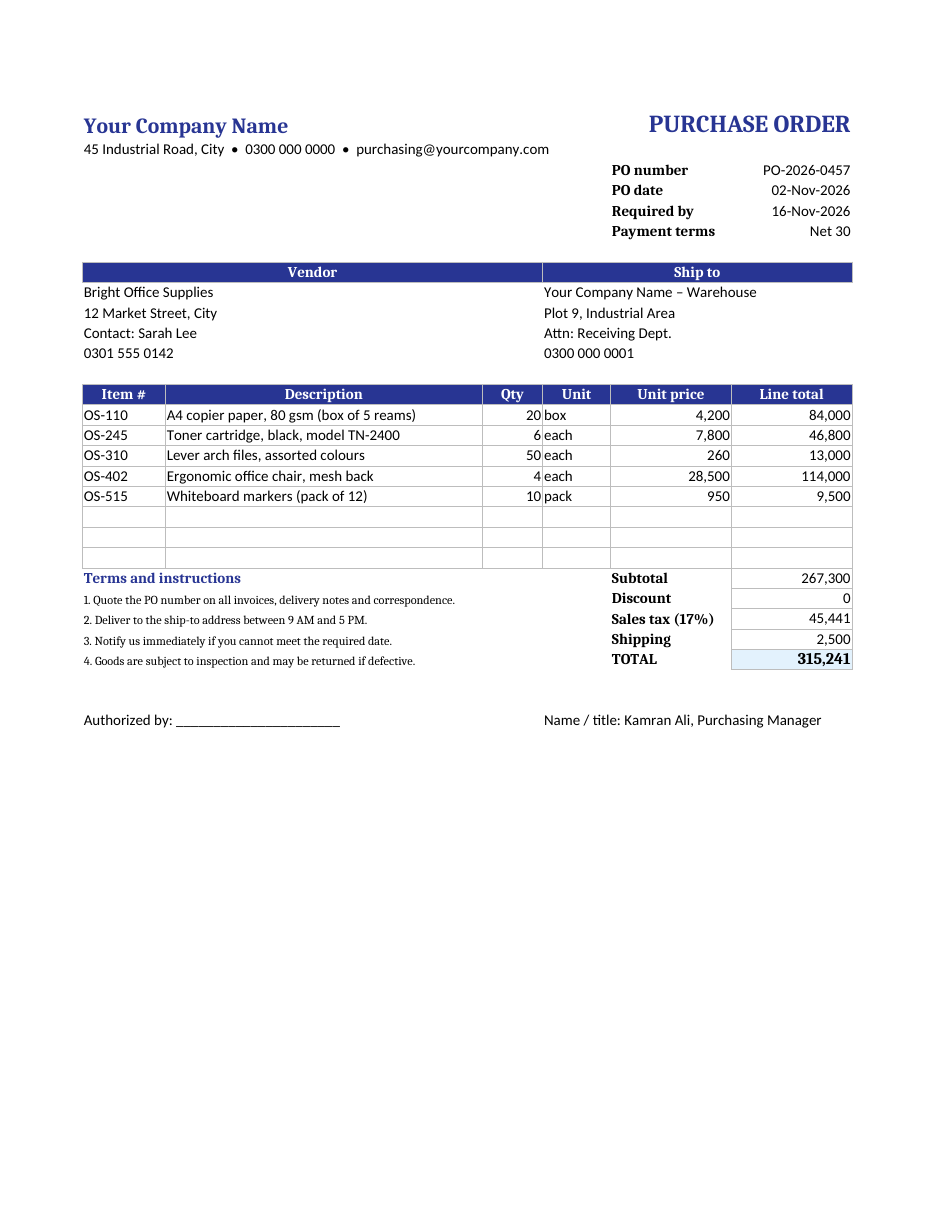
The template works in Microsoft Excel, Google Sheets, LibreOffice Calc and Numbers. Enter the quantity and unit price for each item and the line totals, subtotal, tax and total calculate automatically. Print it, save it as a PDF or email it directly to your supplier.
What is a purchase order?
A purchase order, or PO, is a document issued by a buyer to a seller that authorizes a purchase. It lists the products or services, quantities, agreed prices, delivery date, shipping address and payment terms. Each PO has a unique number that is quoted on the supplier's delivery note and invoice, so the buyer can match the three documents before paying. This process, known as three-way matching, prevents overpayments and errors.
What the purchase order template includes
- Your company name, address, phone and email.
- PO number, PO date, required-by date and payment terms.
- A vendor box for the supplier's name, address and contact.
- A ship-to box for the delivery address and receiving contact.
- An item table with item number, description, quantity, unit, unit price and line total.
- Automatic line totals (quantity × unit price).
- Subtotal, discount, sales tax at an editable rate, shipping and total.
- Terms and instructions for the supplier.
- An authorization line with name and title.
How to create a purchase order
- Enter your company name, address and contact details in the header.
- Assign a unique PO number, for example PO-2026-0457, using a sequence you can track.
- Enter the PO date and the date you need the goods.
- Enter the payment terms you agreed, such as Net 30.
- Fill in the vendor's name, address and contact person.
- Enter the ship-to address and the person who will receive the goods.
- List each item with its code, description, quantity, unit and agreed unit price.
- Enter any discount, the applicable sales tax rate and shipping charges.
- Review the total and check it against the supplier's quotation.
- Add any special instructions in the terms section.
- Have an authorized person sign the PO.
- Send the PO to the supplier and keep a copy for your records.
The purchase order process
A typical purchasing process starts when an employee identifies a need and submits a purchase request. A manager approves it, and the purchasing team requests quotations and chooses a supplier. The buyer then issues a purchase order. The supplier confirms the order and delivers the goods with a delivery note. The receiving team checks the goods against the PO. When the supplier's invoice arrives, accounts payable matches the invoice with the PO and delivery note, then pays the supplier according to the agreed terms.
Purchase order vs invoice
A purchase order is created by the buyer before the goods are delivered; it is a request and authorization to buy. An invoice is created by the seller after delivery; it is a request for payment. The PO number should appear on the invoice so the buyer can match them. Both documents are important records for accounting, audits and tax.
Benefits of using purchase orders
- Clear agreement on items, quantities, prices and delivery dates.
- Fewer errors and disputes with suppliers.
- Better control of spending through approval before purchase.
- Easier matching of invoices with orders and deliveries.
- A full audit trail for accountants and auditors.
- Better tracking of outstanding orders and budgets.
- Legal protection if a supplier fails to deliver as agreed.
Types of purchase orders
Standard purchase order
A one-time order with specific items, quantities, prices and delivery dates. This template is designed for standard POs.
Planned purchase order
An order with items and prices agreed in advance but delivery dates scheduled later through releases.
Blanket purchase order
An agreement to buy goods or services repeatedly over a period, often with an agreed price list and spending limit.
Contract purchase order
An agreement on terms and conditions with a supplier, with separate POs issued for individual purchases.
Tips for managing purchase orders
- Use a consistent numbering system and never reuse a PO number.
- Keep a purchase order log listing every PO, supplier, amount and status.
- Require approval for orders above a set value.
- Attach the supplier's quotation to your copy of the PO.
- Confirm the supplier has accepted the PO before the delivery date.
- Check deliveries against the PO before signing the delivery note.
- Close POs once the goods are received and the invoice is paid.
Customizing the template
Add your logo at the top left, change the blue colour to match your brand and update the terms to reflect your policies. If you buy services rather than goods, rename the "Unit" column to "Hours" or "Days". Change the sales tax rate to the rate that applies in your area, or set it to zero if the purchase is exempt. You can also add columns for account codes or project numbers to help your finance team allocate costs.
Purchase order example explained
The sample PO shows an office supplies order. The buyer orders 20 boxes of copier paper at 4,200 each, six toner cartridges, 50 lever arch files, four ergonomic chairs and ten packs of whiteboard markers. The template multiplies each quantity by its unit price, adds the line totals to give a subtotal of 267,300, applies sales tax at 17% and adds 2,500 for shipping, giving a total of 315,241. The required-by date of 16 November gives the supplier two weeks to deliver, and Net 30 payment terms mean the invoice is due thirty days after it is received.
Because every detail is written down and signed, the supplier knows exactly what to send and the buyer knows exactly what to expect. When the goods arrive, the receiving team compares the delivery against the PO line by line, and when the invoice comes in, accounts payable can approve it quickly because the prices and quantities already match an authorized order.
Purchase orders for small businesses
Small businesses sometimes think purchase orders are only for large companies, but they are just as useful for a small shop, workshop, restaurant or office. A simple PO prevents misunderstandings with suppliers, makes it easier to track what you have ordered and stops staff from buying without approval. Even if you only place a few orders a month, keeping a numbered set of POs alongside your invoices gives you a clear record of spending and makes bookkeeping and tax preparation far easier.
Writing clear terms and instructions
The terms section tells the supplier how you expect the order to be handled. Typical instructions ask the supplier to quote the PO number on all documents, deliver within set hours, notify you of delays, pack goods safely and accept returns of defective items. You can also state that prices are fixed as quoted, that partial deliveries need approval or that the order may be cancelled if goods are not delivered by the required date. Keep the terms short, clear and consistent across all your purchase orders.
Frequently asked questions
Is this purchase order template free?
Yes. Download, edit and use it for your business as often as you like.
Is a purchase order legally binding?
Once the supplier accepts it, a purchase order generally forms a contract between buyer and seller. For complex or high-value purchases, seek legal advice on your terms and conditions.
Can I change the tax rate?
Yes. The sales tax rate is an editable input; enter the rate that applies to your purchase.
How do I number purchase orders?
Use a simple sequence with the year, such as PO-2026-0001, PO-2026-0002, and record each one in a log.
Can I email the purchase order?
Yes. Save the PO as a PDF and email it to your supplier, then ask them to confirm acceptance.
Can I use this template for services?
Yes. Describe the service in the description column, enter hours or days as the unit and the hourly or daily rate as the unit price.
Related templates
- Quotation templates
- Invoice templates
- Blank invoice templates
- Packing list template for Excel
- Cash receipt template