Travel, client meals, fuel, hotel stays and office supplies: employees often pay for business costs out of their own pockets and claim the money back later. An expense report makes that process simple, accurate and fair. It records each expense with a date, category and receipt, totals everything automatically and shows exactly how much the company owes the employee. For managers and finance teams, a consistent expense report makes approval quick and keeps spending under control.
Our free expense report template for Excel includes an employee details section, an expense table with drop-down lists for category and payment method, a receipt reference column, a billable flag for client costs, totals by category, and a summary that deducts company card payments and cash advances to calculate the amount due. Preview the template below, download the XLSX file and use our guide to submit and approve expense claims smoothly.
Download the free expense report template
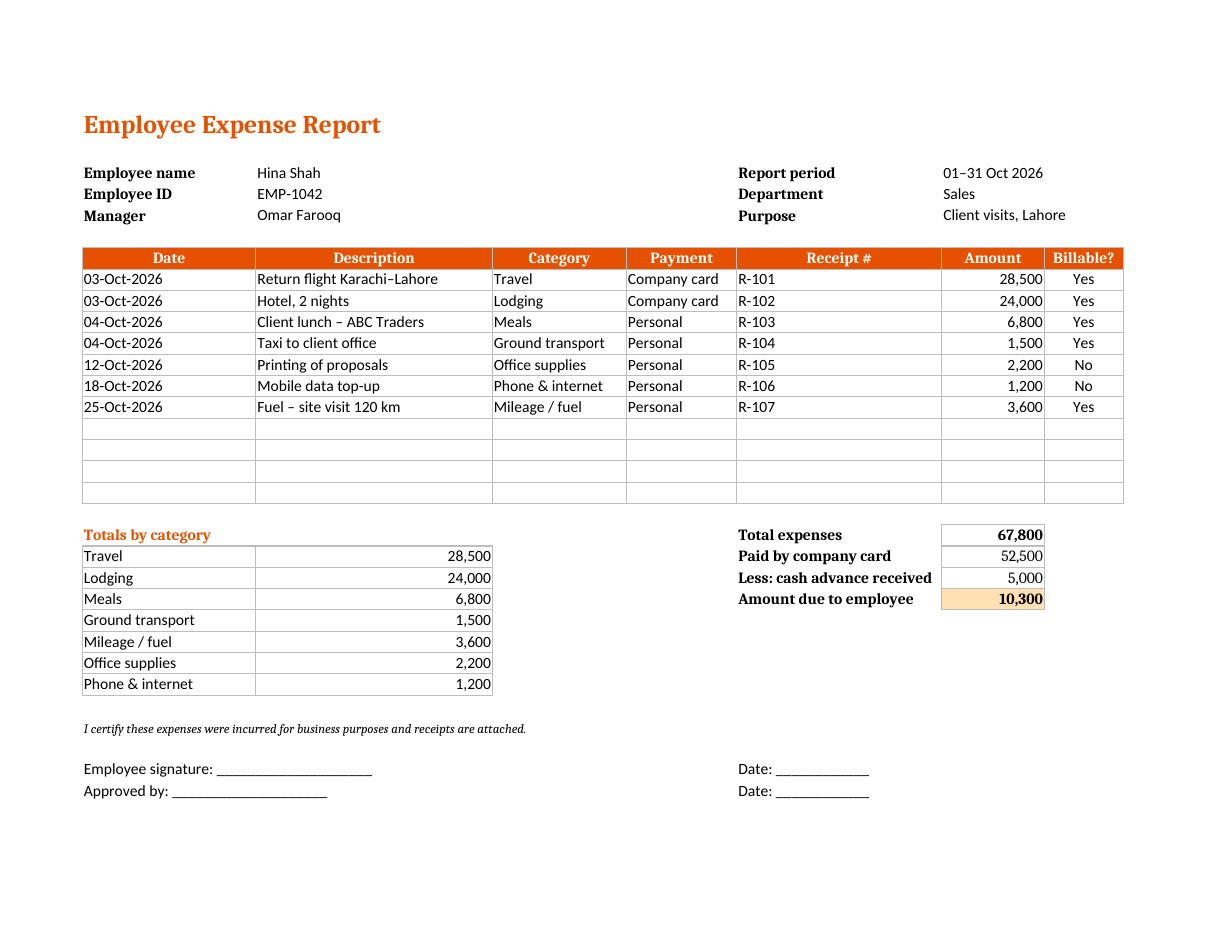
The spreadsheet works in Microsoft Excel, Google Sheets, LibreOffice Calc and Numbers. Select a category and payment method from the drop-down lists, enter the amount and the totals update automatically. The layout is landscape and fits on one printed page with signature lines.
What is an expense report?
An expense report is a document employees use to claim reimbursement for business expenses they paid personally, or to account for expenses charged to a company card. It lists each expense with supporting details and receipts and is approved by a manager before the finance team pays the claim. Expense reports also help businesses track spending, bill clients for project costs and keep accurate records for tax purposes.
What the expense report template includes
- Employee name, employee ID and manager.
- Report period, department and business purpose.
- An expense table with date, description, category, payment method, receipt number, amount and billable flag.
- A category drop-down: Travel, Lodging, Meals, Ground transport, Mileage / fuel, Office supplies, Phone & internet and Other.
- A payment drop-down: Personal or Company card.
- Automatic totals by category.
- Total expenses, company card payments and cash advance received.
- Automatic amount due to the employee.
- A certification statement and signature lines for the employee and approver.
How to fill out an expense report
- Enter your name, employee ID, manager, department and the reporting period.
- Describe the business purpose, such as "Client visits, Lahore" or "Annual sales conference".
- Collect all receipts for the period and number them, for example R-101, R-102.
- Enter each expense on a new row with the date and a clear description.
- Choose the category from the drop-down list.
- Choose "Personal" if you paid yourself, or "Company card" if you used a corporate card.
- Enter the receipt number and amount.
- Mark "Yes" in the billable column if the cost should be recharged to a client.
- Enter any cash advance you received before the trip.
- Check the amount due, sign the report and attach the receipts.
- Submit the report to your manager for approval before the deadline.
How the amount due is calculated
The template totals all expenses, then subtracts the expenses paid with a company card, because the company has already paid those directly. It also subtracts any cash advance the employee received before the trip. The result is the amount the company owes the employee. In the sample report, total expenses are 67,800, company card payments are 52,500 and the cash advance is 5,000, so 10,300 is due to the employee. If the result is negative, the employee owes the company money from an unused advance.
Expense categories explained
Travel
Flights, train and bus tickets, and baggage fees for business trips.
Lodging
Hotel or serviced apartment costs, usually up to a nightly limit set in company policy.
Meals
Meals while travelling and meals with clients. Many companies set daily meal allowances and require the names of attendees for client meals.
Ground transport
Taxis, ride-hailing services, car hire, parking and tolls.
Mileage and fuel
Fuel or a per-kilometre rate for using a personal vehicle on business. Record the distance and destination.
Office supplies and phone
Printing, stationery, mobile data and internet costs for business use.
Tips for employees
- Keep every receipt and photograph it immediately in case it fades or is lost.
- Write the business purpose and attendees on the back of meal receipts.
- Submit expense reports promptly, ideally within a week of the trip or month end.
- Check your company's expense policy for limits and non-reimbursable items.
- Never claim personal expenses such as entertainment for friends or family.
- Separate personal and business items on mixed receipts.
- Keep a copy of every submitted report.
Tips for managers and finance teams
- Publish a clear expense policy with limits, approved categories and deadlines.
- Require receipts above a set amount.
- Check that dates match the trip or project.
- Look for duplicate receipts or claims.
- Approve or query reports quickly so employees are reimbursed on time.
- Track billable expenses so they are recharged to clients.
- Review totals by category to identify savings, such as booking travel earlier.
Creating an expense policy
An expense report works best alongside a simple written policy. Define what counts as a business expense, daily limits for meals and hotels, the class of travel allowed, mileage rates, how to handle company cards and cash advances, and the deadline for submitting claims. State which items are not reimbursed, such as fines, personal entertainment, alcohol or upgrades. Share the policy with all staff and attach it to the expense report template so everyone follows the same rules.
Using expense reports for tax and accounting
Approved expense reports provide the documentation your accountant needs to record business expenses and claim any tax deductions or input tax that applies. Store reports and receipts together, either on paper or as scanned copies, for the period your local tax rules require. Totals by category can be posted straight to the general ledger, saving time at month end and making audits much easier.
Billable expenses and client recharges
Consultants, agencies, contractors and service firms often pass certain costs on to clients, such as travel to a client site, printing for a client project or materials bought for a job. The billable column in the template lets employees flag these items as they enter them. At month end, the finance team can filter the table by "Yes" and add the billable amounts to the client's next invoice, together with copies of the receipts if the contract requires them. Tracking billable costs this way makes sure money is not lost simply because an expense was forgotten when the invoice was prepared.
Mileage claims
If employees use their own vehicle for business, many companies reimburse a fixed rate per kilometre or mile instead of actual fuel costs. Record the date, start point, destination, purpose and distance for every trip, then multiply the total distance by the approved rate. Enter the result in the expense table under "Mileage / fuel" and attach a mileage log as supporting evidence. Using a fixed rate is fair to employees because it covers fuel, wear and insurance, and it is simple for the finance team to check.
Cash advances
For longer trips, companies sometimes give employees a cash advance to cover expected costs. Enter the advance in the summary section, and the template deducts it from the amount due. If the employee spent less than the advance, the amount due becomes negative, showing how much should be returned to the company. Settling advances promptly on each expense report keeps both the employee's and the company's records accurate and avoids confusion later.
Frequently asked questions
Is this expense report template free?
Yes. Download and use it for yourself, your team or your clients.
Can I add more rows?
Yes. Insert rows inside the expense table and the totals will include them. Check that the drop-down lists copy to the new rows.
Can I change the categories?
Yes. Edit the category list in the data validation settings to match your company's chart of accounts.
What if I paid in a foreign currency?
Convert each amount to your home currency using the exchange rate on your card statement and note the original amount in the description.
Do I need receipts for every expense?
Most companies require receipts for all expenses or for amounts above a set limit. Check your expense policy.
How long should I keep expense reports?
Keep approved reports and receipts for as long as your local tax and company rules require, often several years. Scanned copies stored securely are usually acceptable.
Can managers approve the report digitally?
Yes. Save the completed report as a PDF and use your usual e-signature or approval workflow, or simply reply to the submission email with written approval and file it with the receipts.
Can I print the report?
Yes. The layout fits on one landscape page, ready for signatures.
Related templates
- General ledger templates
- Cash receipt template
- Employee tracking templates
- Packing list template for Excel
- Remittance templates