Power cuts, internet outages, floods, fires, cyber-attacks, supplier failures and sudden staff absences can stop a business in hours. Organizations that have thought ahead recover quickly; those that have not can lose customers, money and reputation, and some never reopen. A business continuity plan (BCP) is a short, practical document that tells everyone what to do when something goes wrong and how to keep the most important work running.
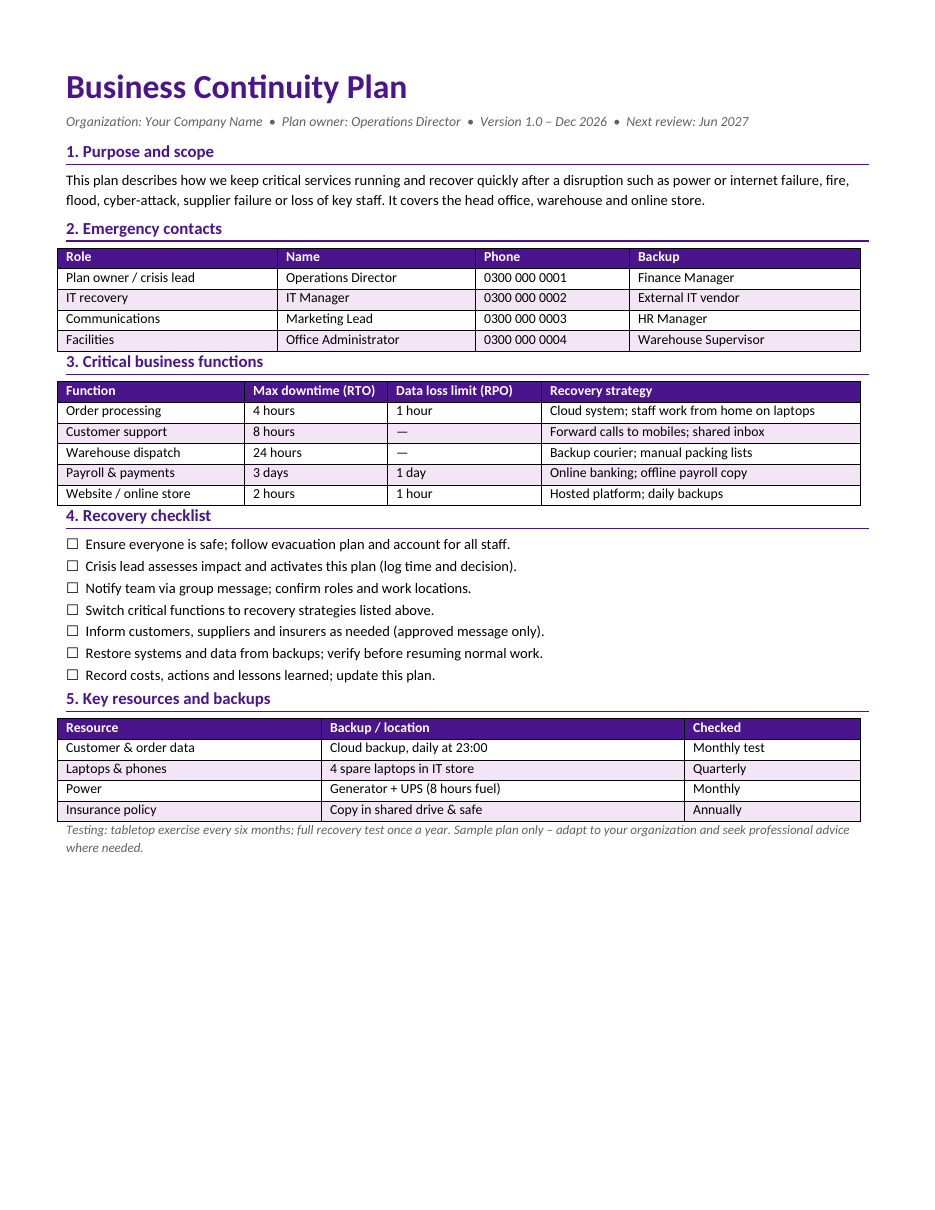
Our free business continuity plan template for Microsoft Word fits the essentials on one page. It covers purpose and scope, emergency contacts with backups, critical business functions with maximum downtime and data loss limits, a step-by-step recovery checklist, and key resources and backups with testing dates. The sample is written for a small company with an office, a warehouse and an online store. Preview it below and download the DOCX.
Download the free business continuity plan template
The template opens in Microsoft Word, Google Docs, LibreOffice Writer and Pages. It is a sample plan for guidance only, not legal, insurance or professional advice. Adapt it to your organization and seek qualified advice for regulated industries or complex risks.
What is a business continuity plan?
A business continuity plan describes how an organization will continue its critical operations during a disruption and return to normal afterwards. It identifies which activities matter most, how quickly they must be restored, who is responsible, and what backup arrangements are in place, such as alternative locations, spare equipment, data backups and alternative suppliers. It is different from an emergency evacuation plan, which focuses on keeping people safe in the first minutes of an incident, although the two work together.
What the template includes
- Plan title, organization, owner, version and next review date.
- Purpose and scope describing what the plan covers.
- Emergency contacts with roles, names, phone numbers and backups.
- Critical business functions with recovery time objective (RTO) and recovery point objective (RPO).
- A recovery strategy for each critical function.
- A seven-step recovery checklist with tick boxes.
- Key resources and backups, with how often each is checked.
- A testing note and a sample-plan disclaimer.
How to write your business continuity plan
- Appoint a plan owner, usually an operations director or senior manager.
- List the activities your business performs and identify the critical ones.
- For each critical function, decide the maximum time it can be down (RTO).
- Decide how much data you could afford to lose (RPO), such as one hour or one day.
- Identify the people, systems, equipment, suppliers and locations each function needs.
- Choose recovery strategies, such as remote work, backup suppliers or cloud systems.
- List emergency contacts and a backup for every role.
- Write a short recovery checklist that anyone can follow under pressure.
- Record key backups and how often they are tested.
- Share the plan with staff, store copies offline and test it regularly.
Understanding RTO and RPO
Recovery time objective (RTO)
The RTO is the maximum time a function can be unavailable before the damage becomes unacceptable. In the sample, order processing has an RTO of four hours, while payroll can wait three days. Short RTOs need strong backup arrangements, such as cloud systems and laptops for remote work.
Recovery point objective (RPO)
The RPO is the maximum amount of data you can afford to lose, measured in time. An RPO of one hour means backups or replication must happen at least every hour. If your backup runs only once a night, your real RPO is up to 24 hours.
Common disruptions to plan for
- Power cuts and generator failures.
- Internet or telephone outages.
- Fire, flood or storm damage to premises.
- Cyber-attacks, ransomware and data breaches.
- Failure of a key supplier or courier.
- Illness or sudden loss of key staff.
- Equipment breakdown in production or the warehouse.
- Road closures, strikes or local unrest preventing travel.
Recovery strategies for small businesses
You do not need a second office to be resilient. Many small businesses rely on simple, low-cost strategies: cloud-based accounting and order systems, laptops that staff can take home, call forwarding to mobile phones, a shared inbox, a backup courier, a generator and UPS for power, and copies of key documents stored online and in a safe. The important thing is to decide these arrangements in advance and make sure people know how to use them.
The recovery checklist explained
In a crisis, people need simple instructions. The checklist starts with safety: make sure everyone is safe and accounted for. Next, the crisis lead assesses the impact and formally activates the plan, recording the time and decision. The team is notified and confirms roles. Critical functions switch to their recovery strategies. Customers, suppliers and insurers receive approved messages. Systems and data are restored and checked before normal work resumes. Finally, the team records costs, actions and lessons learned and updates the plan.
Communicating during a disruption
Clear communication prevents panic and protects your reputation. Prepare short message templates in advance for staff, customers and suppliers, and agree who is allowed to speak on behalf of the business. Use several channels, such as group messages, email, your website and social media, in case one is unavailable. Keep messages factual: what happened, what you are doing, what customers should expect and when you will update them next.
Testing and maintaining the plan
- Hold a tabletop exercise every six months, walking through a scenario such as a server failure or flood.
- Run a full recovery test, such as restoring data from backup, at least once a year.
- Check that emergency contact details are current every quarter.
- Test the generator and UPS monthly.
- Update the plan after any real incident or major change in the business.
- Record each test and the improvements made.
Who needs a business continuity plan?
- Small and medium-sized businesses of all types.
- Online stores that depend on websites and couriers.
- Clinics, pharmacies and laboratories.
- Schools, colleges and training centres.
- NGOs and charities delivering essential services.
- Manufacturers and warehouses with supply chain dependencies.
- Offices that rely on IT systems and data.
Sample plan walkthrough
The sample plan is written for a small company with a head office, a warehouse and an online store. The operations director owns the plan and leads the response in a crisis, with the finance manager as backup. Each emergency role, IT recovery, communications and facilities, has a named person, a phone number and a backup, so the plan still works if someone is on leave or unreachable.
Five functions are marked as critical. The website and online store must be back within two hours, because every hour offline means lost sales; it runs on a hosted platform with daily backups. Order processing must return within four hours, using a cloud system and staff working from home. Customer support can be down for up to eight hours, with calls forwarded to mobiles. Warehouse dispatch has 24 hours, using a backup courier and manual packing lists, and payroll can wait up to three days using online banking and an offline copy of the payroll file.
The resources table lists the backups that make these strategies possible: nightly cloud backups of customer and order data, four spare laptops, a generator and UPS with eight hours of fuel, and copies of the insurance policy. Each has a checking frequency, because a backup that has never been tested may not work when it is needed.
Business impact analysis in simple steps
Before choosing recovery strategies, larger organizations run a business impact analysis (BIA). You can do a simple version in an hour. List each activity, then ask: what happens if this stops for one hour, one day and one week? Consider lost income, unhappy customers, legal or contract penalties, safety and reputation. Activities with serious effects within hours are critical and need short RTOs; those that can wait several days need simpler arrangements. Record the results in the critical functions table.
Frequently asked questions
Is this business continuity plan template free?
Yes. Download and adapt it for your organization.
How long should a BCP be?
A one-page summary like this suits small businesses. Larger organizations often add detailed procedures for each department in appendices.
What is the difference between a BCP and a disaster recovery plan?
A BCP covers the whole business, including people, premises, suppliers and communication. A disaster recovery plan focuses on restoring IT systems and data.
How often should the plan be reviewed?
Review it at least once a year, and after any major incident, change of premises, new system or change of key staff.
Where should I keep copies of the plan?
Keep printed copies off-site and with key staff, and a digital copy in cloud storage, so it is available even if the office or network is down.
Does a small business really need a BCP?
Yes. Small businesses often have fewer resources to absorb a disruption, so a simple plan made in advance can make the difference between a short interruption and a long closure.
Related templates
- Risk management plan template
- Incident report templates
- Action plan templates
- Executive summary templates
- Meeting minutes templates