
Customers are your best source of ideas for improving your business. They know what you do well, what frustrates them and what would make them come back more often. A short, well-designed survey turns those opinions into clear, useful feedback. Whether you run a shop, restaurant, clinic, salon, training course or online business, regular surveys help you measure satisfaction, spot problems early and make decisions based on what customers actually think.
Our free survey template for Microsoft Word is a one-page customer satisfaction survey with a mix of question types: multiple choice, a 1–5 rating grid, a 0–10 recommendation scale, open questions and optional demographics. It is ready to print, hand out or convert into an online form. Preview it below, download the editable DOCX file and use our guide to write questions that get honest, useful answers.
Download the free survey template
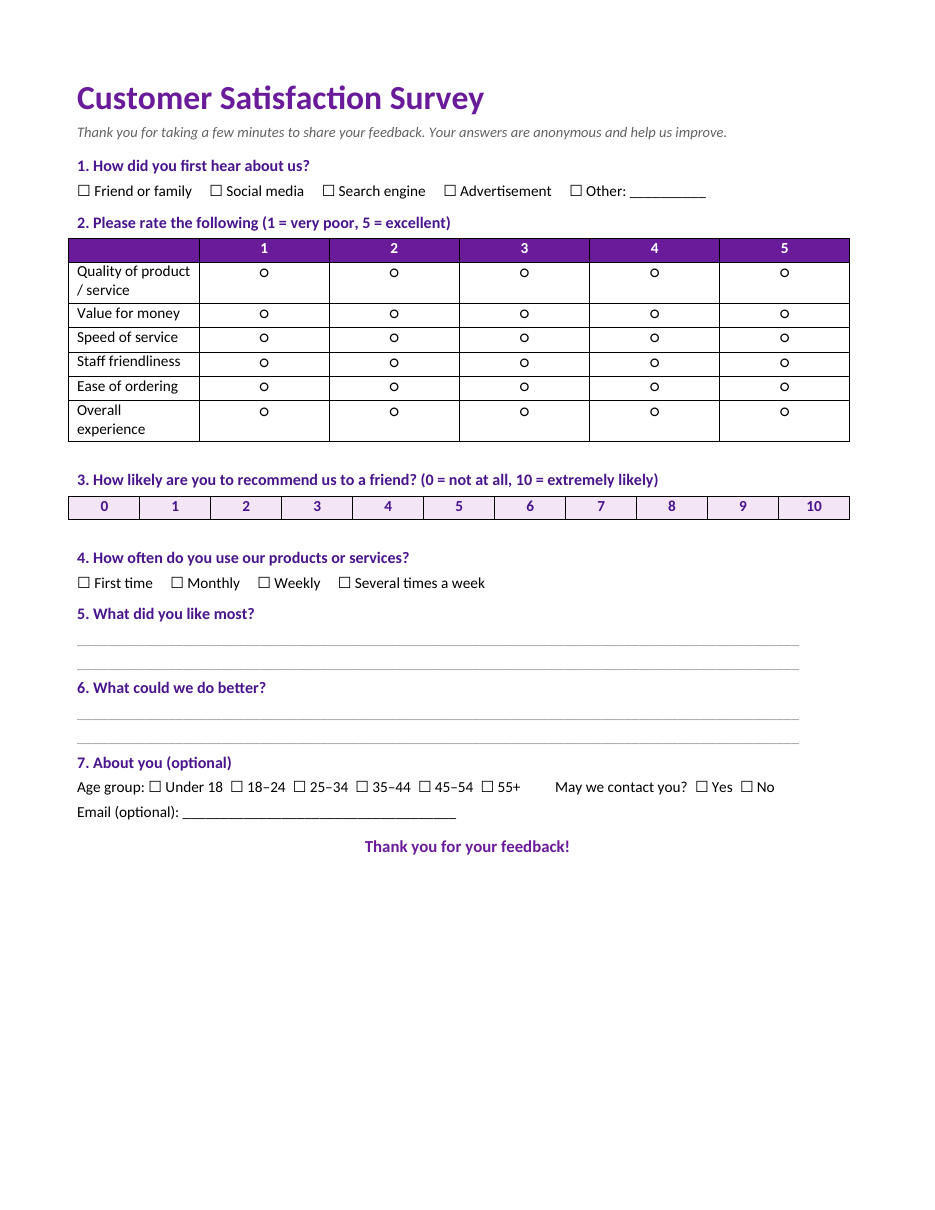
The template opens in Microsoft Word, Google Docs, LibreOffice Writer and Pages. Edit the questions, add your logo and print copies for your counter, reception or events.
What the survey template includes
- A friendly introduction explaining the purpose and that answers are anonymous.
- A multiple-choice question about how customers found you.
- A 1–5 rating grid for quality, value for money, speed of service, staff friendliness, ease of ordering and overall experience.
- A 0–10 "how likely are you to recommend us" question.
- A usage frequency question.
- Open questions: what customers liked most and what you could do better.
- Optional age group, contact permission and email.
- A thank-you message.
Types of survey questions
Multiple choice
Offers a list of answers, such as how customers heard about you. Quick to answer and easy to analyse. Include "Other" with a blank for answers you did not think of.
Rating scales
Ask customers to rate statements on a scale, such as 1 (very poor) to 5 (excellent). A grid lets you measure several aspects of the experience in one question.
Recommendation score
"How likely are you to recommend us to a friend?" on a 0–10 scale is a widely used measure of loyalty. Customers who answer 9–10 are enthusiastic supporters, 7–8 are satisfied but passive, and 0–6 are less happy and may need attention.
Open-ended questions
Let customers answer in their own words. They take longer to analyse but often contain the most valuable ideas.
Demographic questions
Optional questions about age or location help you compare groups. Keep them optional and at the end.
How to create an effective survey
- Decide what you want to learn, such as satisfaction with a new service.
- Keep the survey short; one page or five minutes is ideal.
- Start with easy questions and put personal questions at the end.
- Use simple, neutral wording.
- Ask one thing per question.
- Use consistent rating scales throughout.
- Include at least one open question.
- Test the survey with a few people and fix unclear questions.
- Decide how you will collect responses: paper, email or online form.
- Explain why you are asking and how the feedback will be used.
- Thank respondents and, if possible, share what you changed.
Writing good survey questions
Good questions are clear, specific and neutral. Avoid leading questions such as "How much did you enjoy our excellent service?", which push respondents toward a positive answer. Avoid double questions such as "Was our staff friendly and fast?", because a customer might feel the staff were friendly but slow. Use everyday language rather than internal jargon, and make sure answer options do not overlap, such as age ranges 18–24 and 25–34.
How to calculate results
For rating questions, add up all the scores for each item and divide by the number of responses to get an average score out of five. Compare averages to see which areas are strongest and weakest. For the 0–10 recommendation question, calculate the percentage of respondents who scored 9–10 and subtract the percentage who scored 0–6; the result, from −100 to +100, is a simple loyalty score you can track over time. For open questions, read every response and group similar comments into themes, such as "waiting time" or "friendly staff".
When to send a customer survey
- Right after a purchase, visit or service, while the experience is fresh.
- After a customer support interaction.
- After launching a new product, service or location.
- At the end of a project or course.
- Once or twice a year for a general satisfaction check.
- When you notice a change, such as more complaints or fewer repeat customers.
Increasing response rates
- Keep the survey short and say how long it will take.
- Make it easy: place paper surveys and pens at the counter, or share a QR code to an online version.
- Explain how feedback will be used.
- Keep responses anonymous unless customers choose to share contact details.
- Offer a small thank-you, such as a discount on the next visit, if appropriate.
- Send a single reminder for email surveys.
- Show customers that you acted on previous feedback.
Acting on survey feedback
A survey is only valuable if it leads to action. Review results with your team, celebrate strengths and choose one or two areas to improve first. If many customers mention slow service, look at staffing at busy times or simplify ordering. If value for money scores are low, review pricing or communicate the benefits better. Contact customers who gave low scores and agreed to be contacted; a quick, sincere follow-up can turn an unhappy customer into a loyal one. Repeat the survey later to measure progress.
Adapting the template for other surveys
The structure works for many purposes. For an employee survey, replace the rating items with workload, communication, recognition and training. For an event survey, rate the venue, speakers, catering and organization. For a training course, rate content, trainer, materials and usefulness. For a school or community survey, ask about facilities, communication and activities. Keep the same mix of question types and the single-page format.
Paper vs online surveys
Paper surveys work well where customers already spend time with you, such as at a restaurant table, a clinic waiting room or the end of a training session. They are easy to complete and often get higher response rates in person. Online surveys are better for reaching customers after they leave, collecting responses at scale and analysing results automatically. Many businesses use both: a printed form with a QR code linking to the same questions online, so customers can choose the method that suits them.
Keeping survey data organized
Enter paper responses into a simple spreadsheet with one row per response and one column per question. This makes it easy to calculate averages, count answers and filter by group, such as first-time versus regular customers. Date every batch of responses so you can compare results over time. Store completed paper forms securely for a short period, then shred them once the data has been entered, especially if customers shared contact details.
Privacy and consent
Respect customers' privacy. Explain briefly why you are collecting feedback, keep personal questions optional and only ask for contact details if you intend to follow up. If a customer provides an email address, use it only for the purpose they agreed to, such as a reply to their feedback, and do not add them to marketing lists without permission. Follow any data protection rules that apply to your business, and keep survey data secure.
Example: a café customer survey
Imagine a café hands the survey to customers with their bill for one month and collects 120 responses. The rating grid shows high scores for quality and staff friendliness but lower scores for speed of service. The open answers mention long queues at lunchtime. The owner adds a second person at the counter between 12:00 and 2:00 and introduces pre-ordering. Two months later, a repeat survey shows speed scores rising and more customers saying they would recommend the café. This simple cycle of asking, acting and checking again is how surveys deliver real improvements.
Frequently asked questions
Is this survey template free?
Yes. Download, edit and print it for your business or organization.
How many questions should a survey have?
Most customer surveys work best with five to ten questions. Shorter surveys get more responses.
Can I turn this into an online survey?
Yes. Copy the questions into any online form tool and share the link by email, text or a QR code.
Should surveys be anonymous?
Anonymous surveys usually get more honest answers. Offer an optional contact field for customers who want a reply.
Can I change the rating scale?
Yes. You can use a 1–5, 1–7 or 1–10 scale, but keep the same scale throughout the survey so results are easy to compare.
How often should I run a customer survey?
Many businesses run a short survey continuously after each visit or purchase, plus a fuller survey once or twice a year to track overall satisfaction.
Can I add my logo to the survey?
Yes. Insert your logo at the top of the page and change the purple colour to match your brand.
Related templates
- Quiz templates
- Fact sheet templates
- Meeting agenda templates
- Progress report templates
- Weekly marketing report templates