A heartfelt thank-you never goes out of style. In a world of quick text messages, a printed thank-you card shows that you took the time to appreciate someone properly. Whether you are thanking friends for holiday gifts, wedding guests for celebrating with you, colleagues for their support, customers for their business or teachers for a wonderful year, a well-designed card makes your gratitude feel personal and memorable.
Our free thank you card template for Microsoft Word features an elegant cream and burgundy front panel with gold floral accents and an editable message panel on the right, all framed by a fine gold border. Print it on card stock, fold or cut it, add your own words and you have a beautiful card in minutes. Preview the design below, download the editable DOCX file and use our wording ideas to write the perfect thank-you message.
Download the free thank you card template
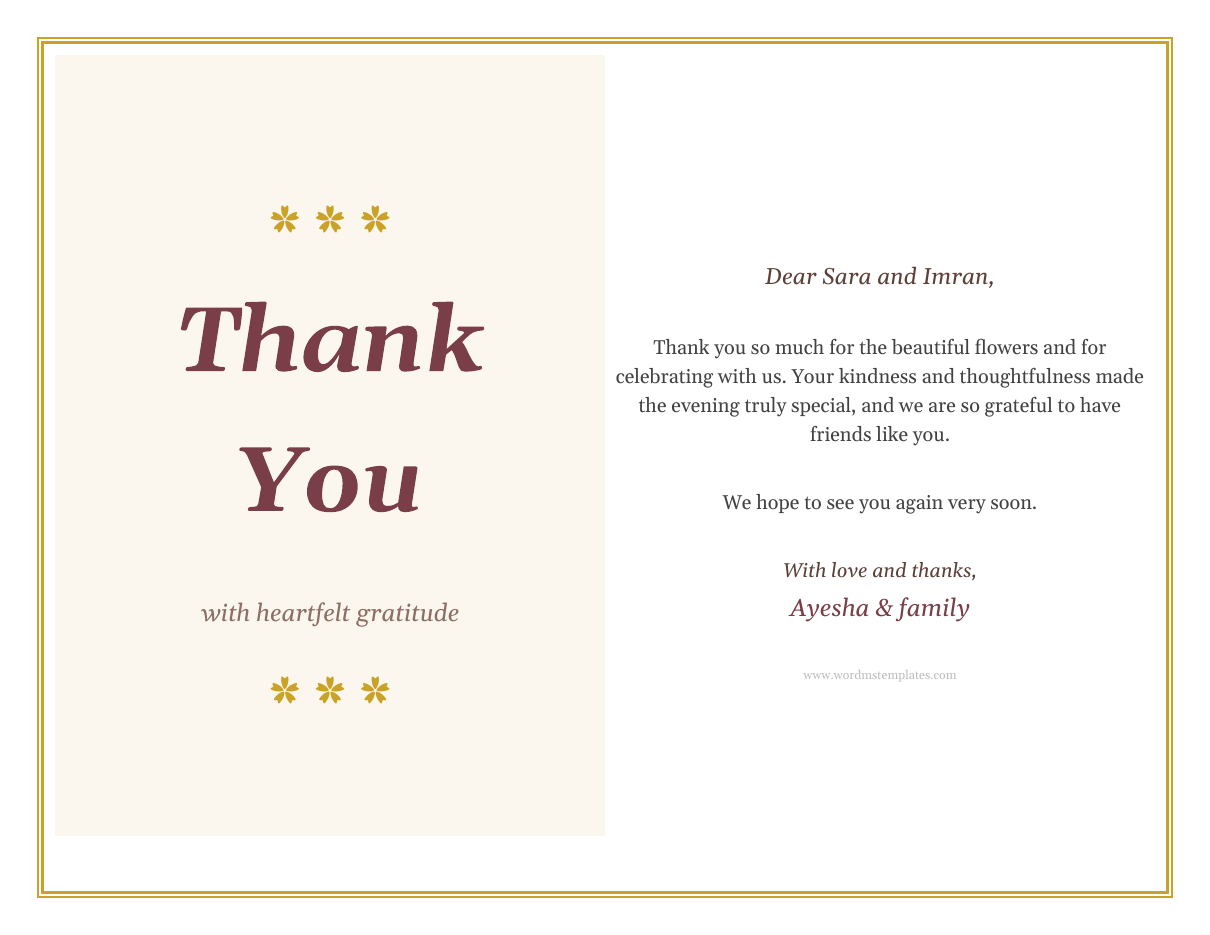
The template opens in Microsoft Word, Google Docs, LibreOffice Writer and Pages. It is set up in landscape so you can print one card per sheet and fold it in half, or cut along the centre to make two flat cards: a front and a message card.
Features of the thank you card template
- An elegant front panel with large "Thank You" lettering in burgundy.
- A soft cream background and gold floral accents for a classic, timeless look.
- A "with heartfelt gratitude" subtitle that suits personal and business use.
- An editable message panel with a greeting, message, closing and signature.
- A fine gold page border that frames the card neatly.
- Landscape layout designed for folding into a half-fold card.
- Fully editable fonts, colours and wording.
How to make your thank you card
- Download the DOCX file and open it in Word.
- Click the greeting and replace "Dear Sara and Imran" with the recipient's name.
- Write your message in the panel, keeping it to three to five sentences.
- Change the closing and signature to your name, family name or company name.
- Adjust colours or fonts if you want to match a wedding or brand theme.
- Print a test copy on plain paper to check the layout.
- Print the final card on 200 to 300 gsm card stock.
- Fold the page in half along the centre so the "Thank You" panel is on the front, or cut along the centre for two flat cards.
- Add a handwritten signature or short personal note for a warm finishing touch.
- Place the card in a matching envelope and send it promptly.
How to write a thank-you message
The best thank-you notes are simple, sincere and specific. Start by greeting the person by name. In the first sentence, thank them for something specific, such as a gift, a kind act or their time. Next, explain why it mattered to you or how you will use or enjoy the gift. Add a warm line about your relationship or looking forward to seeing them again, then close with a friendly sign-off and your name. Even a few heartfelt sentences mean far more than a long, generic message.
A simple thank-you formula
- Greeting – "Dear Aunt Farah,"
- Thank you – "Thank you so much for the beautiful scarf."
- Detail – "The colour is perfect, and I have worn it every day this week."
- Relationship – "It was lovely to see you at the family dinner."
- Closing – "With love and thanks, Maryam"
Thank-you card wording ideas
For gifts
"Thank you for the thoughtful gift. It was such a lovely surprise, and I will think of you every time I use it."
For holiday gifts
"Thank you for making our holidays so special. Your generous gift and warm wishes brought so much joy to our home."
For wedding guests
"Thank you for celebrating our wedding with us and for your generous gift. Having you there made our day even more memorable."
For a party or dinner
"Thank you for a wonderful evening. The food was delicious, and the company was even better."
For colleagues and managers
"Thank you for your guidance and support on the project. I have learned so much from working with you."
For customers and clients
"Thank you for choosing our business. We truly appreciate your support and look forward to serving you again."
For teachers
"Thank you for your patience, encouragement and inspiration this year. You have made a real difference."
For sympathy and support
"Thank you for your kind words and support during this difficult time. Your thoughtfulness meant more than words can say."
When to send a thank-you card
- After receiving a gift for a birthday, holiday, wedding, graduation or new baby.
- After attending a dinner, party or event as a guest.
- After someone helps you, such as a neighbour, friend or colleague.
- After a job interview, to thank the interviewer for their time.
- After a customer purchase or the end of a project with a client.
- At the end of a school year for teachers and staff.
- After receiving sympathy, flowers or support during a hard time.
Thank-you card etiquette
Timing matters. Try to send thank-you cards within two weeks of receiving a gift or attending an event. For weddings, the traditional guideline is within three months, but sooner is always better. Personalize every card, even if you are sending many; mention the specific gift or kindness. Handwritten signatures and notes add warmth, even when the main message is printed. If a gift came from a group, you can send one card to the group or individual cards to each person who contributed.
Printing tips for thank you cards
- Use 200 to 300 gsm matte or linen card stock for a premium feel.
- Select "best" print quality and the correct paper type in your printer settings.
- Print a test copy on plain paper first to check alignment.
- Score the fold line with a ruler and the back of a butter knife for a crisp fold.
- Use a paper trimmer for straight edges if you cut the card.
- Choose envelopes slightly larger than the folded card.
- Cream or ivory card stock enhances the warm colour scheme.
Thank-you cards for businesses
Small businesses can build loyalty by including a printed thank-you card with every order or sending cards after a big project. Replace the message with a note about your company and add your logo, website and social media handle. Include a discount code for a future purchase or a request to leave a review. Handwritten signatures from the owner make the gesture feel personal and help your brand stand out from larger competitors.
Customizing the card design
The template is easy to adapt. Change the burgundy text to navy, emerald or blush to match a wedding palette. Replace the floral symbols with a small logo, monogram or photo. Change "with heartfelt gratitude" to "from the bottom of our hearts", "for being amazing" or a phrase in another language. You can also switch the message panel to a blank area for a fully handwritten note.
Thank-you cards for special occasions
The design works beautifully for many occasions. For a baby shower, change the message to thank guests for their gifts and good wishes for the new arrival. For graduations, thank family and friends for their support throughout your studies. For a retirement, thank colleagues for years of friendship and memories. For volunteers, thank them for giving their time to your cause, and mention the results they helped achieve. Because the template is fully editable, you can create a separate version for each occasion and save it for future use, building your own collection of ready-to-print cards.
Frequently asked questions
Is this thank you card template free?
Yes. Download, edit and print it as many times as you like for personal or business use.
How do I fold the card?
Print the page in landscape, then fold it in half from left to right so the "Thank You" panel is on the front and the message panel is inside on the right.
Can I edit the card in Google Docs?
Yes. Upload the DOCX file to Google Drive and open it with Google Docs. Check the border and alignment before printing.
What size envelope do I need?
A folded US Letter page measures 5.5 × 8.5 inches, which fits an A9 envelope. A folded A4 page measures about 148 × 210 mm, which fits a C5 envelope.
Should thank-you cards be handwritten?
A fully handwritten card is lovely, but a printed message with a handwritten signature and short personal note is also warm and appropriate.
Can I print two cards on one page?
Yes. Cut along the centre line to create a flat front card and a separate message card, or duplicate the message panel to make two flat note cards per sheet. Flat cards fit neatly inside small envelopes or gift boxes.
Can I add a photo to the card?
Yes. Click inside the front panel, choose Insert > Pictures and set the text wrapping to "In front of text" so you can position the photo freely without disturbing the layout.
Related templates
- Greeting card templates
- Anniversary card templates
- Wedding invitation templates
- Birthday invitation templates
- Gift certificate templates