Gift certificates are a win for everyone. Customers get an easy, thoughtful gift, recipients get to choose what they enjoy and businesses get upfront revenue and new customers through the door. Whether you run a spa, salon, restaurant, boutique, studio or service business, or you simply want to give a personal "voucher" to a friend or family member, our free gift certificate template for Microsoft Word helps you create an elegant, professional voucher in minutes.
Preview the design below, download the editable DOCX file, and read our tips on wording, numbering, printing and managing gift certificates.
Download the free gift certificate template
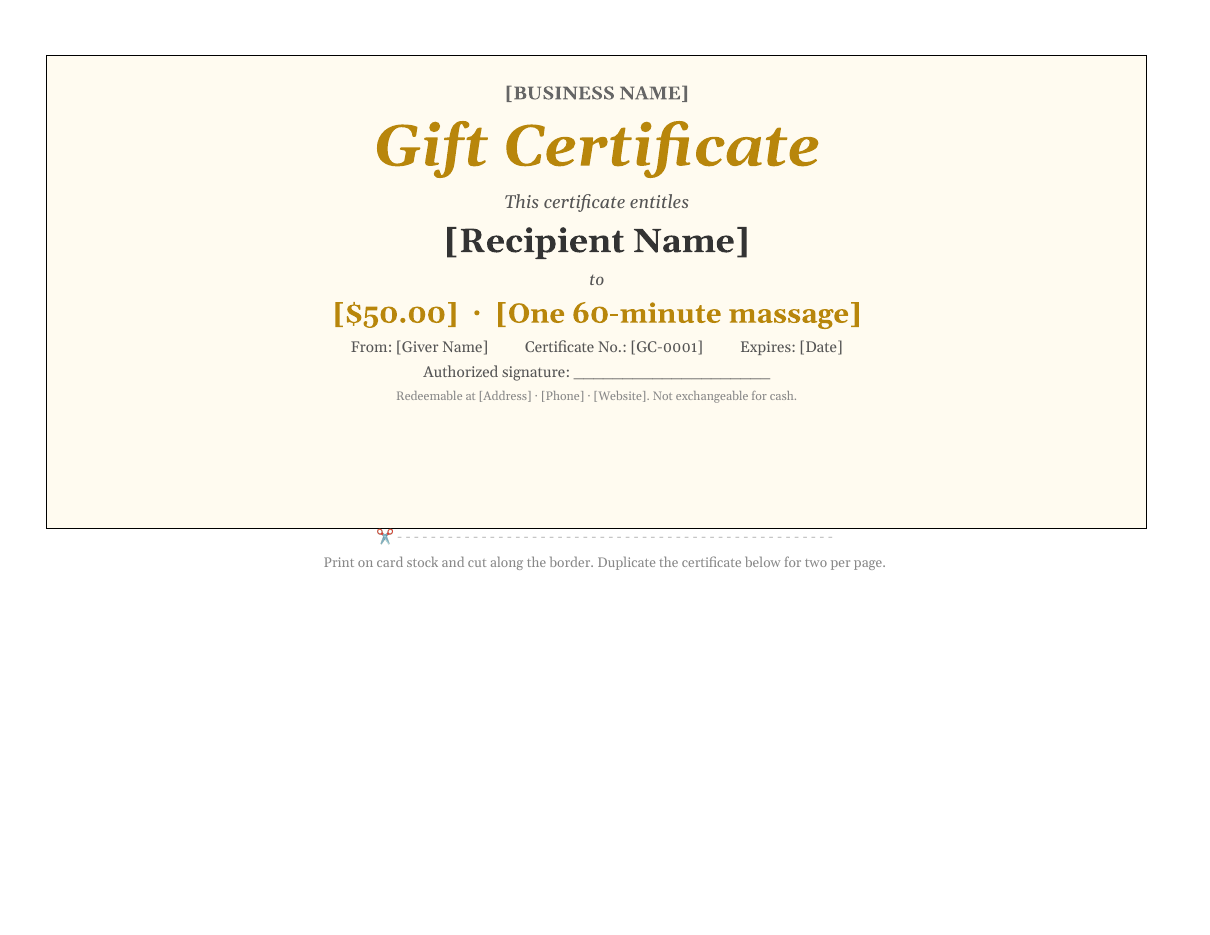
The template opens in Microsoft Word, Google Docs, LibreOffice Writer and Pages. It is designed in landscape format with a cut line, so you can print one or two certificates per page on card stock.
Features of this gift certificate design
- An elegant cream background with gold accents and a script-style "Gift Certificate" title.
- Business name at the top for branding.
- "This certificate entitles" wording with a large recipient name line.
- A value or service line, for example a cash amount or a specific treatment.
- From line for the person giving the gift.
- Certificate number and expiry date for tracking and terms.
- Authorized signature line to prevent misuse.
- A footer for your address, phone, website and redemption terms.
- A dashed cut line and instructions for printing two per page.
Who can use this gift certificate template?
- Spas, salons, barbers and beauty therapists.
- Restaurants, cafes and bakeries.
- Boutiques and retail stores.
- Fitness studios, gyms and personal trainers.
- Photographers and creative studios.
- Tutors, coaches and music teachers.
- Hotels, tour operators and experience providers.
- Car washes, cleaning companies and other service businesses.
- Schools, charities and clubs for fundraising raffles and prizes.
- Individuals creating personal vouchers, such as "one home-cooked dinner" or "a day of babysitting".
How to create a gift certificate step by step
- Open the template in Word and replace [Business Name] with your own name or logo.
- Enter the recipient's name, or leave the line blank if the buyer will fill it in.
- Enter the value, such as $50.00, or the service, such as "One 60-minute massage".
- Add the giver's name in the From line.
- Assign a unique certificate number, such as GC-0001, and record it in a log.
- Set an expiry date that complies with local laws.
- Update the footer with your address, phone, website and terms.
- Print a test copy, then print on quality card stock.
- Sign the certificate before handing it to the customer.
- Cut along the border and place it in an envelope or gift card holder.
Gift certificate wording ideas
Value-based certificates
- "This certificate entitles the bearer to $50 towards any service."
- "Enjoy $100 to spend in store or online."
- "Treat yourself to a $25 coffee and cake voucher."
Service-based certificates
- "One 60-minute relaxation massage."
- "A dinner for two from our seasonal menu."
- "A one-hour portrait photography session."
- "Four personal training sessions."
Personal and family vouchers
- "One breakfast in bed, served with love."
- "A weekend free from chores."
- "A movie night of your choice, popcorn included."
- "One day of babysitting so you can relax."
Best practices for businesses
Number every certificate
Unique certificate numbers prevent fraud and make it easy to check whether a certificate has been redeemed. Keep a simple log with the number, value, purchaser, recipient, date sold, expiry date and redemption date.
State clear terms
Include key terms on the certificate, such as "Not redeemable for cash", "Valid for one use only" or "Not valid with other offers". Make sure your terms comply with local consumer protection laws, which may require minimum expiry periods or ban expiry altogether in some places.
Sign or stamp each certificate
An authorized signature or business stamp makes certificates harder to copy.
Track liability
Unredeemed gift certificates are a liability in your accounts until they are used or expire. Record sales correctly and speak to your accountant about the treatment of unredeemed balances.
Using gift certificates for marketing
Gift certificates are an effective marketing tool. Promote them before holidays such as Christmas, Valentine's Day, Mother's Day and Father's Day, when shoppers look for last-minute gifts. Offer bonus value, such as "Buy a $100 certificate, get a $20 bonus voucher", to increase sales. Donate certificates to local charity raffles to reach new audiences. Use them to apologize to unhappy customers and win back their loyalty, or reward loyal clients and referrals. Each redeemed certificate brings a potential new customer through your door, and many recipients spend more than the certificate's value.
Printing tips
- Print on heavy card stock of 250 gsm or more for a premium feel.
- Cream, ivory or linen-textured paper complements the gold design.
- Use high-quality print settings and let the ink dry before cutting.
- Use a paper trimmer or craft knife and ruler for clean edges.
- Present the certificate in a matching envelope or folded card.
- Consider foil stickers or embossed seals for extra security and elegance.
Customizing the design
Change the gold accent to match your brand by selecting the title and value text and choosing a new font colour. Replace the background colour under Table Design > Shading. Insert your logo above the business name with Insert > Pictures. For a seasonal version, add a holiday illustration or change the colours to red and green for Christmas or pink for Valentine's Day. To print two certificates per page, copy the table and paste it below the cut line.
Digital gift certificates
Many customers now prefer digital vouchers they can send instantly. Complete the certificate in Word, export it as a PDF or image and email it to the buyer or directly to the recipient. Include the certificate number and redemption instructions in the email, and mark the certificate as sold in your log. Digital certificates are especially useful for last-minute gifts and long-distance gifting.
Creating a gift certificate tracking log
A simple log makes managing gift certificates easy and protects your business. Create a spreadsheet with columns for certificate number, date sold, purchaser name, recipient name, value or service, payment method, expiry date, date redeemed and staff initials. When a customer presents a certificate, look up the number, confirm it has not been used and record the redemption. For partial redemptions of cash-value certificates, record the remaining balance and issue a new certificate or note the balance on the original. Review the log monthly to see how many certificates are outstanding, which helps with financial planning and staff scheduling.
Gift certificate design tips
The design of a gift certificate influences how valuable it feels. Elegant fonts, generous white space and a restrained colour palette create a premium impression, while bright colours and playful illustrations suit children's activities and casual businesses. Keep your branding consistent with your shop, menu or website so recipients recognize you instantly. Make the value or service the most prominent element after the title, and keep terms short and readable. If you sell certificates for different occasions, create a few variations of this template, such as birthday, holiday, thank-you and wedding versions, and keep them ready to print on demand.
Gift certificates for personal gifting
Homemade gift certificates are a heartfelt alternative to store-bought gifts. They are perfect for birthdays, anniversaries, Mother's Day and Father's Day, or as a thoughtful gesture for a friend going through a tough time. Promise an experience or act of kindness, such as a cooked meal, a guided hike, help with a project or a day out together. Personalize the wording with an inside joke or special memory, and present the certificate in a card or small box for a memorable surprise.
Frequently asked questions
Is this gift certificate template free?
Yes. Download, edit and print it free for personal or business use.
Can I edit the template in Google Docs?
Yes. Upload it to Google Drive and open it with Google Docs. Check colours and spacing before printing.
Should gift certificates have an expiry date?
Many businesses use expiry dates, but rules vary. Some jurisdictions require a minimum validity period or prohibit expiry dates on certain gift cards. Check your local laws.
How do I prevent gift certificate fraud?
Use unique numbers, sign or stamp each certificate, keep a log and check the log when certificates are redeemed.
Can I print several certificates on one page?
Yes. Copy the certificate table and paste it below the cut line to print two per page. Reduce the font sizes slightly if you want to fit three or four smaller certificates on a single sheet of card stock.
Can customers buy certificates online?
Yes. Sell them on your website, then email a completed PDF copy.
Related templates
Create more printable designs with our certificate of completion template, greeting card templates, restaurant menu template and birthday invitation templates.