
Memos remain one of the clearest ways to share important information inside an organization. Whether you are announcing a policy change, an office closure, a new procedure or a deadline, a well-structured memo tells everyone exactly what is happening, why it matters and what they need to do. Unlike a casual chat message, a memo creates a formal record that people can refer back to.
Our free memo template for Microsoft Word has a clean, professional design with a company name line, a bold MEMORANDUM heading, a blue divider, aligned To, From, CC, Date and Subject fields, and a body with numbered action points and a signature. The sample memo announces the year-end office closure and leave planning, which is exactly the kind of message many HR teams send in November. Preview it below and download the DOCX.
Download the free memo template
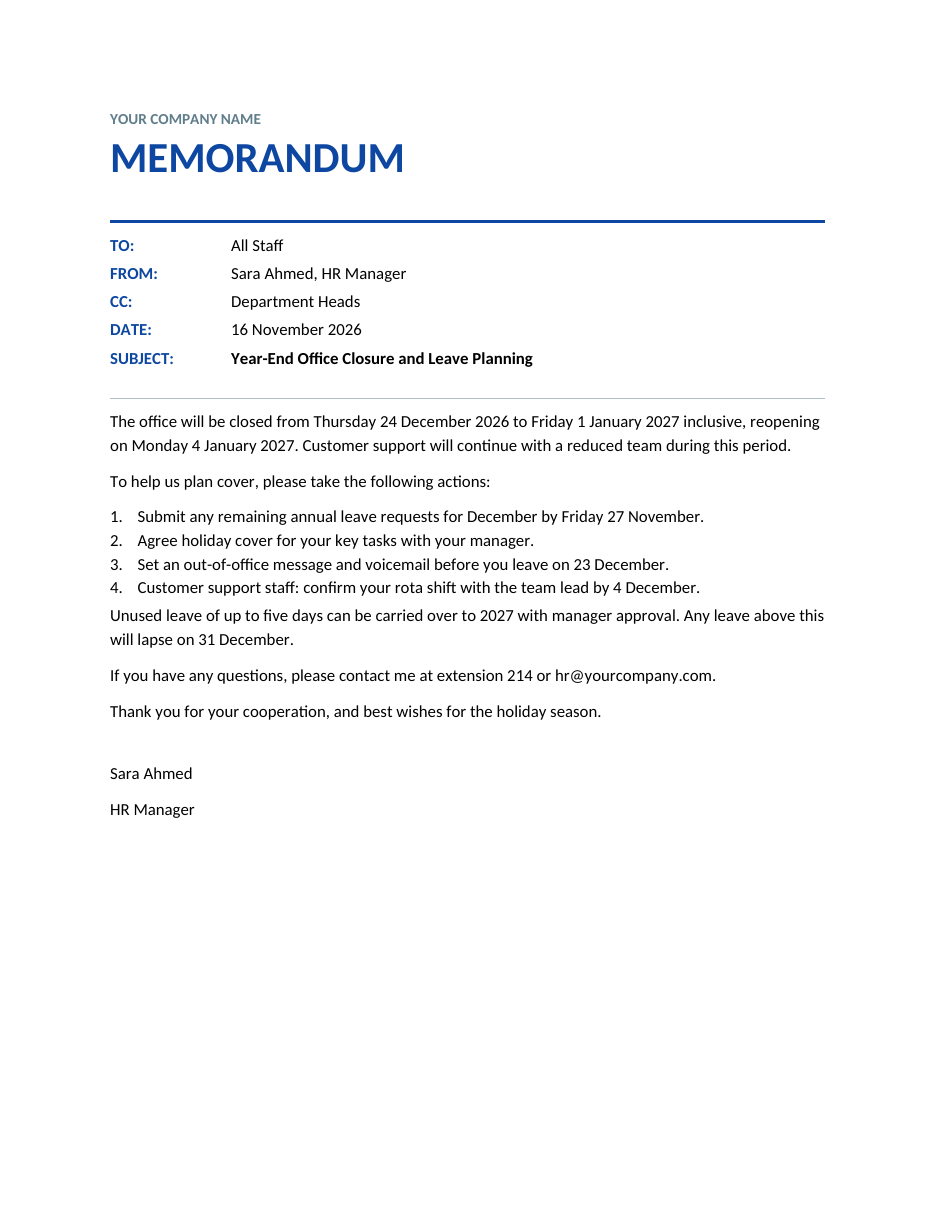
The template opens in Microsoft Word, Google Docs, LibreOffice Writer and Pages. Replace the sample content, then print it, save it as a PDF or paste it into an email.
What is a memo?
A memo, short for memorandum, is a brief written message used for internal communication within an organization. It is usually sent to a team, department or all staff, and focuses on a single topic. Memos are more formal than chat messages but shorter and more direct than letters or reports. They are commonly used for announcements, policy updates, requests for action, reminders and summaries of decisions.
What the template includes
- A company name line at the top.
- A large MEMORANDUM heading in your brand colour.
- A divider line under the heading.
- Aligned header fields: To, From, CC, Date and Subject.
- A bold subject line that summarises the memo.
- A clear opening paragraph with the main message.
- A numbered list of actions with deadlines.
- Supporting information and contact details.
- A closing line and the sender's name and title.
How to write a memo
- Decide the purpose: inform, request action, remind or confirm a decision.
- Identify the audience and fill in the To and CC fields.
- Write a specific subject line, such as "Year-End Office Closure and Leave Planning".
- Start with the most important information in the first sentence.
- Explain the background briefly if needed.
- List the actions readers must take, with deadlines, as numbered points.
- Add any extra details, exceptions or policies.
- Tell readers whom to contact with questions.
- End with a short closing line and your name and title.
- Proofread, then send or distribute the memo.
Memo format explained
Header
The header tells readers at a glance who the memo is for, who sent it, when and what it is about. Align the labels so the header is easy to scan.
Opening
State the main point immediately. In the sample: the office will be closed from 24 December 2026 to 1 January 2027 and will reopen on 4 January 2027.
Body
Give the details readers need, in short paragraphs or numbered points. Keep each point to one idea.
Closing
Summarise any next steps, provide a contact and thank readers. Memos usually do not need "Sincerely"; your name and title are enough.
Tips for effective memos
- Cover one topic per memo.
- Keep it to one page whenever possible.
- Use a specific, informative subject line.
- Put deadlines in bold or in a numbered list.
- Use plain language and short sentences.
- Be polite but direct.
- Check dates, names and figures carefully.
- Send it early enough for people to act.
Types of memos
- Announcement memos: office closures, new hires, events.
- Policy memos: changes to leave, travel, IT or safety rules.
- Request memos: asking for information, approvals or documents.
- Reminder memos: upcoming deadlines or meetings.
- Confirmation memos: recording decisions made in meetings.
- Report memos: short summaries of results or incidents.
Memo vs email vs letter
An email is fast and informal, and is often used to deliver a memo. A memo is a formal internal document with a standard structure; it can be printed, posted on a notice board or attached to an email. A letter is used for external communication with customers, suppliers or official bodies. For important internal announcements, writing a memo and attaching it to an email gives you the speed of email and the formality of a memo.
Year-end memo ideas
- Office closure dates over the holidays.
- Leave planning and carry-over rules.
- Year-end inventory count schedule.
- Deadlines for expense claims and invoices.
- Holiday party details.
- New Year policy changes.
- Performance review timetable.
Sample memo walkthrough
The sample memo is sent by Sara Ahmed, the HR Manager, to all staff, with department heads in copy. It is dated 16 November 2026, giving employees more than five weeks' notice before the closure. The subject line, "Year-End Office Closure and Leave Planning", tells readers exactly what the memo covers before they read a single paragraph.
The first paragraph gives the key facts: the office closes on Thursday 24 December 2026, stays closed until Friday 1 January 2027 and reopens on Monday 4 January 2027, while customer support continues with a reduced team. The memo then lists four numbered actions, each with a clear deadline: submit leave requests by 27 November, agree holiday cover, set out-of-office messages before 23 December and confirm support rota shifts by 4 December. A short paragraph explains the leave carry-over rule, followed by a contact extension and email address, and a friendly closing wish for the holiday season.
This structure, main news first, then actions, then supporting rules, then contact details, works for almost any memo. Readers who only skim the first paragraph and the numbered list still get everything they need to act.
Memo writing style
Memos should sound professional but human. Use the active voice ("Please submit your leave requests") rather than the passive ("Leave requests should be submitted"), because it is shorter and makes it clear who must act. Address readers directly as "you". Avoid jargon, abbreviations that not everyone knows and long introductions. If the memo announces bad news, such as a policy change that staff may not like, explain the reason briefly and respectfully, and give people a way to ask questions.
Formatting tips
- Use a standard font such as Calibri or Arial at 11 points.
- Keep margins at about one inch.
- Use bold sparingly, for the subject line and key deadlines.
- Use numbered lists for steps and bullet lists for options.
- Leave white space between paragraphs.
- Add your company logo next to the company name for a branded look.
Distributing and storing memos
Decide how the memo will reach everyone. For office staff, email with a PDF attachment is usually best. For teams without regular email access, such as warehouse or field staff, print the memo and post it on notice boards or hand it out at a briefing. Save every memo in a shared folder by date and subject, so you can find past announcements and decisions quickly. A simple file name such as "2026-11-16 Year-end closure memo" works well.
Memo checklist before sending
- The subject line is clear and specific.
- The main message is in the first sentence.
- All dates and deadlines are correct.
- Actions are numbered and easy to follow.
- The right people are in the To and CC fields.
- A contact person is included for questions.
- Spelling and names have been checked.
When not to use a memo
Memos are best for information that affects a group and needs a record. They are not ideal for sensitive personal matters, such as performance problems, disciplinary issues or individual pay changes; these should be discussed privately and followed up with a confidential letter. Memos are also too formal for quick questions or casual updates, which are better handled in a short message or team meeting. For complex topics with many details, write a report and use a brief memo to introduce it and highlight the key points and actions.
Frequently asked questions
Is this memo template free?
Yes. Download, edit and use it as often as you need.
How long should a memo be?
Ideally one page. If you need more space, consider writing a short report and attaching it to a brief memo.
Do memos need a signature?
Not usually. The From line identifies the sender, but some organizations add initials or a name and title at the end.
Can I send a memo by email?
Yes. Paste the memo into the email body or attach it as a PDF, using the memo subject as the email subject.
Who should be in the CC field?
People who need to be informed but are not the main audience, such as managers or department heads.
Can I add my company logo?
Yes. Insert your logo next to or instead of the company name line at the top of the memo.
Should a memo be formal or informal?
A memo should be professional and polite, but it does not need to be stiff. Use clear, direct language that suits your organization's culture.
Can I use this template for school or club notices?
Yes. Replace the company name with your school, club or organization and adapt the fields for your audience.
Related templates
- Meeting minutes templates
- Meeting agenda templates
- Letterhead templates
- Phone message templates
- Executive summary formats