
Year-end galas, school concerts, charity dinners, holiday parties and New Year celebrations all need tickets. Printed tickets help you control entry, track how many seats are sold, collect payment in advance and give guests something they can keep as a souvenir. With a good template, you can make professional tickets in minutes instead of paying a print shop for a small run.
Our free event ticket template for Microsoft Word includes four tickets per page. Each ticket has a bold event name, a short tagline, date and time, venue, admission type and price on the main part, and a tear-off stub with a ticket number, date, row and seat. The sample is designed for an "Annual Winter Gala 2026", and every detail is editable. Preview the page below and download the DOCX file.
Download the free event ticket template
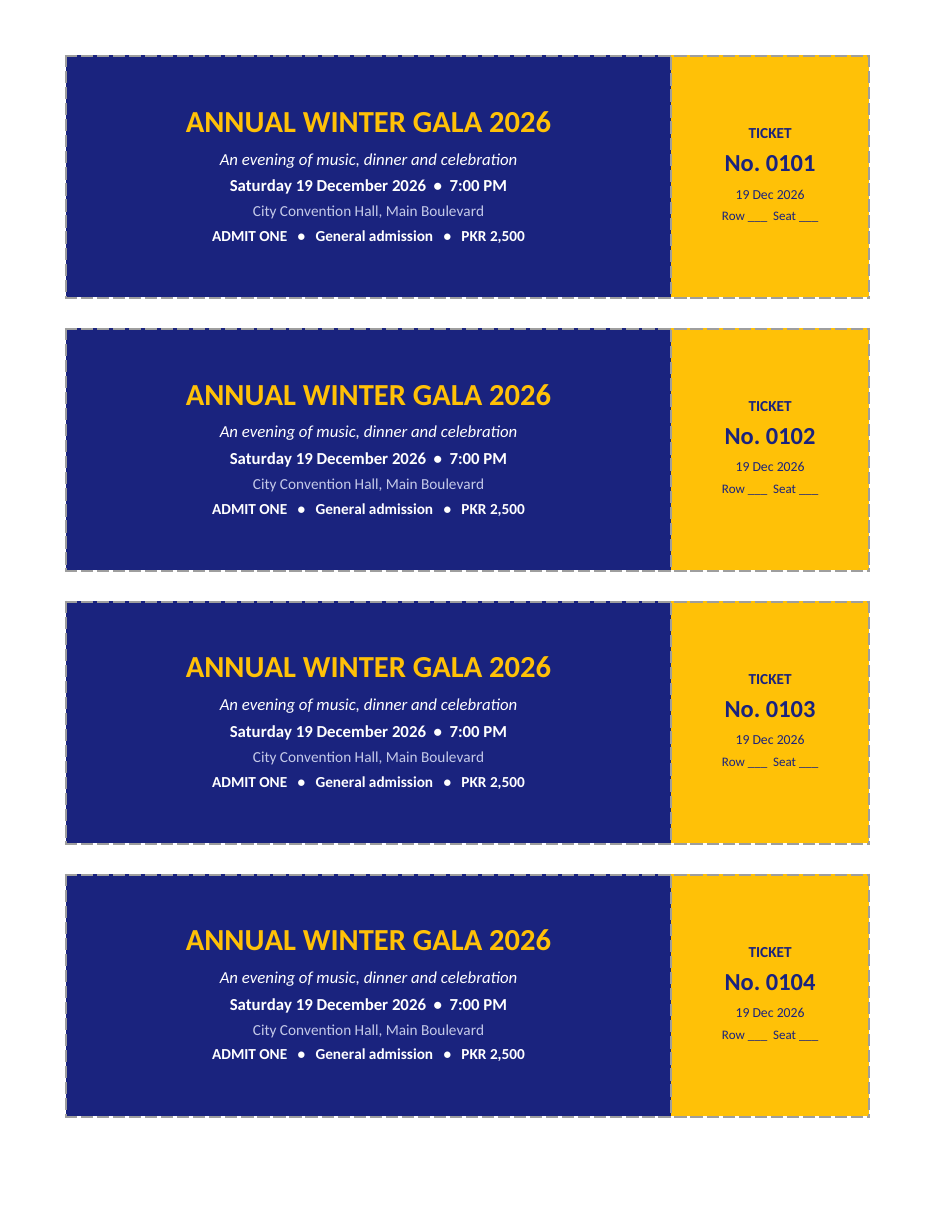
The template opens in Microsoft Word, Google Docs, LibreOffice Writer and Pages. Print on card stock and cut along the dashed borders to create four tickets per sheet.
Features of the ticket template
- Four tickets per page with dashed cut lines.
- A bold event name in a large, eye-catching font.
- A tagline line to describe the event.
- Date, time and venue on every ticket.
- Admission type and price.
- A tear-off stub with a unique ticket number.
- Row and seat fields for seated events.
- A navy and gold colour scheme that can be changed to match your event.
Events you can make tickets for
- Galas, award nights and charity dinners.
- School concerts, plays and graduation ceremonies.
- Holiday parties and New Year celebrations.
- Raffles and lucky draws.
- Workshops, seminars and conferences.
- Sports matches and tournaments.
- Film screenings and community fairs.
- Fundraisers and church or community events.
How to make event tickets
- Download the DOCX and open it in Word.
- Replace the event name, tagline, date, time and venue.
- Enter the admission type, such as General, VIP or Student, and the price.
- Change the ticket colours to match your event branding.
- Edit the stub with the ticket number, date and seat details.
- Copy the page and update the ticket numbers for each new sheet.
- Print a test page on plain paper to check alignment.
- Print the final tickets on 250 to 300 gsm card stock.
- Cut along the dashed lines with a paper trimmer.
- Record each ticket number when you sell or give it out.
Numbering tickets
Numbered tickets prevent copying and make it easy to track sales. The sample starts at No. 0101 and continues to 0104 on the first page. For the next page, continue with 0105 to 0108, and so on. For large events, use Word's mail merge with a spreadsheet of ticket numbers to print hundreds of unique tickets automatically. Keep a sales log with the ticket number, buyer name and payment method so you can check entries at the door.
Using the tear-off stub
The stub on the right side of each ticket can be torn off at the door and kept by the event team, while the guest keeps the main part. Stubs help you count attendance and can also be used as raffle tickets for a lucky draw during the event. To make tearing easier, fold the ticket along the dashed line a few times before the event.
What to include on an event ticket
- Event name and a short description.
- Date, start time and doors-open time if different.
- Full venue name and address.
- Ticket type and price.
- Ticket number and seat details if seats are assigned.
- Organizer contact information or website.
- Short terms such as "non-refundable" or "admit one".
Preventing ticket fraud
For larger events, make tickets harder to copy. Use unique numbers, print on coloured or textured card, add a stamp or signature on each ticket, or include a QR code linked to your guest list. Check numbers against your sales log at the door and mark used tickets. Do not publish photos of tickets on social media before the event, as they can be copied.
Planning ticket sales
Decide on ticket prices early, considering the venue cost, catering, entertainment and any fundraising goal. Offer early-bird prices to encourage people to buy in advance, and set a deadline for ticket sales so you can confirm catering numbers. Sell tickets through organizers, at a booth or online, and keep all sales in one list. Before the event, prepare a guest list and a cash float for door sales.
Design and printing tips
- Keep the event name large and easy to read.
- Use high-contrast colours so tickets read well under event lighting.
- Leave a small margin inside the border for clean cutting.
- Print on heavy card stock so tickets feel valuable.
- Use a paper trimmer rather than scissors for straight edges.
- Print a few extra tickets for replacements.
Ticket design ideas for winter events
For a winter gala or holiday party, deep navy, burgundy or forest green paired with gold or silver text gives an elegant feel. For a children's concert, use brighter colours and a playful font. For a New Year party, add a 2027 theme with gold accents. Whatever the style, make sure the essential details, date, time and venue, remain clear and readable.
Ticket types and pricing ideas
General admission
The simplest option. Guests can sit or stand anywhere, and the ticket shows only "General admission" and the price. Ideal for concerts in open halls, fairs and parties.
VIP tickets
Offer a premium ticket with front-row seats, a welcome drink, reserved parking or a meet-and-greet. Use a different colour, such as gold or black, so VIP tickets are easy to recognise at the door.
Student, child and family tickets
Discounted tickets encourage families and students to attend. Make each type a different colour or add a clear label so door staff can check eligibility.
Early-bird and group tickets
Early-bird prices reward people who commit early and help you estimate attendance. Group tickets, such as "table of ten", work well for gala dinners and corporate events.
Running the door on event night
Good preparation at the entrance makes the first impression of your event a positive one. Set up a welcome table with your ticket sales log, a pen, a cash box for door sales and a container for collected stubs. Assign at least two volunteers or staff: one to check tickets and tear stubs, and one to handle questions and late sales. Open the doors 30 to 45 minutes before the start time so guests do not queue in the cold.
As guests arrive, check the ticket number against your log and tear off the stub. Count the stubs at regular intervals so you always know how many people are inside, which is important for venue capacity and safety. If you are running a raffle, keep the stubs in a separate box ready for the draw.
After the event
Once the event is over, count the collected stubs and compare them with tickets sold to see your attendance rate. Add up ticket income by type, subtract costs and record the results for next year's planning. Send a thank-you message to guests and sponsors, and share photos of the evening. Keep a copy of your ticket design so next year's tickets take only a few minutes to update.
Ticket wording examples
- "Admit One – General Admission – PKR 2,500".
- "VIP – Table 4 – Includes dinner and welcome drink".
- "Student ticket – valid with student ID".
- "Doors open 6:30 PM – Show starts 7:00 PM".
- "Non-refundable. Please bring this ticket to the entrance."
- "All proceeds support the school library fund."
Keep the wording short and clear. Guests usually glance at a ticket only to check the date, time and venue, so make sure those three details stand out. Put longer information, such as parking directions, dress code or a full programme, on your event page or invitation instead of crowding the ticket. If the event is a fundraiser, a single line explaining where the money goes encourages people to buy tickets and feel good about attending.
Frequently asked questions
Is this event ticket template free?
Yes. Download, edit and print it for any event.
How many tickets fit on one page?
Four tickets fit on one page.
Can I add a QR code?
Yes. Generate a QR code with a free tool and insert it on the stub or main ticket as an image.
What paper should I print tickets on?
Use 250 to 300 gsm card stock for sturdy, professional tickets.
Can I use the stubs for a raffle?
Yes. Collect stubs at the door and draw numbers during the event.
How do I print tickets on both sides?
Create a second page with terms or a map and use your printer's double-sided setting, flipping on the long edge. Print a test sheet first to check alignment.
Can I change the colours?
Yes. Click the ticket, choose Shading and select new colours for the main part and the stub.
Related templates
- Poster templates
- Basketball flyer templates
- Guest list templates
- Wedding invitation templates
- Birthday invitation templates